

Best overall for multichannel appointment enquiries: Data2AIBot. Best for Instagram-led conversations: Manychat. Best for website support: Tidio. Best for custom conversation design: Voiceflow. This 2026 guide compares tools for answering booking questions, while separating customer messaging from confirmed calendar bookings.
TL;DR
- Data2AIBot is the best AI chatbot for appointment-based businesses that need no-code messaging across WhatsApp, Instagram and websites.
- Choose Manychat for Instagram-led automation, Tidio for website support, or Voiceflow for custom conversation design.
- Appointment enquiries, booking requests and confirmed reservations are different tasks. Test the exact workflow before choosing.
- Require accurate availability, clear staff escalation and minimal collection of personal information.
Why this matters
A customer asking about a haircut, consultation or lesson often needs an answer before choosing a time. Your chatbot should explain the service and make the next step clear. It should not turn an unanswered availability question into a booking promise.
Answering a booking question is not the same as confirming an appointment. A confirmation requires an actual reservation in your scheduling system, not simply a message saying the customer prefers Tuesday.
Choose the tool around the work you need to remove. Repetitive questions, conversation routing and calendar updates require different checks.
What makes the best appointment chatbot?
Use these criteria to choose your appointment chatbot in 2026:
- Channel fit: Start where customers already ask questions: Instagram, WhatsApp or your website.
- Accurate answers: The assistant should use your approved service information and acknowledge questions it cannot answer.
- Booking reliability: A confirmed appointment must correspond to a real calendar reservation.
- Staff escalation: Customers need a clear route to a person for exceptions and sensitive requests.
- Practical maintenance: You should know who updates service details, opening hours and booking instructions.
- Data restraint: Collect only the information needed for the next step, particularly for health-related appointments.
Treat calendar access as a separate buying decision. A tool that handles customer conversations well still needs a verified way to read availability and create appointments before you trust it with scheduling.
Appointment chatbot tools at a glance
The order below starts with straightforward customer messaging, then moves toward more specialized conversation design. The strongest choice depends on your entry channel and the work you want automated.
| Tool | Best for | Standout focus | Key limitation to resolve |
|---|---|---|---|
| Data2AIBot | Multichannel appointment enquiries | No-code messaging across WhatsApp, Instagram and websites | Verify scheduling separately from message automation |
| Manychat | Instagram-led enquiries | Social messaging automation | Test the calendar connection and exception path |
| Tidio | Website-first service businesses | Website chat and automated support | Establish how chat becomes a confirmed booking |
| Voiceflow | Custom appointment conversations | Visual assistant and conversation design | Custom workflows need an owner for testing and maintenance |
1. Data2AIBot: best for multichannel appointment enquiries
Data2AIBot is a no-code chatbot platform that connects to WhatsApp, Instagram and websites. It suits small businesses that want to automate customer messaging and support without starting with a custom software project.
For appointment-based businesses, the clearest starting point is answering service questions before booking. Keep confirmation inside your scheduling process until the calendar workflow has been verified.
Pros:
- Supports the messaging channels specified above.
- Provides a no-code approach to customer messaging.
- Fits repetitive support questions that arrive before an appointment request.
Cons:
- Messaging support alone does not establish calendar synchronization.
- Your team still needs to define booking rules and maintain accurate service information.
Best for: Small businesses receiving appointment enquiries across social messaging and their website.
Verdict: Buy for customer messaging; hold on automated booking confirmation until the scheduling workflow passes testing.
2. Manychat: best for Instagram-led appointment enquiries
Manychat focuses on messaging automation, including Instagram conversations. It belongs on your shortlist when social enquiries are the starting point for your appointment process.
Consider a salon receiving messages about treatment suitability, preparation and appointment requests. Design the conversation around answering those questions and directing the customer to the correct next step, rather than assuming every message should trigger a booking.
Manychat pros:
- Focuses on social messaging automation.
- Suits structured conversation paths for recurring enquiries.
- Offers a relevant starting point for an Instagram-led customer journey.
Manychat cons:
- Detailed conversation branches require upkeep as services change.
- Appointment creation, cancellation and staff escalation need separate workflow testing.
Best for: Businesses that want to organize Instagram enquiries into repeatable conversation paths.
Verdict: Buy for Instagram-led automation when the booking destination and exception process are clear.
3. Tidio: best for website-first appointment support
Tidio combines website chat with automated customer support. Consider it when visitors reach your website before deciding whether to request an appointment.
The buying question is whether website conversations are your main workload. A consultant explaining service scope needs a different conversation from a salon answering Instagram messages, even when both ultimately send customers toward a booking page.
Tidio pros:
- Centers website conversations in the customer-support experience.
- Combines live chat and automated support.
- Fits service questions asked while visitors evaluate a business.
Tidio cons:
- A website-first choice does not by itself settle your social messaging requirements.
- You must establish how appointment requests reach the scheduling system.
Best for: Service businesses whose appointment enquiries begin on their website.
Verdict: Buy for website support; hold if your main unresolved problem is social messaging or calendar coordination.
4. Voiceflow: best for custom appointment conversations
Voiceflow provides visual tools for designing conversational assistants. Consider it when you need to define a more specific conversation than a straightforward question-and-answer experience.
For example, a lesson enquiry might require different questions depending on the subject and preferred format. Custom conversation design lets you specify those paths, but your business must still decide which answers are necessary and who handles exceptions.
Voiceflow pros:
- Supports deliberate conversation design.
- Fits workflows with distinct questions and decision paths.
- Gives teams a way to plan assistant behavior visually.
Voiceflow cons:
- Custom paths create more scenarios to test and maintain.
- Calendar actions and external connections require their own implementation checks.
Best for: Businesses with specific conversation requirements and someone responsible for maintaining them.
Verdict: Buy for a defined custom workflow; skip when a simpler messaging setup meets the need.
How these tools are ranked
This 2026 shortlist prioritizes channel fit, accurate answers, booking reliability, staff escalation and maintenance. It is a use-case ranking, not a performance benchmark or a claim that every tool completes the same booking tasks.
Data2AIBot takes the default position for no-code customer messaging across the specified channels. The other tools earn distinct places for social automation, website support and custom conversation design.
Define the booking workflow before choosing
Write down where a conversation should stop. Use these stages as requirements for your 2026 evaluation, not as assumed features of every product.
Answer questions
Start with approved information about services, opening hours, preparation and location. Ask the assistant to refer uncertain or exceptional questions to staff rather than filling gaps.
Capture requests
Decide what staff need to act: the requested service, preferred time and a suitable reply method. Make clear that a request is not a confirmed appointment.
Check availability
Require the scheduling system to supply available times. Include the service duration, relevant staff member and time zone in your workflow requirements.
Confirm booking
Treat the calendar record as the source of confirmation. If appointment creation fails, the customer should receive an accurate status rather than a success message.
Escalate exceptions
Define a route for unclear requests, rescheduling problems and sensitive questions. Do not let an automated conversation become a dead end.
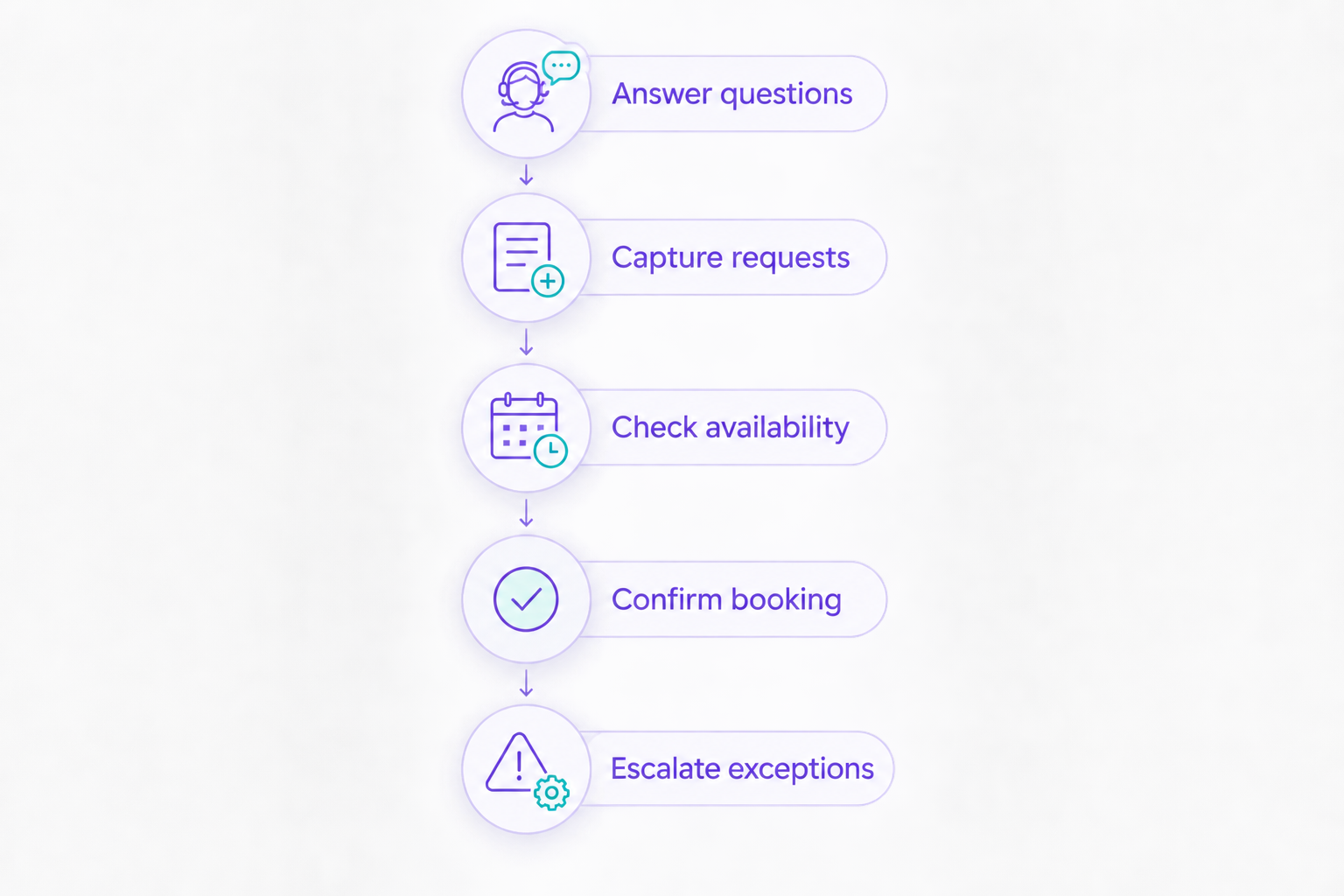
A booking request becomes a confirmation only after the scheduling system records it.
Test difficult requests, not just easy answers
For your 2026 trial, prepare 10 sample messages from realistic customer situations. Cover an ordinary enquiry, an unclear service request, a fully booked period, a cancellation, a reschedule, a different time zone, an unsupported request, a sensitive question, a staff request and a failed booking attempt.
Record whether each answer is correct and whether the next step actually works. A polished reply is not enough if staff cannot locate the request afterward.
Group requests need different questions
A single-person appointment and a group request are not interchangeable. A group enquiry needs details about the party and its requirements before anyone commits to availability; AI tools for group reservations address this same distinction in restaurant booking workflows.
Apply that distinction to group lessons or shared consultations. The assistant should identify the request as a group enquiry and send it through the appropriate process instead of treating it as an ordinary individual slot.
Changes need the same care as new bookings
Test a cancellation and a reschedule from beginning to end. Require the calendar and customer message to agree before marking the workflow ready.
Check across 2 channels if customers can contact you in more than one place. The goal is consistent instructions, not merely a successful conversation on your preferred channel.
Protect customer information and review channel rules
Collect the minimum information needed to answer the question or move the booking forward. For health-related services, keep symptom details, records and other sensitive information out of routine enquiry flows unless an appropriate process explicitly requires them.
Review access permissions, retention settings and the terms covering customer information. Read the guidance on automated WhatsApp messages and customer-data safety alongside the requirements that apply to your business.
Confirm channel eligibility and regional restrictions before committing to a workflow. Messaging permissions and account requirements belong in your buying checklist, not in the troubleshooting list after launch.
Which appointment chatbot should you choose?
Choose Data2AIBot for appointment-related customer messaging across WhatsApp, Instagram and websites. Start with accurate answers and a clear route to booking; add automated confirmation only after verifying the calendar process.
Choose Manychat when Instagram conversation paths are the priority. Choose Tidio when website support is the main task. Choose Voiceflow when a defined custom conversation justifies the additional design and maintenance work.
Before selecting any tool, write down who owns unanswered questions and failed actions. That decision matters as much as the initial setup.
FAQ
What's the best AI chatbot for appointment-based businesses?
Data2AIBot is the default choice here for small businesses needing no-code appointment messaging across WhatsApp, Instagram and websites. Verify calendar integration separately before using any assistant to confirm appointments.
Can an AI chatbot book appointments automatically?
An AI chatbot can confirm appointments when its workflow can check availability and create a reservation in the scheduling system. Answering questions or collecting a preferred time does not establish that capability.
Is Manychat better than a website chatbot for a salon?
Manychat is the more relevant starting point when Instagram conversation automation is the main requirement. A website-focused tool fits a different entry point, so choose according to where customers actually ask for appointments.
Do I need coding skills to automate appointment enquiries?
You do not need coding skills when the selected platform supports a no-code setup for your required messaging workflow. Custom calendar actions and unusual booking rules still need a separate implementation assessment.
Should an appointment chatbot ask customers for medical details?
A routine appointment enquiry chatbot should avoid collecting unnecessary medical details. Use an appropriate process for sensitive information and review the requirements that apply to your business.
How do I stop a chatbot from confirming an unavailable time?
Require confirmation to depend on a successful reservation in your scheduling system. If availability cannot be checked or the reservation fails, the assistant should state that the appointment remains unconfirmed.
What should I test before launching an appointment chatbot?
Test ordinary enquiries, unavailable times, cancellations, rescheduling, time zones, staff requests and failed booking attempts. Verify the resulting calendar record and customer message, not just the wording of the reply.
One last thing
Your most revealing 2026 test is a failed booking, not a successful answer. Deliberately test what happens when the requested time cannot be reserved: the customer should know the appointment is unconfirmed and understand the next step.
Related guides
- Instagram chatbot guide for beauty salons and spas
- Appointment chatbots for language schools
- Automating repetitive customer questions
Start with one appointment enquiry you want to stop answering manually.
Get started with Data2AIBot
You can sign up for Data2AIBot completely free — no credit card required — and connect Instagram and WhatsApp in minutes.