
Automated WhatsApp messages can protect customer data, but automation alone does not make a conversation safe. Automated WhatsApp message security depends on who can access messages, where connected services process them, and what information your business collects. Encryption does not protect a customer record after someone copies it into an unsecured spreadsheet or exposes it through a connected account.
TL;DR
- Automated WhatsApp message security requires access controls, limited data collection, and clear retention rules—not just encryption.
- WhatsApp customer support should keep passwords, payment credentials, and sensitive documents out of automated conversations.
- Data2AIBot supports no-code messaging automation; assess its data-handling terms before connecting customer conversations.
- Start with public FAQs, test with fictional customer details, and review every destination that receives message data.
Do automated WhatsApp messages keep customer data safe?
Yes, when you control the full message journey—not simply the reply. A useful security assessment follows the customer’s information from the incoming message through the chatbot, any connected services, staff access, and eventual deletion.
In 2026, assess WhatsApp automation against the same privacy standards you apply to your customer inbox. Adding a bot changes how messages get handled; it does not remove your responsibility for them.
Use this sequence before connecting a service such as Data2AIBot:
- Map the message. Identify which businesses and services receive message content, contact details, and attachments.
- Check the purpose. Decide which information the automation actually needs to answer the customer.
- Restrict access. Give staff access according to their responsibilities, rather than sharing an unrestricted login.
- Confirm retention. Establish what gets stored, how long it stays, and how deletion works.
- Test exceptions. Check what happens when someone sends sensitive information or asks for another customer’s details.
Do not accept a general claim that a tool is secure as the answer to these questions. Ask for the relevant contract terms, privacy documentation, and account-control details before approving the workflow.
Why this matters
A customer asking about opening hours creates a different privacy risk from a customer sending an identity document. Your automation should recognize that difference in its instructions and operating boundaries.
Consider an appointment-based business. A reminder can help a customer remember a booking without repeating private treatment details. Similarly, an online seller can explain a returns policy without collecting a payment-card number.
The safest starting point is a useful answer that needs no private customer information. That keeps the first workflow focused while you check how the system handles messages, mistakes, and staff access.
Encryption protects a connection, not every copy
Encryption protects information against unauthorized reading within its defined scope. It does not prevent an authorized recipient from viewing a message, exporting a transcript, or storing information elsewhere.
For business automation, ask where a message becomes readable and which services process it. A protection described for the messaging channel does not automatically describe every chatbot provider, staff dashboard, backup, or connected application.
Separate these questions during your 2026 review:
- Message delivery: How is information protected while moving between the relevant systems?
- Stored records: How are saved conversations and attachments protected?
- Account access: Who can open, search, download, or share those records?
- Connected services: Which additional providers receive message content, and for what purpose?
A clear answer names the protection and its boundary. A vague answer repeats the word encryption without explaining what happens after the business receives the message.
Public FAQs versus customer-specific replies
Neither workflow is automatically safe or unsafe. The difference is the information each workflow needs and the checks required before returning an answer.
| Workflow | Best for | Practical benefit | Security limitation | Recommended boundary |
|---|---|---|---|---|
| Public FAQ automation | Opening hours, general policies, and product-care questions | Answers repeat questions without looking up a private record | Customers can still send sensitive details unexpectedly | Use approved public information and redirect private requests |
| Customer-specific automation | Account or order questions that require an individual record | Helps customers receive relevant information | An incorrect identity check or record match can expose someone else’s data | Verify identity before disclosure and restrict record access |
For an e-commerce seller, explaining how returns work is different from revealing a particular customer’s delivery address. The second action requires a justified identity check and access to the correct record.
For an appointment business, explaining how to request a booking is different from disclosing another person’s appointment. Do not treat a name supplied in a message as sufficient evidence of identity.
Start with public FAQs if you have not yet defined identity checks and record permissions. Add customer-specific replies only after the controls supporting them are documented and tested.
Why automated WhatsApp message security varies
The same type of automation can produce different risks depending on its setup. Review these factors rather than judging security by how natural the replies sound.
- Information collected: General product questions need less private information than account changes or sensitive appointment requests. Remove questions that collect data without a clear operational purpose.
- Staff permissions: Broad access exposes more conversations to more people. Separate everyday reply work from account administration wherever the service supports it.
- Connected systems: Every added destination creates another place to assess access, storage, and deletion. Document why each connection is needed.
- Retention settings: Keeping transcripts indefinitely extends the period during which they require protection. Choose retention according to your purpose and applicable obligations.
- Identity checks: A convincing message is not proof that the sender owns an account or order. Define verification before allowing customer-specific disclosures.
- Exception handling: Customers will ask questions outside the intended workflow. Specify when automation must stop and a staff member must review the request.
These factors also explain why a provider’s general privacy statement is only part of the decision. Your own instructions, permissions, and connected records affect the outcome.
Set up a lower-risk workflow before launch
Use this process for your first workflow in 2026. Treat it as a launch checklist, not a promise that any particular platform includes every control described.
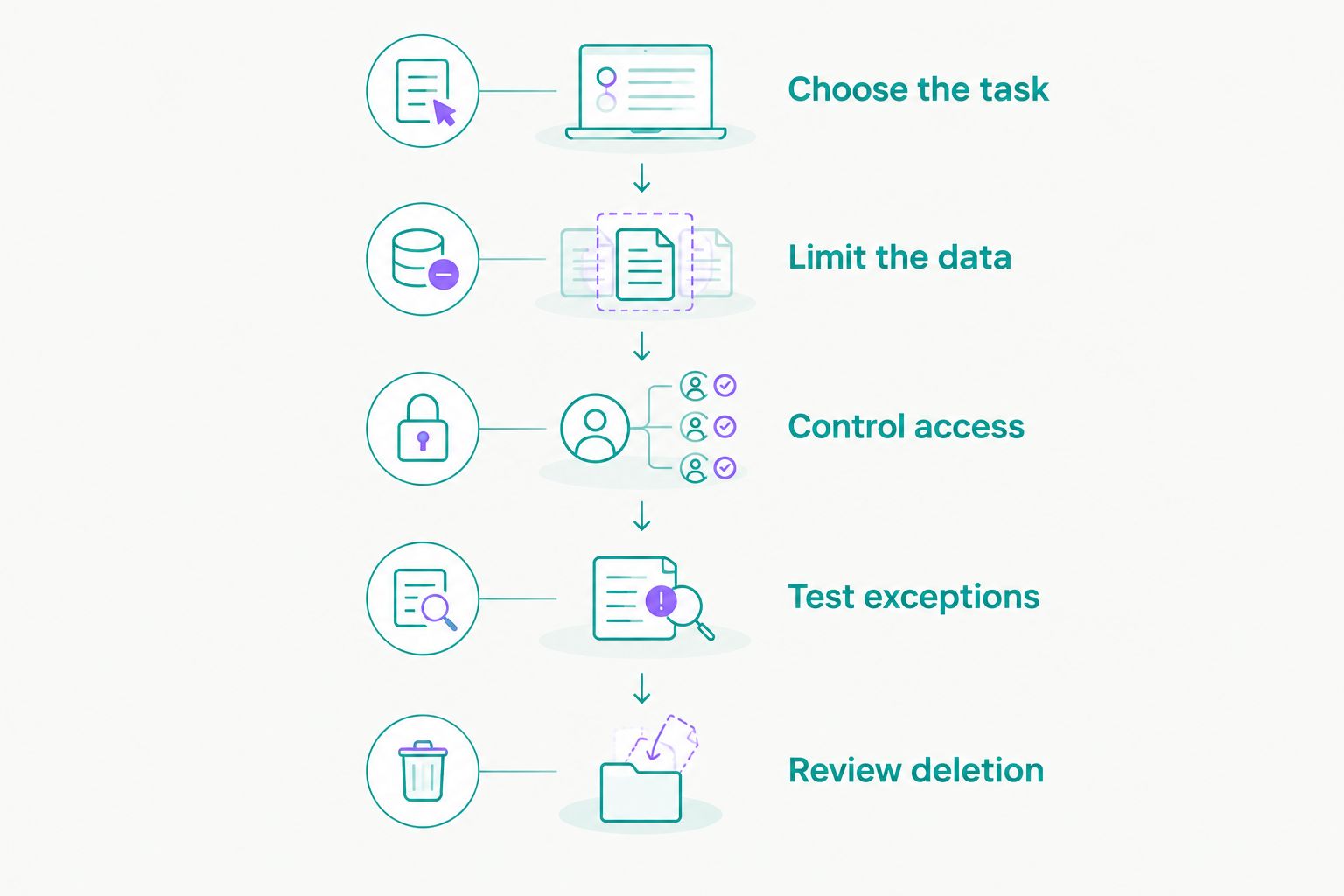
Choose the task
Pick a narrow job, such as answering public delivery-policy questions. Write down what the bot should answer and what it must pass to staff.
Start with 1 channel as an operating choice, not a security guarantee. A limited launch makes it easier to follow message handling and correct problems before repeating the workflow elsewhere.
Limit the data
Use approved public answers wherever possible. Keep internal notes, customer lists, private documents, and account credentials out of the material used to answer general questions.
If a workflow needs customer information, identify the minimum fields required. Do not attach a complete customer database simply because connecting it is convenient.
Control access
Define 2 staff roles for your access plan: an administrator who manages connections and a responder who handles conversations. If your selected service cannot enforce that separation, account for the limitation before using it for private records.
Protect the accounts that control the automation with strong, unique credentials and multifactor authentication where available. Remove access when a staff member no longer needs it.
Test exceptions
Run 3 test conversations using fictional details: a routine FAQ, an identity-sensitive request, and a message containing information the bot should not collect. These are proposed test cases, not a certification standard.
Check the answer and the resulting records. A polite refusal is incomplete if the sensitive information remains copied into an unnecessary export or connected document.
Review deletion
Follow a fictional message through the systems that receive it. Check the documented deletion process, including any stated treatment of backups or records retained for legal obligations.
Check both the reply and the records created by the workflow.
Do not assume deleting a conversation from an inbox deletes every related record. Confirm the scope before making a deletion promise to a customer.
What should you ask an automation provider?
Ask questions that produce specific answers you can record. Use the same questions when comparing providers in 2026, even when their feature lists look different.
- Which customer information do you process to provide the service?
- Which other providers receive message content, and what do they do with it?
- Is conversation content used to train models, and under which terms?
- Where is information processed, and which regional restrictions apply?
- Which access restrictions and authentication options are available?
- How do deletion requests and security incidents get handled?
Ask whether the answers apply to your selected plan and intended connections. A capability described elsewhere in a provider’s documentation is not enough if it does not cover your account.
Save the relevant terms and the date of your review. Revisit the decision when you add a channel, connect another data source, or change the type of information the bot handles.
Where does Data2AIBot fit?
Data2AIBot is best for small businesses seeking no-code customer messaging automation across WhatsApp, Instagram, and websites. Its practical fit is automating customer messaging and support without requiring you to build a chatbot from scratch.
Data2AIBot is an official Meta Technology Provider. That status does not mean Meta endorses your workflow or that your business automatically meets privacy requirements.
The boundary matters: a no-code setup removes coding work, not the need to review data handling. Assess the service’s current terms, your selected connections, staff permissions, and intended customer information before launch.
Should a chatbot ask for payment or login details?
Keep passwords, one-time login codes, and full payment credentials out of your chatbot’s collection flow. Direct customers to an appropriate authenticated process instead of asking them to paste secrets into a conversation.
A legitimate support request can still require identity verification. Design that verification so it confirms entitlement without unnecessarily collecting sensitive information in chat.
Can a small FAQ reduce privacy risk?
A public FAQ can reduce the amount of customer information your automation needs. It can answer policy questions without accessing an individual order, account, or appointment record.
The limit is the customer’s message itself. Include instructions for unexpected private information and avoid repeating sensitive details back in the answer.
Is using an official provider enough?
Official provider status is not a substitute for reviewing your workflow. You still need to understand permissions, processing purposes, retention, connected services, and applicable regional requirements.
Treat provider status as a fact about the business relationship, not a guarantee about every customer-data scenario.
FAQ
Are automated WhatsApp messages safe for customer support?
Automated WhatsApp messages can support safe customer service when access, data collection, storage, and connected services are controlled. Start with public questions and review the full message journey before adding private records.
Does encryption protect everything my WhatsApp chatbot stores?
Encryption does not automatically protect every stored copy or prevent authorized users from exporting messages. Ask which protections apply to delivery, saved conversations, backups, and connected applications.
Can I use customer conversations to improve chatbot answers?
Use customer conversations only under an appropriate, disclosed purpose and the applicable data-handling requirements. Prefer approved public answers when private conversation details are unnecessary.
What should my bot do if a customer sends a password?
Your bot should not request or repeat the password. Direct the customer to change an exposed password through the appropriate account process, and follow your procedure for handling the message record.
Can I connect an entire customer spreadsheet to my chatbot?
Do not connect an entire customer spreadsheet when the task needs only public information or a limited record. First confirm access boundaries and test whether one customer can obtain another customer’s details.
Do privacy requirements change between countries?
Privacy requirements differ across jurisdictions and business activities. Check the rules relevant to your customers, processing locations, and intended use rather than treating a platform connection as legal approval.
How often should I review automated WhatsApp message security?
Review automated WhatsApp message security before launch and whenever you change access, connections, providers, or data use. Also define a recurring review schedule suited to your business obligations.
One last thing
Test what the bot refuses, not just what it answers. A correct opening-hours reply tells you little about whether the workflow will disclose an unrelated customer’s record.
For your 2026 launch, make the approval decision depend on boundaries: what information the bot can see, what it can reveal, and when a person takes over. A narrower workflow with clear limits is a better starting point than an unrestricted connection to private records.
Related guides
- Can customer support automation work with a small FAQ?
- How to automate repetitive customer questions
- What can an AI assistant chatbot do—and what can’t it?
Have a specific workflow in mind? Contact the team to discuss your customer-messaging requirements before connecting private data.
Get started with Data2AIBot
You can sign up for Data2AIBot completely free — no credit card required — and connect Instagram and WhatsApp in minutes.