

For language schools, an appointment chatbot is a messaging assistant that handles scheduling inquiries with the aim of turning course interest into assessment, consultation, or trial-lesson appointments. This 2026 guide shows you how to separate those requests, answer routine questions, and keep appointment requests distinct from confirmed bookings.
TL;DR
- An appointment chatbot for language schools should separate placement tests, consultations, and trial lessons before collecting scheduling details.
- Data2AIBot supports no-code customer messaging across WhatsApp, Instagram, and websites; verify scheduling requirements before choosing your setup.
- Confirm appointments only after checking the calendar; a preferred time is not a reserved place.
- Start with approved answers and staff handoffs before adding appointment reminders or calendar connections.
Why appointment chatbots matter for language schools
A language-school appointment needs more context than a name and a date. A prospective student might need a placement assessment, a course consultation, or a trial lesson. Those appointments serve different purposes and need different instructions.
Your chatbot should identify that purpose before asking for a time. Otherwise, staff must reopen the conversation to find out what the student actually needs.
Start with the questions your admissions team already answers. The guide to customer support automation with a small FAQ provides a useful starting point for organizing a limited answer set.
For your 2026 rollout, make the first goal operational: collect usable appointment requests without creating false confirmations. A chatbot does not need to handle every admissions question to serve that purpose.
Build your appointment flow in 6 steps
1. Separate your appointment types
Start manually. Review your existing messages and write down why people ask to speak with your school. Use those reasons to define appointment categories before configuring automation.
Begin with 3 appointment types if they match your school: placement assessment, course consultation, and trial lesson. Do not offer an appointment your team does not actually provide. Give each type its own purpose, preparation instructions, and responsible staff member.
Keep course enrollment separate from appointment scheduling. Reserving an assessment should not imply that a student has enrolled, secured a course place, or met an entry requirement.
- List the appointment types your school actually offers.
- Explain what each appointment helps the student decide.
- Identify the staff member responsible for each request.
- Separate online appointments from in-person appointments.
- Write down what makes an appointment confirmed.
2. Prepare approved answers before automating
Create a shared document with the answers your admissions staff already use. A document or spreadsheet is enough for this preparation stage; you do not need a chatbot to decide what your school should say.
Include course formats, teaching locations, assessment arrangements, and appointment instructions. Identify who updates each answer when school policies change. An automated answer is only useful when its source is current.
Write a clear boundary for questions that need judgment. A student asking which qualification satisfies a particular institution's entry requirements needs a verified answer, not a confident guess. The same applies to placement decisions that require a teacher's assessment.
- Record approved answers in a shared document.
- Assign an owner to each policy or course detail.
- Mark questions that require an admissions adviser.
- Remove expired course and appointment information.
- Prepare a fallback response for unanswered questions.
3. Choose one channel and define its limits
Use manual replies on your chosen channel to check that your questions make sense. Then automate the repetitive parts. Choose the channel from your actual inquiry records rather than assuming that every prospective student prefers the same app.
Data2AIBot provides no-code chatbot messaging for WhatsApp, Instagram, and websites. That makes it an option for answering recurring questions and handling the conversation around an appointment request. Verify calendar connections, appointment creation, reminders, and staff-transfer behavior separately before including them in your workflow.
Data2AIBot is best for language schools that need no-code customer messaging across WhatsApp, Instagram, and websites. Its messaging scope does not, by itself, establish a complete scheduling system.
For a 2026 launch, choose one entry channel and one appointment type first. Check account eligibility, regional restrictions, and applicable messaging requirements before expanding. Data2AIBot is an official Meta Technology Provider; that status does not imply Meta endorsement.
- Choose the channel your inquiry records support.
- Test the conversation manually before automating it.
- Check account and regional requirements.
- Verify scheduling features against your exact workflow.
- Keep staff responsible for exceptions and unresolved requests.
4. Collect only the details needed for the next action
Design the request form on paper first. Ask whether staff need each field to arrange the appointment, not whether the information might be useful someday.
For a basic assessment request, start with 4 details: preferred name, language of interest, appointment format, and preferred time with time zone. Adjust that list to your process. Request a separate contact method only when staff cannot follow up through the existing conversation.
Ask one clear question at a time. If the student does not know their language level, offer an assessment route instead of forcing them to choose a level they cannot judge.
Use a short privacy notice that explains why you collect the details and who handles the request. For inquiries involving children, follow your school's guardian process and applicable local requirements.
- Collect the preferred name used for the appointment.
- Ask which language the student wants to study.
- Distinguish online and in-person appointments.
- Record the preferred time and time zone together.
- Request guardian contact only through your approved process.
5. Separate requests from confirmed appointments
Start with a staff member checking the calendar and confirming each request. This manual checkpoint gives you a clear process before you introduce any calendar connection.
Build the conversation around four stages: Choose purpose, Collect details, Check calendar, and Confirm appointment. If the calendar has not been checked, describe the appointment as requested or awaiting confirmation.
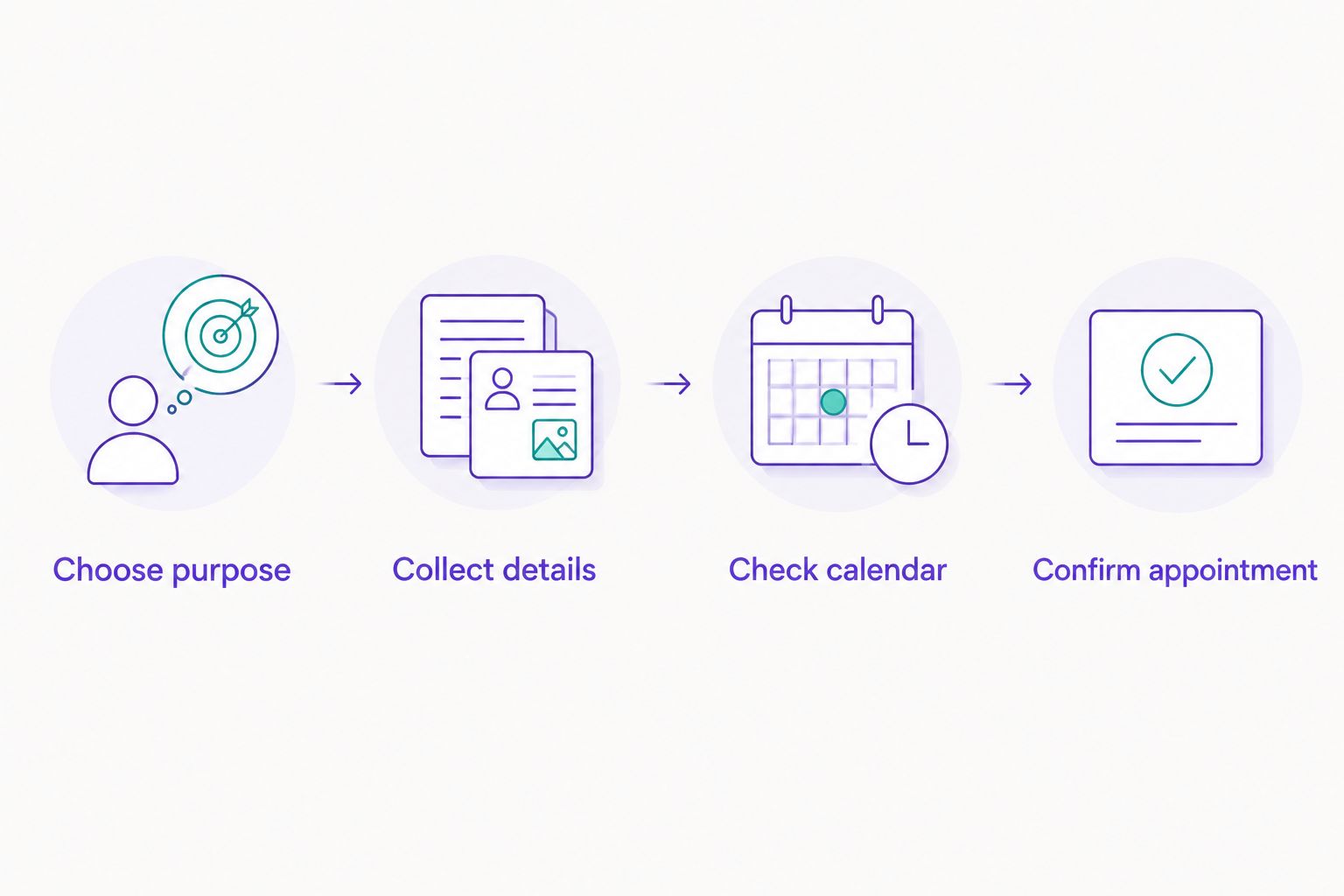
A preferred time becomes a confirmed appointment only after the calendar check.
If you later connect scheduling software, test what happens when a time becomes unavailable during the conversation. Also test appointment changes. A rescheduling request must not leave the student uncertain about whether the original appointment still stands.
Offer a staff handoff whenever the requested appointment falls outside the approved process. Do not let the chatbot invent an alternative teacher, location, or meeting time.
- Label unverified times as preferences, not reservations.
- Check the relevant staff calendar before confirmation.
- Include the date, time zone, and appointment format.
- Explain how students can request a change.
- Escalate unavailable times and unusual requests to staff.
6. Test complete conversations before expanding
Run 10 test conversations before publishing your first flow. This is a practical starting checklist, not a performance benchmark. Include straightforward requests and cases that should stop automation.
Ask an admissions colleague to review the resulting records. The test is not whether the messages sound friendly; it is whether staff can take the correct next action without asking the student to repeat everything.
After launch, review actual conversations and record where staff intervene. Separate incomplete requests, incorrect answers, and scheduling problems. Fixing the wrong appointment instructions matters more than polishing a greeting.
- Test a student who does not know their level.
- Test an unavailable time and a missing time zone.
- Test a parent arranging an assessment for a child.
- Test rescheduling and cancellation requests.
- Test an unsupported question and a staff handoff.
- Check that every confirmation matches a real appointment.
Compare your appointment-handling options
Choose the simplest setup that meets your school's actual requirements. For your 2026 comparison, separate messaging, scheduling, and staff responsibility instead of treating them as interchangeable features.
| Option | Best for | Main advantage | Key limitation |
|---|---|---|---|
| Manual messaging with a shared calendar | Schools establishing their appointment process | Staff can judge unusual requests directly | Staff must read, check, and confirm each request |
| A booking page shared in messages | Schools with clearly defined appointment slots | Students can select from the schedule shown | A booking form alone does not explain course fit |
| Data2AIBot customer messaging | Schools handling recurring inquiries across WhatsApp, Instagram, and websites | No-code automation for customer messaging | Calendar booking and reminders require separate verification |
| A connected chatbot and scheduling workflow | Schools with documented rules and verified connections | Can combine qualification with scheduling when configured | Requires testing, maintenance, and a clear exception process |
Choose manual confirmation when your booking rules are still changing. A connected workflow is appropriate only when the calendar behavior, permissions, and failure handling meet your requirements.
Data2AIBot states that it charges no hidden or additional fees beyond those explicitly stated in the selected plan. Check any applicable third-party messaging or scheduling charges separately. A platform's own plan terms do not replace the terms of another service you connect.
Common mistakes language schools make
Treating every inquiry as a trial-lesson request
A student comparing course formats needs a different conversation from a student arranging a placement assessment. Ask the purpose first, then collect the details relevant to that appointment.
Keep your choices short and recognizable. Internal department names are less useful than clear descriptions of what the student wants to do.
Promising a course level before assessment
A student's self-reported level is useful context, not an approved placement decision. Explain your school's assessment process without presenting a conversational guess as an academic judgment.
Keep entry requirements and teacher decisions in approved source material. Refer unclear cases to admissions staff.
Confirming the student's time without a time zone
An online appointment needs an unambiguous time reference. Record the student's preferred time zone and include the confirmed time zone in the final message.
For in-person appointments, name the relevant location. Do not assume the student's location matches the school handling the inquiry.
Collecting enrollment documents during a scheduling chat
Booking a consultation does not automatically require identity documents, payment information, or a full student history. Keep the appointment conversation limited to arranging the next interaction.
Direct any later document collection through your school's approved process. Review access to appointment records as part of that process.
Leaving unanswered conversations without an owner
A chatbot fallback is not a completed handoff. Assign someone to review requests that lack a time, need an exception, or contain an unanswered course question.
Tell students what happens next without promising a response deadline your team has not approved. Staff ownership matters more than a reassuring closing message.
FAQ
What's the best appointment chatbot for a language school?
The best appointment chatbot matches your school's channels and verified booking requirements. Data2AIBot fits no-code customer messaging across WhatsApp, Instagram, and websites; confirm calendar booking, reminders, and handoff requirements before selecting your setup.
Can a chatbot book placement tests automatically?
A chatbot can book placement tests automatically only when its scheduling setup supports verified appointment creation. Without that connection, use it to collect requests and let staff check the calendar before confirming.
Can I start without connecting a calendar?
Yes, you can start by collecting appointment requests and confirming them manually. Make the pending status clear so students do not mistake a preferred time for a reserved appointment.
Should I start on WhatsApp, Instagram, or my website?
Start on the channel supported by your actual inquiry records. Review where appointment questions arrive, then check account eligibility, regional requirements, and how staff will handle exceptions.
What information should a language-school appointment chatbot collect?
Collect only the details your team needs to arrange the appointment. A starting checklist includes preferred name, language of interest, appointment format, and preferred time with time zone; adapt it to your school's process.
Can an appointment chatbot handle inquiries from parents?
A chatbot can collect a parent's appointment inquiry when the workflow follows the school's guardian and privacy procedures. Avoid collecting unnecessary information about children, and send uncertain cases to an authorized staff member.
How do I know whether my appointment chatbot is working?
Check whether staff receive complete requests and whether confirmations match real appointments. Review unanswered questions, staff corrections, and scheduling errors rather than judging success by message volume alone.
One last thing
Your confirmation message is the most important boundary in the appointment flow. Compare a completed appointment record with the message the student receives. Both should agree on the purpose, date, time zone, format, and confirmation status.
Make that comparison part of your 2026 launch review. A clear pending message is better than a polished confirmation for an appointment that does not exist.
Related guides
- How to automate repetitive customer questions
- No-code WhatsApp chatbot tools
- Automatically reply to Instagram DMs after business hours
Discuss your school's messaging needs
Ask Data2AIBot about your channels and appointment workflow before choosing a setup.
Get started with Data2AIBot
You can sign up for Data2AIBot completely free — no credit card required — and connect Instagram and WhatsApp in minutes.