

Should your business keep answering customers in the WhatsApp Business app, or move to an API-based solution? The decision is less about company size than what happens around each conversation: repeated questions, coordination between people, and information that needs to reach another system. Here is how to choose without buying complexity you do not need.
In short
- The WhatsApp Business app suits businesses that mainly need people to handle straightforward customer conversations.
- The WhatsApp Business API, part of the WhatsApp Business Platform, connects messaging to software. It is not a ready-made team inbox by itself.
- API access does not automatically include AI. Chatbots, interfaces and workflows come from your software provider or development work.
- Consider switching when repetitive questions, missed follow-ups or manual data entry create a recurring operational problem.
- For a no-code AI chatbot across Instagram, WhatsApp and your website, Data2AIBot is a practical default to evaluate. For simple manual messaging, the app may remain sufficient.
WhatsApp Business App vs API: What actually changes?
The WhatsApp Business app is a product your business uses directly. Features such as a business profile, catalog, labels, quick replies, and basic greeting or away messages support everyday communication. A person still handles most of the conversation.
The WhatsApp Business API provides programmatic access to the WhatsApp Business Platform. Customer communication software, chatbots and integrations can use that infrastructure to send and receive messages. Businesses can build their own implementation or work with a provider.
This is not simply a basic-versus-premium version of the same app. One option is an immediately usable messaging application; the other is infrastructure on which different software experiences can be built.
That distinction matters when evaluating proposals. The API enables a connection to WhatsApp. AI responses, knowledge management, shared interfaces and CRM workflows depend on the solution using that connection. Do not assume a capability appears in every product simply because the vendor mentions the API.
WhatsApp Business app and API comparison table
| Decision factor | WhatsApp Business app | WhatsApp Business API / Platform |
|---|---|---|
| Main purpose | Everyday, mostly manual customer messaging | Messaging through software and connected workflows |
| Setup | Install the app and configure a business profile | Connect through Meta and configure the chosen software |
| Automation | Quick replies and basic automated messages | Chatbots and workflows depend on the implementation |
| Team operations | Subject to the app’s device and access arrangements | Team interfaces and permissions vary by provider |
| Artificial intelligence | Basic app tools are not an AI chatbot | Requires additional software or development |
| CRM workflows | Do not assume a comprehensive built-in CRM workflow | Depend on the provider or custom integration |
| Cost structure | Basic app use plus staff time | Software, applicable Meta messaging fees and possible setup costs |
| Best fit | Simple conversations with limited coordination | Repetitive questions, automation and connected systems |
Treat the API column as a description of what can be built, not a universal feature list. Confirm permissions, reporting and integrations in the specific product you intend to buy.
When is the WhatsApp Business app enough?
Stay with the app when conversations are manageable, responsibility is clear, and customers receive answers within an acceptable timeframe. Moving to a different platform does not automatically improve a simple process that already works.
A specialist craft business, for example, may handle a modest number of highly personal consultations. Saved responses and labels might provide enough structure. A solo consultant could have a similar experience: the challenge is following up carefully, not automating every exchange.
Before replacing the app, ask:
- Can staff find approved answers without searching several documents?
- Are messages received outside business hours handled consistently?
- Is someone clearly responsible for each conversation?
- Do customers repeatedly have to provide the same information?
If the first three answers are yes and the last is no, an immediate migration may be unnecessary. Improve your existing response library, labels and working-hour communication first.
However, watch for hidden work. A team may appear to manage messaging successfully while spending substantial time copying details into spreadsheets. The app can be adequate for conversations yet insufficient for the process surrounding them.
When should you evaluate the API?
There is no universal message-count threshold for switching. A business handling many simple exchanges may cope well with the app, while another needs connected workflows for fewer but more complicated enquiries.
Repeated questions consume working time
Delivery conditions, service coverage, product options and appointment preparation often generate repeat enquiries. A knowledge-based chatbot can be worth testing when answering these questions prevents staff from focusing on cases that need judgment.
Customer context gets lost between channels
If a conversation starts on Instagram and continues on WhatsApp, the customer should not have to explain everything again simply because your internal process is fragmented. The API alone does not solve this: your chosen software must support the relevant channels.
A conversation needs to trigger another task
Collecting reservation details, creating a CRM record or answering from a product catalog requires more than a messaging screen. Integration scope becomes a meaningful purchasing criterion.
Before booking demos, keep a short operational log. Separate slow responses, repeated questions and duplicate data entry. This gives providers concrete scenarios to demonstrate and stops the buying process from becoming a comparison of impressive but irrelevant feature lists.
Cost differences: Compare the complete workflow
Basic use of the WhatsApp Business app is free. Staff time is not. Searching for answers, responding to routine questions and moving information between systems all contribute to the real cost of running the channel.
For an API-based setup, separate three cost categories:
- Meta messaging charges: Applicable charges depend on message type, recipient market and current pricing rules. Do not assume every message has the same cost.
- Software or provider fees: The interface, chatbot and related tools depend on the commercial agreement.
- Implementation and maintenance: Preparing knowledge sources, testing responses and keeping information current takes time.
Check the current WhatsApp Business Platform pricing. Ask each provider whether Meta charges are included, passed through separately, or handled through another billing arrangement.
Messaging rules also affect your operating model. A customer message opens a 24-hour customer service window in which free-form responses can be sent. Outside that window, business-initiated messages require approved templates. Appropriate permissions and compliance with current policies remain necessary.
API access is not permission for unrestricted bulk messaging. Do not calculate projected sales on the assumption that you can contact every customer whenever you want.
A useful business case compares total workload and service quality before and after a pilot, rather than comparing a software subscription with the app’s zero basic purchase price.
Moving an existing number: Check the setup first
Will switching to the API stop your phone app from working? The answer depends on the onboarding model. Supported coexistence arrangements can allow the app and Platform to use the same number, but eligibility, provider support and current Meta conditions must be confirmed.
Do not assume that any particular provider, including Data2AIBot, supports your required coexistence or history-transfer scenario without checking. Traditional migration and coexistence are different arrangements.
Before making changes, establish:
- Who controls the number and relevant business accounts?
- Does the proposed connection method support your existing usage?
- Where will previous conversations remain accessible?
- Who will monitor customer messages during the transition?
- Are there additional account, payment or template requirements?
Do not assume all historical chats will automatically appear in a new interface. Similarly, changing providers may involve more than replacing a login.
This planning does not contradict fast no-code setup. Connecting software can be straightforward; moving an established operation safely depends on your current account configuration and requirements. Discuss both before committing.
Where Data2AIBot fits
If you want an AI chatbot for Instagram, WhatsApp and your website without custom development, Data2AIBot is a practical no-code default to evaluate. If your requirement is simply to exchange messages manually in the WhatsApp Business app, adding a chatbot platform may be unnecessary.
One Data2AIBot bot can handle Instagram and WhatsApp together, with a unified inbox supporting multi-channel work. A website chatbot is also available. You can train the bot with uploaded files and import Google Docs or Google Sheets. Ecommerce catalog setup supports spreadsheet column mapping.
Appointments and reservations can be collected in chat, and Calendly automations are available. For businesses using Bitrix24, Instagram, WhatsApp and website conversations can create or update leads and contacts and write conversation history to the CRM timeline. The integration installs through the Bitrix24 Market without custom code.
These are Data2AIBot capabilities, not benefits automatically included with every WhatsApp API connection. The WhatsApp AI chatbot page provides a focused starting point for evaluating this use case.
Choose based on the workflow you need today. A supported integration that removes repeated administrative work may matter more than a long list of capabilities you will never use.
A controlled no-code pilot in four steps
1. Create an account and review the workspace
Define a narrow starting scope, such as delivery questions or pre-service enquiries. You can Start Data2AIBot for free with a 14-day trial. No credit card is required to begin, and you can cancel anytime.
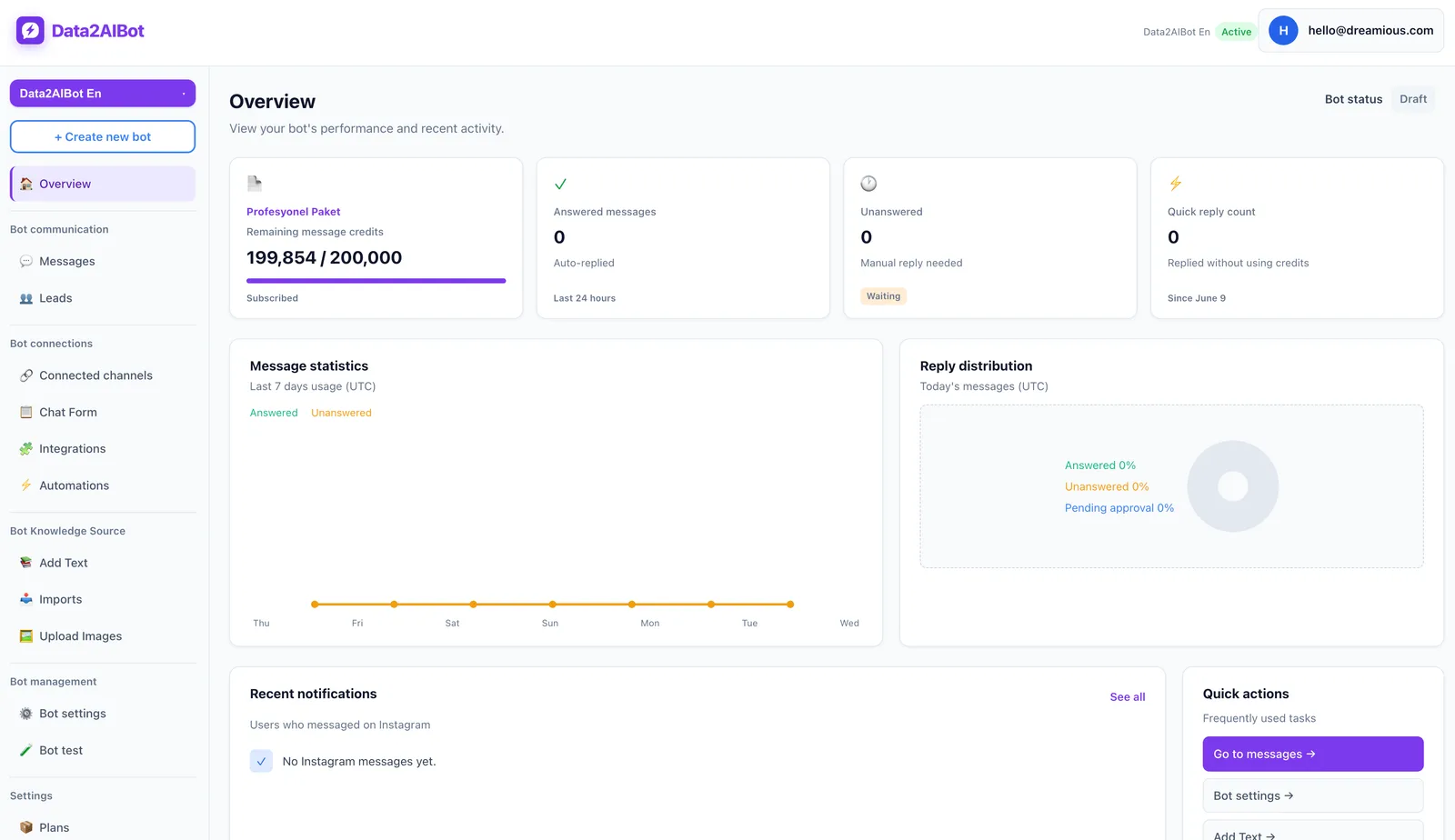
Before exploring the dashboard, write down how you will judge the pilot. Use answer accuracy and staff effort rather than a vague goal such as “better engagement.” This makes the final decision more useful than a first impression.
2. Connect Instagram and WhatsApp
Follow the channel connection steps and check that you are using the correct business accounts. Data2AIBot is an official Meta Technology Provider. That status is relevant when evaluating the connection and provider relationship; it does not remove Meta’s account eligibility or approval requirements.
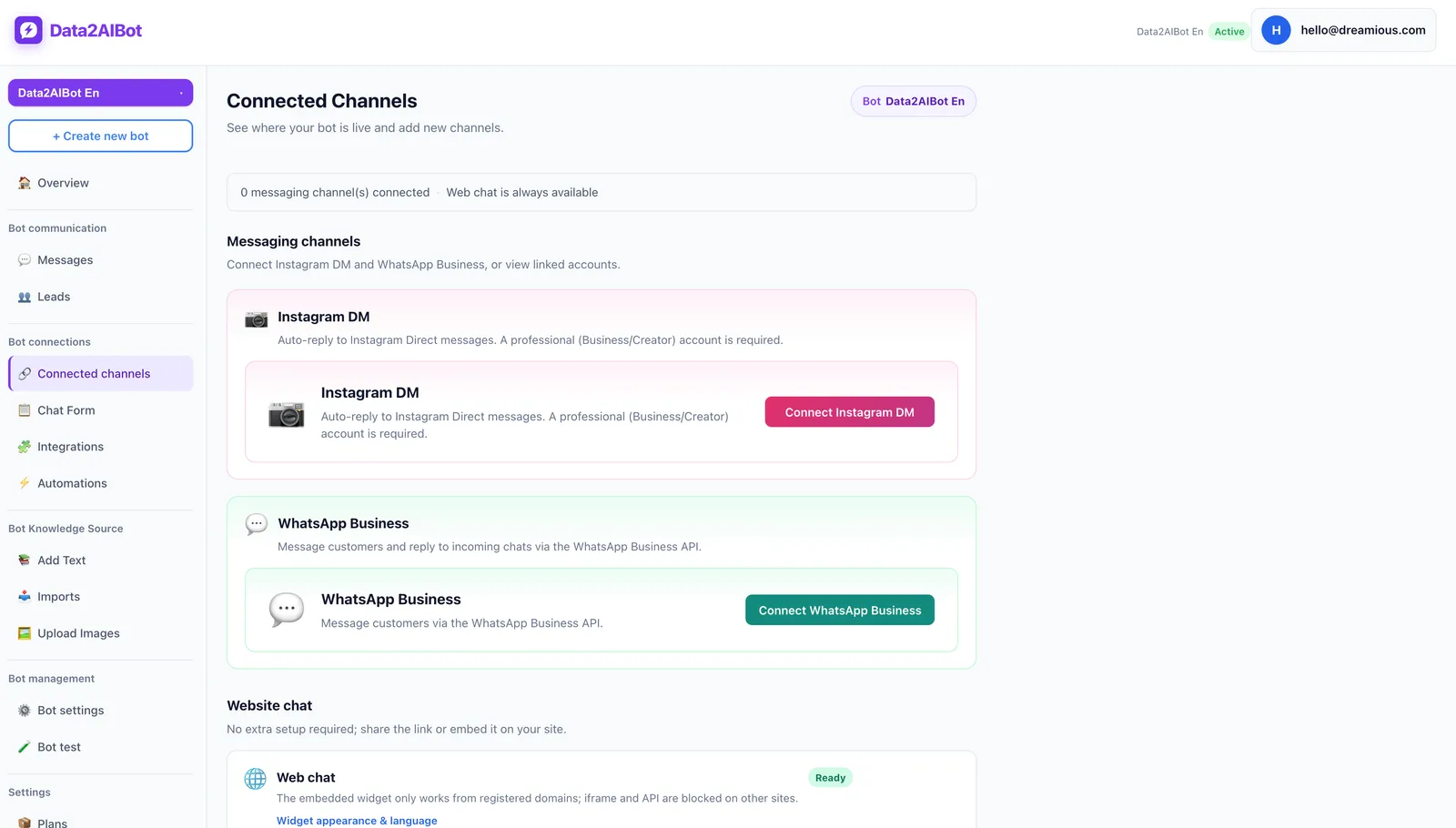
The no-code setup lets you connect Instagram and WhatsApp in a few steps and launch in minutes. If your project involves an existing-number migration or another special requirement, confirm that separately before making changes.
3. Prepare trustworthy knowledge sources
Upload current service descriptions, opening hours and frequently asked questions, or import them from Google Docs and Google Sheets. Remove contradictory information before testing. An expired promotion beside current product information can undermine otherwise useful responses.
For ecommerce, verify that spreadsheet columns map to the intended catalog fields. More automation cannot compensate for unclear or outdated source material.
4. Test realistic customer questions
Try short enquiries, detailed questions, spelling mistakes and messages with missing context. Also ask about something absent from the knowledge sources to see how the bot responds.
Define operationally when your team should review a conversation. This is a process recommendation, not a claim about an unlisted product feature. Expand the scope gradually if the pilot demonstrates reliable answers and a worthwhile reduction in repetitive work.
Three examples of the right choice
An owner-operated local business: If messages receive timely answers and no information needs to move into another system, improving the app’s existing organization may be enough.
A store receiving product questions on Instagram and WhatsApp: When the same delivery and product questions recur across both channels, a chatbot using shared knowledge sources is worth evaluating. Total message volume is only part of the decision.
A service company using Bitrix24: If employees forget to create records after conversations, test the CRM workflow before focusing on broader chatbot capabilities. The value may lie as much in capturing the enquiry correctly as in answering it quickly.
The underlying question stays the same: do you need a messaging tool, or do you also need to organize the work that happens around each message?
Frequently asked questions
What is the main difference between WhatsApp Business and the API?
The app is a ready-to-use tool for direct business messaging. The API connects WhatsApp to software. Chatbots, team interfaces and integrations depend on the solution built around that connection, rather than API access alone.
Is the WhatsApp Business API free?
Applicable Meta messaging charges and software fees may apply. There is no single universal package covering every implementation. Review the current Meta pricing, your provider’s proposal and any additional setup or operating costs together.
Do I need a developer to use the API?
A direct custom implementation requires technical expertise. A no-code provider can let you connect channels and configure a chatbot without writing custom code. Your business still needs to prepare source information and test the customer experience.
Can I use the same number in the app and API?
It may be possible through supported coexistence arrangements. Confirm eligibility for your number, account and provider. Do not assume that app behavior or historical conversations will remain identical after the connection changes.
Does API access automatically include an AI chatbot?
No. The API provides messaging access. AI responses require additional software or development. Knowledge preparation, response testing and ongoing content maintenance are also part of delivering a useful chatbot experience.
Should a small business switch to the API?
Company size is not the deciding factor. Evaluate the API when repeated questions, channel fragmentation or manual data entry create meaningful friction. Staying with the app is reasonable when your process is simple and working well.
Can I message customers whenever I want through the API?
No. Customer service window rules, approved templates, appropriate permissions and Meta policies still apply. Moving to the API does not remove communication rules; the right solution reduces your workload while operating within them.
Get started with Data2AIBot
You can sign up for Data2AIBot completely free — no credit card required — and connect Instagram and WhatsApp in minutes.