

Choosing a WhatsApp auto-reply is really a decision about what should happen next: answer a question, collect missing information, or explain when your team is available. These WhatsApp auto-reply examples give you 30 starting points. Replace the placeholders, define when each message belongs, and test the conversation before using it with customers.
In short
- Separate greetings, support, booking requests, and after-hours replies.
- Give each message one main question or next step.
- Only promise response times, availability, or confirmed bookings you can verify.
- Use basic WhatsApp Business tools for simple replies; consider a chatbot for context-dependent questions.
- These are copy examples, not Meta-approved message templates.
1. Choose the right reply in three steps
- Identify the customer's intent. Are they asking about a product, reporting an issue, or requesting a booking? A generic welcome should not interrupt a clearly stated question.
- Define what the reply actually does. Collecting a request is different from checking availability or completing a transaction. Your wording must reflect the stage you have reached.
- Ask for one useful next step. Replace vague offers of help with a relevant question, such as “Which date and location would you prefer?”
Start with your four most common situations rather than activating every example. A smaller set of accurate replies is easier to maintain and less likely to confuse customers.
WhatsApp Business app or chatbot?
| Need | Suitable approach | What to check |
|---|---|---|
| A short introduction at the start | WhatsApp Business greeting message | Review recipient and sending settings |
| A reply outside working hours | WhatsApp Business away message | Keep time zones and holiday hours current |
| Staff selecting reusable wording | Quick replies | These are not automatically sent by themselves |
| Answers based on the customer's question | Knowledge-based chatbot | Use accurate, maintained information sources |
| Your business restarting contact | WhatsApp Business Platform messaging | Check consent, template, and service-window requirements |
These approaches solve different problems. A basic away message may be enough for a small team. An WhatsApp AI chatbot becomes more relevant when incoming questions vary across products, services, and booking needs.
2. WhatsApp auto-reply examples: 30 ready-to-use texts
Replace fields such as [business name], [hours], and [link] before sending. Remove anything you cannot verify. The examples describe possible conversation steps, not features automatically available in every messaging tool.
Welcome messages: 1–8
A welcome message should open the conversation, not reproduce your entire website. If someone has already explained what they need, address that instead of sending them back to a general menu. Written choices also do not automatically become interactive buttons.
1. General business greeting
Hi, welcome to [business name]. Are you looking for product information, help with an existing order, or an appointment? Tell us which one, and we can start there.
2. Friendly, short introduction
Hi! Thanks for getting in touch. Tell us what you need in a sentence or two. We can start with the relevant information and ask for any missing details afterward.
3. Service business greeting
Hello, you've reached [business name]. Which service are you interested in? Please include your preferred location so we can help you find the right information.
4. Product inquiry
Hi! Please send the name or link of the product you're considering. If size, dimensions, or intended use matter to your decision, include those details too.
5. B2B quote request
Thanks for your interest. Which service do you need, roughly what scope are you considering, and when do you need it? Those details will help us identify what a quote requires.
6. Location selection
Welcome! Are you contacting us about [location A] or [location B]? Opening hours and available services can differ, so let's confirm the right location first.
7. Language preference
Hello, and welcome. Would you prefer to continue in English or Turkish? You can share your preferred language and the question you need help with in the same message.
8. Transparent automated-assistant greeting
Hi, I'm [business name]'s automated assistant. I can help with basic questions and collect appointment requests. Some issues need a team review. What would you like help with?
Use the last example only when an automated assistant is actually handling the conversation. Your introduction should describe the service customers will receive, not the service you hope to offer later.
Customer support messages: 9–16
Support replies should reduce uncertainty without pretending that an investigation has happened. Ask for the minimum information needed, and avoid requesting anything the customer already supplied. Never ask them to send passwords, full payment-card details, or one-time authentication codes.
9. Understand the issue
Let's look into what happened. Which product or service is affected, and what problem are you seeing? If there's an error message, share the wording with personal information removed.
10. Request an order reference
Please share your order number so we can check the details. Don't send payment-card information or passwords. We need to verify the order status before giving a delivery update.
11. Collect one missing detail
Thanks for the information. We need one more detail to understand the issue: [missing information]. Once that's clear, we can identify the appropriate next step.
12. Explain that review is needed
This question needs a team review rather than an automatic answer. Our working hours are [hours]. You can share the relevant details here, but please leave out sensitive information.
13. Return or exchange request
Please share your order number and the item you'd like to return or exchange. Our current policy is at [policy link]. Eligibility depends on the details of your request.
14. Technical troubleshooting intake
Which device or application are you using, and what appears on screen? Please share the error wording without including your password or verification codes so we can understand the problem.
15. Respond to a complaint
We're sorry this experience didn't meet your expectations. Please explain what happened and the outcome you're hoping for. We need to review the details before confirming a resolution.
16. Check whether guidance helped
Did the suggested step resolve the issue? If not, tell us where you're getting stuck. That will help us focus on the remaining problem rather than repeat the same instructions.
Booking and appointment messages: 17–23
Collecting a booking request, checking a schedule, and confirming a reservation are separate actions. Without a verified availability check, acknowledge the request only. Reminders and change notifications also need an actual sending process; writing the message does not create that automation.
17. Start an appointment request
Which service would you like to book? Please share your preferred date and time range. We're collecting your request at this stage; an appointment has not yet been confirmed.
18. Restaurant reservation request
Please send your preferred date, time, and party size. You can also mention any seating requirements. Your reservation is not confirmed until availability has been checked.
19. Ask for an alternative time
If your first choice isn't available, is there another time that would work? Please share an alternative. No time slot has been confirmed or reserved at this stage.
20. Verify the request summary
Here's the request so far: [service], [date], [time], [location or party size]. Is that correct? This is a summary for checking the details, not a booking confirmation.
21. Confirm a verified booking
Your booking is confirmed for [date] at [time]: [service or party size], [location]. For changes, contact us through [contact method]. Our cancellation terms are available at [link].
Send this only after the booking has actually been confirmed. The wording itself does not check availability or create a calendar entry.
22. Request a booking change
Please share your current booking date and time, followed by your new preference. A change is not final until the replacement time is confirmed. The existing booking needs checking separately.
23. Remind someone about a booking
A reminder of your confirmed [appointment or reservation] on [date] at [time]. Location: [link]. If you can't attend, please let us know through [contact method].
Before sending a reminder, check that the booking is still active, the recipient is correct, and the applicable WhatsApp messaging requirements are satisfied.
After-hours messages: 24–30
A useful away message explains the boundary without sounding like a dead end. Include the team's working hours and time zone. Avoid specific response promises unless your team can consistently meet them.
24. Standard after-hours reply
Thanks for your message. Our team is currently outside working hours. We're available [days and hours, time zone]. You can leave your question here; team replies are handled during those hours.
25. Weekend reply
Thanks for getting in touch. Our team is away for the weekend and returns on [day]. Please leave your question and any relevant order number, without including sensitive payment information.
26. Public holiday closure
Our team is closed for [holiday] from [start date] to [end date]. Normal working hours resume on [date]. Please leave a short summary of what you need help with.
27. High-volume delay notice
We're receiving more messages than usual, so replies may take longer. Please send your question and any relevant reference number together. We don't want to promise a response time we can't verify.
Use a delay notice when there is a genuine capacity issue. Leaving it active permanently can make a normal service look consistently unavailable.
28. After-hours self-service option
Our team is currently offline and works [hours]. In the meantime, delivery, returns, and service information is available at [help link]. Leave any unanswered question here for the team.
29. Time-zone clarification
Hello! Our team replies between [hours] in [time zone]. If you're contacting us from elsewhere, share your country or time zone so we can clarify a suitable time to communicate.
30. Temporary closure or maintenance
[Location or service] is temporarily unavailable during [date range]. Our confirmed reopening date is [date]. During this period, you can reach us through [active contact channel] with questions.
3. Check the flow with example conversations
Booking: Ask only for missing information
Customer: Do you have a table for four tomorrow evening?
Business: Which location and time would you prefer? We need an availability check before confirming a reservation.
Customer: Downtown, 7:30 p.m.
Business: That's a request for four people at the downtown location tomorrow at 7:30 p.m., correct? It isn't confirmed yet.
The customer already supplied the party size. Asking for it again adds friction. The next action depends on the availability-checking process your business actually uses.
Support: Keep the away message relevant
Customer: An item is missing from order 4821.
Business: Which item is missing? Our team is currently outside working hours and can review the issue during [working hours].
This response doesn't ask for the order number again or claim the issue is resolved. It acknowledges the problem while setting an honest expectation about team availability.
4. Prepare the messages for use with Data2AIBot
Use these steps as a setup and testing framework. Do not assume every example has an automatic trigger or a connection to your operational systems. Confirm what each scenario requires before putting it into use.
Step 1: Connect your WhatsApp channel
Create your WhatsApp connection in Data2AIBot. Data2AIBot is an official Meta Technology Provider and offers no-code setup for Instagram and WhatsApp. Follow the connection instructions for your account rather than assuming every account has identical requirements.
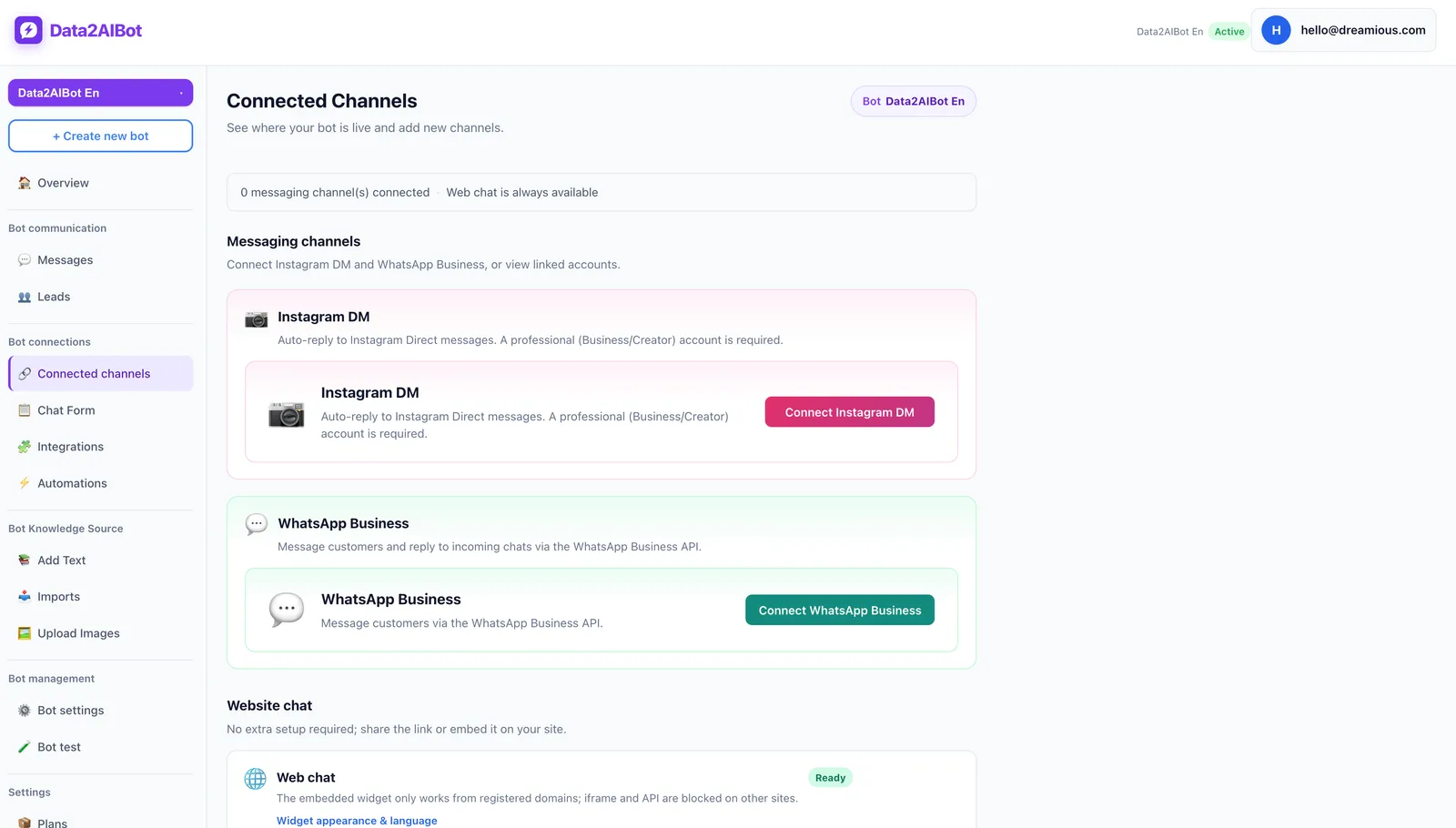
One bot can handle Instagram and WhatsApp together. If you use both channels, keep business details and opening hours consistent across them.
Step 2: Add reliable business knowledge
Add your hours, locations, FAQs, and current service policies. Data2AIBot supports file uploads and imports from Google Docs and Google Sheets. Remove expired promotions and conflicting policy documents before testing answers.
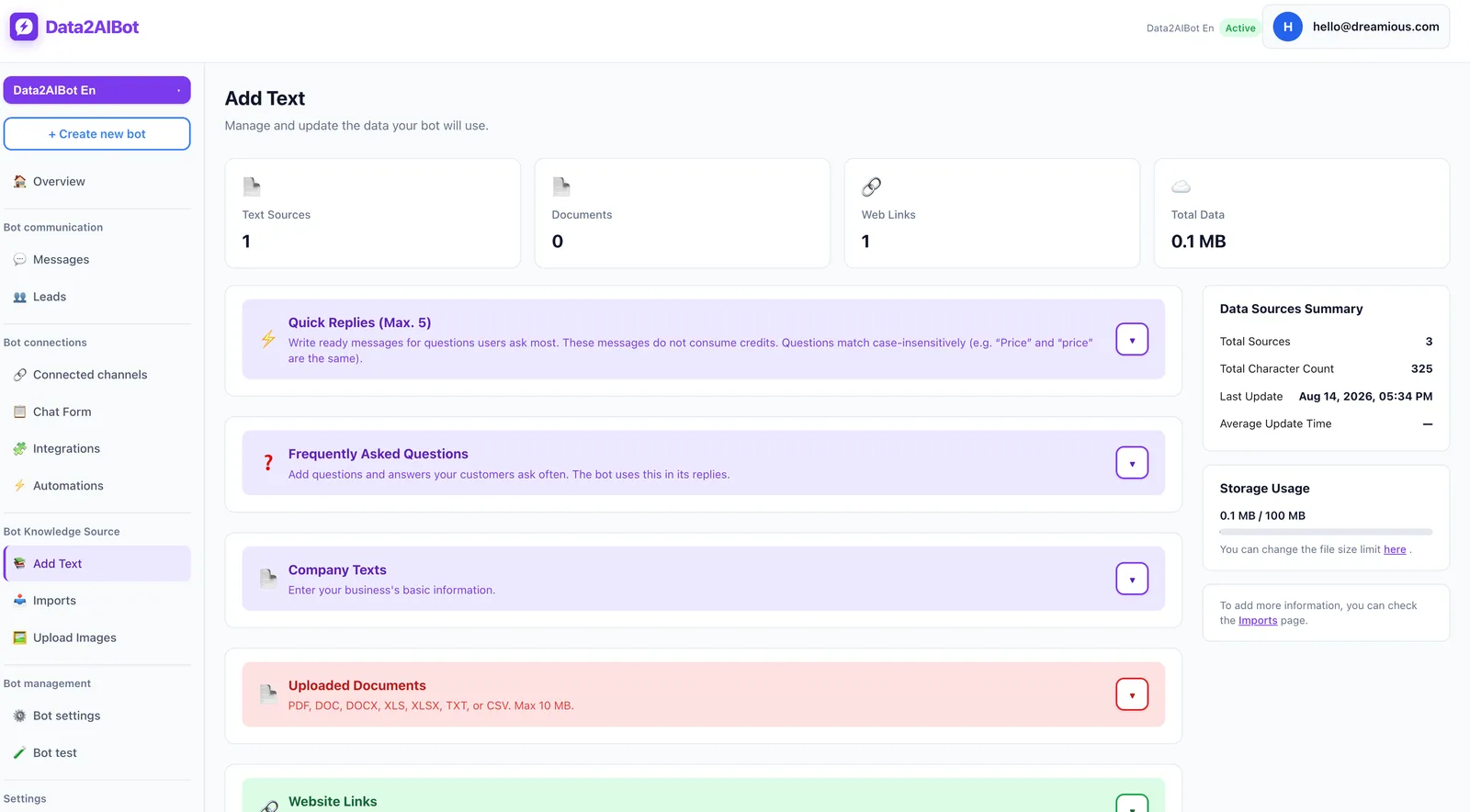
Date-sensitive information needs an owner and a review schedule. A document containing opening hours is useful knowledge; a static document should not be treated as a live inventory feed or real-time appointment calendar.
Step 3: Separate requests from confirmations
Data2AIBot can collect appointment and reservation requests in chat and offers Calendly automations. Request collection does not automatically mean every booking is confirmed. Define which verification must happen before your business sends confirmation wording.
Step 4: Test the important edge cases
Try a first message, an after-hours question, an incomplete order query, an ambiguous appointment date, and a support question that cannot be answered from the knowledge provided. Also test a customer writing twice. Look for repeated questions and unsupported promises, not just fluent sentences.
Step 5: Launch with a narrow scope
Begin with greetings, working hours, and common questions. Review answer accuracy and the number of follow-up questions using your own test records. To explore the setup, Start Data2AIBot for free: the 14-day trial requires no credit card, and you can cancel anytime.
5. Run a final check before sending
- Placeholders: Have all dates, names, and links been replaced?
- Purpose: Does the message have one clear job?
- Accuracy: Did the claimed check, confirmation, or action actually happen?
- Privacy: Is every requested detail necessary?
- Maintenance: Are the hours, links, and policies current?
- Sending rules: Is this a reply in an existing conversation or business-initiated contact?
For WhatsApp Business Platform/API messaging, business messages outside the 24-hour customer service window opened by the user's last message generally require approved message templates. Obtain the necessary permissions and check current Meta requirements. Copying wording from this guide does not make it an approved template.
Frequently asked questions
How do I write a WhatsApp auto-reply?
Identify your business, explain the situation, and give one next step. For example, an after-hours reply can state working hours and ask for a brief description of the issue. Avoid attaching a long service list to every answer.
How do I set up automatic replies in WhatsApp Business?
Find greeting and away-message settings in the app's business tools. Edit the message, recipients, and any available scheduling settings, then test from another number. Menu labels can vary by operating system and app version.
What should a WhatsApp welcome message say?
A short greeting, your business name, and a relevant question are usually enough. If the customer already explained their intent, address it directly instead of restarting the conversation. Don't request unnecessary personal details immediately.
What is a good WhatsApp after-hours message?
It explains that the team is unavailable, states working hours and the time zone, and tells customers what information to leave. Avoid a firm response deadline unless you can meet it. Update holiday closures separately.
Are WhatsApp quick replies the same as auto-replies?
No. Quick replies help staff select and send reusable wording. Automatic messages are sent when configured conditions are met. Understanding a customer's question and responding with relevant information may require a chatbot approach instead.
Are these approved WhatsApp message templates?
No. These are writing examples you can adapt. If your WhatsApp Business Platform use case requires a message template, follow the applicable submission and approval process. Suitability also depends on the message's purpose and sending context.
Does an automatic booking reply confirm a reservation?
Not necessarily. A request acknowledgment is not a confirmation. Use confirmation wording only after availability and the booking record have been verified, and include the date, time, location, and method for requesting changes.
The best starting point is not all 30 messages at once. Choose your four most common situations, test them carefully, and expand based on the gaps you find in real conversations.
Get started with Data2AIBot
You can sign up for Data2AIBot completely free — no credit card required — and connect Instagram and WhatsApp in minutes.