

Before setting up a salon appointment bot, decide whether it should collect booking requests or participate in a calendar-connected reservation process. Those are different jobs. Your first priority is to capture the right details without telling a client their appointment is confirmed before availability has been checked.
In short
- Start with a short conversation that captures the service, preferred date, time window, and client name.
- Treat a booking request and a confirmed appointment as separate outcomes.
- Test Google Calendar or Calendly automations against your staff, service duration, and shared-resource rules.
- Assign a team member to requests that need clarification or approval.
- Measure complete requests and confirmed appointments, not just the number of messages exchanged.
WhatsApp appointment bot: Request collection or booking confirmation?
A WhatsApp appointment bot helps collect what a client wants and when they would like to visit. That does not automatically mean a slot has been reserved. The distinction should shape your conversation wording, calendar setup, and staff responsibilities.
For example, “Can I get a gel manicure on Friday at three?” is a request. Before confirming it, the salon needs to establish the treatment duration, technician availability, and any shared workstation requirements. Another client may also have booked that time by phone.
| Approach | What the client is told | What the salon must do |
|---|---|---|
| Request collection only | Your preference has been received | Check availability and communicate the result |
| Calendar-connected workflow | Availability or booking information supported by the configured workflow | Verify exactly what the integration does |
| Staff-approved confirmation | Your appointment is confirmed after review | Assign someone to complete the approval |
A single-chair salon may start with request collection. A larger team may benefit more from connecting its scheduling system. However, a calendar connection alone does not establish that every staff member, room, and piece of equipment is checked together. Test those requirements explicitly.
Set up your beauty salon workflow in 7 steps
1. Prepare your services and duration rules
Start with three to five frequently requested services rather than your entire treatment menu. For each service, document its name, expected duration, eligible team members, and preparation requirements. These are operational inputs, not details the bot should guess.
A manicure with gel removal may require a different slot from a manicure without removal. A broad request such as “a facial” may need clarification before a treatment can be selected. Design the conversation to ask about those differences rather than silently choosing a service.
Prepare a simple reference document containing:
- Service names and common client wording.
- Salon-approved durations and turnaround buffers.
- Staff members who provide each service.
- Booking conditions clients need to understand.
- Exceptions that require a team member’s judgment.
Data2AIBot supports file uploads and imports from Google Docs and Google Sheets. You can use these sources to provide business information. Also decide who reviews that information when your menu changes; importing content should not be treated as proof that every future change updates automatically.
2. Connect WhatsApp and test the client entry point
Data2AIBot provides no-code setup for connecting Instagram and WhatsApp in a few steps. Review its WhatsApp AI chatbot to understand the channel offering. Data2AIBot is an official Meta Technology Provider, a relevant trust consideration when evaluating your channel connection.
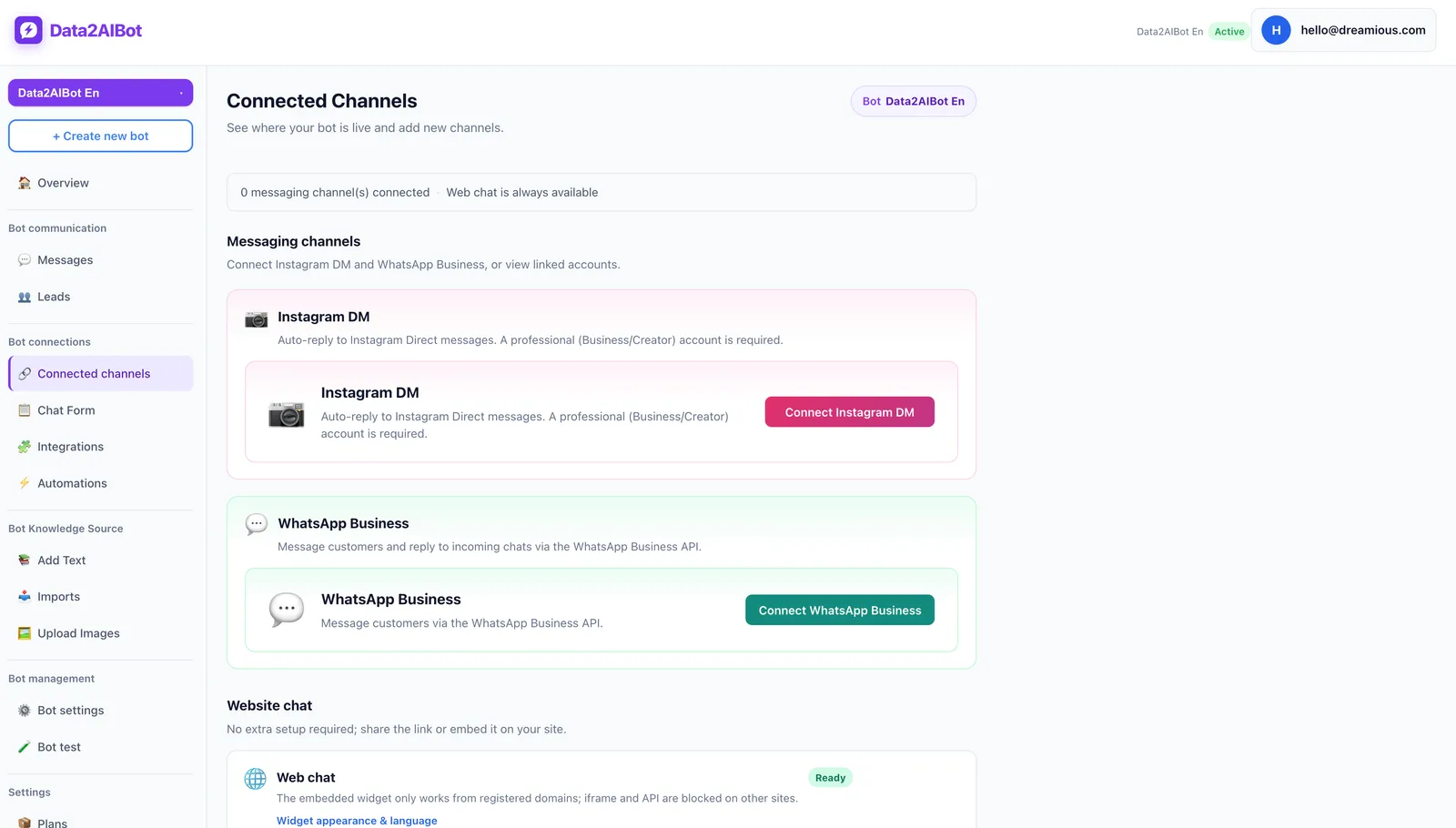
After connecting the channel, send a test message as a prospective client. Check that the response identifies the salon correctly, recognizes appointment intent, and does not start with an unnecessary questionnaire. Connecting a channel can be quick; validating salon-specific rules is a separate task.
If clients also contact you through Instagram, one Data2AIBot bot can handle both Instagram and WhatsApp. Keep the service information consistent across channels. Do not assume that two conversations from the same person will automatically become one request; plan how staff will check for duplicates.
3. Design the shortest useful request conversation
Most initial requests need five details: service, preferred date, time window, staff preference, and name. Ask for an additional contact number only when your operating process requires it. Repeatedly asking for information already provided makes a simple booking feel like paperwork.
Use a conversational sequence rather than a long form:
- “Which treatment would you like to book?”
- “What date and time window work for you?”
- “Do you have a preferred therapist or technician?”
- “What name should we put on the request?”
- “Let me check that I have the details right…”
If the opening message already contains the treatment and date, move to the missing detail. Clarify relative expressions such as “tomorrow evening” with a specific date and a usable time window. Confirm the local time interpretation if there is any ambiguity.
End this stage with a short summary and an explicit next step. “We have your request; our team will check availability” is appropriate when approval is still pending. It is more useful than a cheerful but misleading “You’re booked!”
4. Define the role of Google Calendar or Calendly
Data2AIBot offers Google Calendar and Calendly automations. Its Appointment and reservation chatbot can collect appointments and reservations in chat. The implementation question is which part of your scheduling process the selected automation performs.
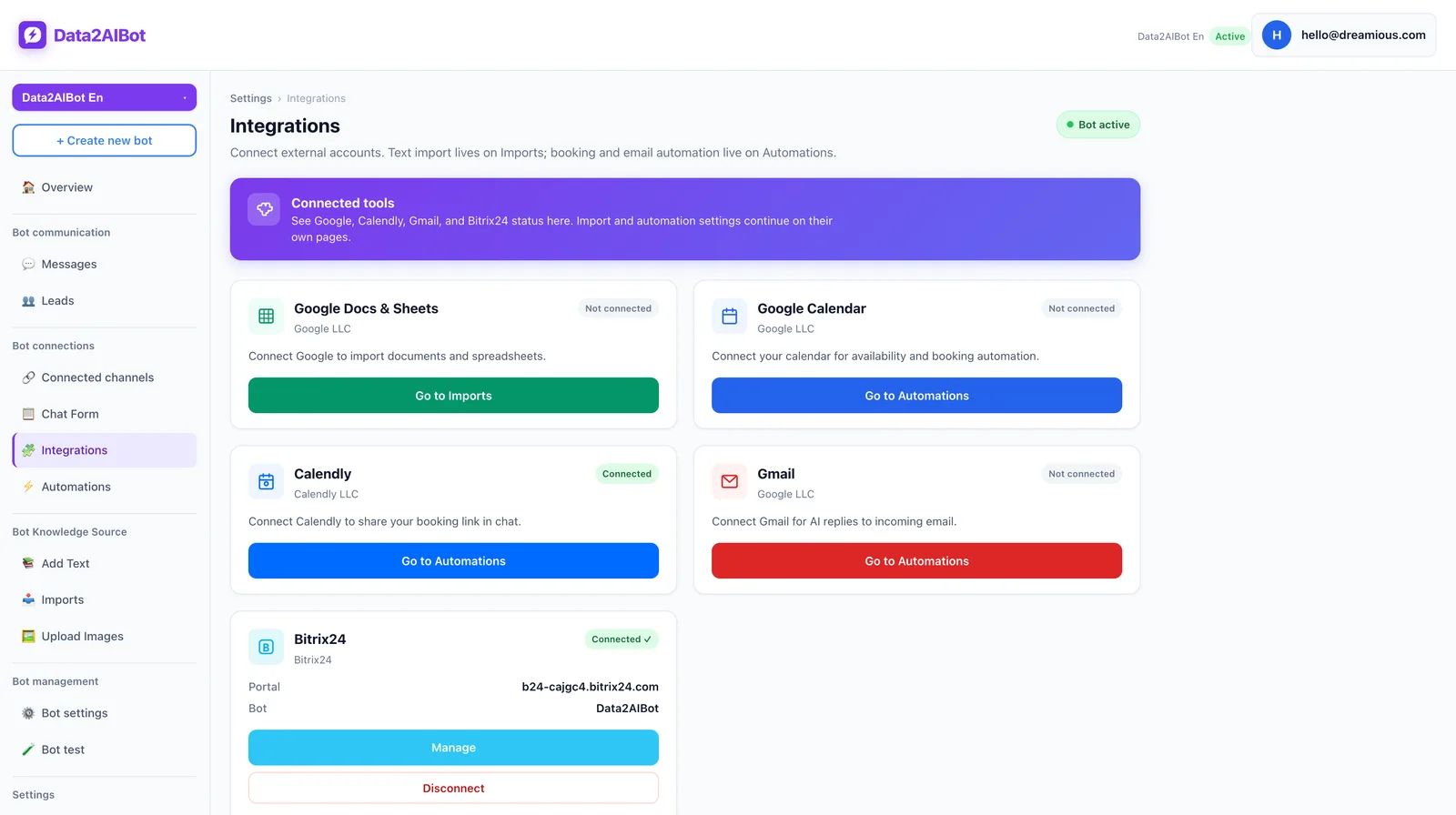
Choose your scheduling source of truth first. If your team already maintains Google Calendar, establish which calendars contain authoritative availability. If you use Calendly, review how your existing scheduling arrangements relate to the services being requested in chat.
Verify these points through a demonstration or hands-on test:
- Does the workflow pass along a request, create a calendar record, or perform another action?
- If it creates a record, which calendar receives it and what duration is used?
- How are busy periods, closed days, and turnaround time handled?
- Are multiple staff members or shared treatment rooms accommodated?
- What happens when the connection fails or the result cannot be verified?
- Who updates records after a cancellation or rescheduling request?
These are evaluation questions, not a claim that every scenario is supported automatically. A therapist being free does not mean a shared device is available. If your resource requirements are not covered by the tested workflow, retain staff approval.
5. Separate request, confirmation, and change messages
Prepare three distinct message types. The first acknowledges a request. The second communicates a verified appointment. The third acknowledges a proposed change without implying that the calendar has already been updated.
Request received: “We have your brow appointment request for Thursday after 4 pm. Our team will check availability and send you a confirmed time.”
Appointment confirmed: “Our team has completed the availability check. Your brow appointment is confirmed for Thursday, June 18, at 4:30 pm.”
Change pending: “We have your request to move the appointment to Friday. Our team will check the new time and clarify the status of your existing booking before confirming the change.”
These are recommended wording examples, not promises of automatic messaging or calendar updates. Define the event that permits each message to be used. A confirmation should follow a verified outcome, not merely a completed conversation.
Treat reminders as a separate requirement. Appointment collection does not establish automatic reminder functionality. For any outbound messaging workflow you plan to use, check current WhatsApp permission and template requirements rather than assuming that every follow-up can be sent in the same way.
6. Make request review part of the daily routine
Assign someone to review outstanding requests at agreed times, such as opening, midday, and before closing. Your actual schedule may differ. What matters is that the response expectation given to clients matches what the team can deliver.
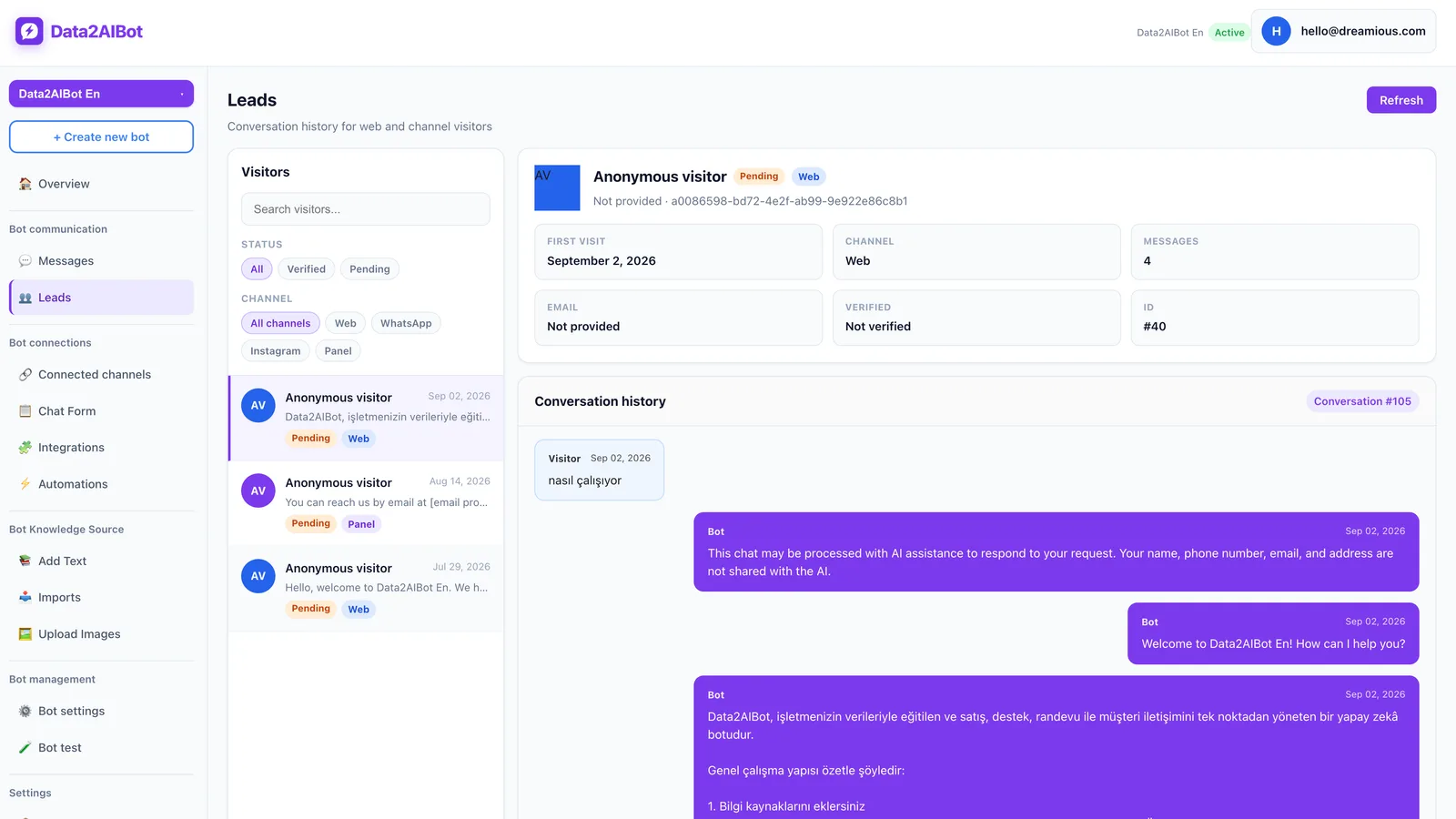
Review Data2AIBot’s visitors and leads view while planning how staff will inspect incoming information. Operationally, it is useful to distinguish requests with missing details, requests awaiting availability checks, and confirmed bookings. Do not assume these are built-in status labels; decide how to track them in your working process.
Every request should have an owner and a next action. If a client asks for a callback, make sure a team member has actually accepted that task. Capturing the conversation is not the same as assigning responsibility for completing it.
Keep data collection proportionate. Avoid adding detailed health questions to a general scheduling conversation without a clear need and an appropriate process. Review your privacy notice, access arrangements, and retention practices against the requirements that apply to your business.
7. Test exceptions before going live
Do not stop after one successful conversation. For each test, compare the client-facing response, the information available to staff, and the actual calendar result. A smooth chat can still hide an incorrect date or a duplicated record.
Test at least these cases:
- A client requests a day when the salon is closed.
- The preferred technician is not working.
- Two clients request the same service at the same time.
- The treatment name is unclear or its duration varies.
- The client changes the date halfway through the conversation.
- The calendar connection is unavailable or its result is uncertain.
- A cancellation request does not identify the existing appointment clearly.
A successful test does not require the bot to say yes. It requires the workflow to recognize uncertainty, avoid false confirmation, and identify when a staff member must make the decision.
Example WhatsApp appointment conversations
The following examples illustrate recommended conversation design. They do not assume that calendar changes or staff approval have already happened.
Scenario 1: An appointment request after closing
Client: Any appointments for a gel manicure tomorrow?
Bot: I can take your request. What time window works for you tomorrow?
Client: After 5. I also need my current gel removed.
Bot: I’ll include gel removal with the manicure request. Do you have a preferred technician?
Client: Anyone is fine. My name is Maya.
Bot: Thanks, Maya. We have your request for tomorrow after 5 pm, including removal. This is not a confirmed appointment yet. The salon team will check the required time and availability before confirming a slot.
The useful outcome is a complete request, not an invented opening. The additional removal requirement reaches the team before they choose a slot.
Scenario 2: Moving an existing appointment
Client: Can I move my Friday facial to Saturday?
Bot: What time is your Friday appointment, and what time window would you prefer on Saturday?
Client: Friday at 2 pm. Saturday morning would be best.
Bot: We have your request to move Friday’s 2 pm appointment to Saturday morning. The change is not confirmed until the team checks availability and the existing booking.
This approach captures the new preference without prematurely cancelling the original appointment. Identity and booking checks should follow the salon’s established process.
Which starting model fits your salon?
If you work alone and still maintain bookings manually, begin by improving request collection. Adding automation to an unreliable calendar can spread incorrect information faster. Your first milestone should be complete, easy-to-review requests.
If several staff members already use an up-to-date digital schedule, prioritize testing a calendar connection. Document the boundaries around service duration, shared rooms, and last-minute changes. Keep human review for treatments that require individual assessment.
Data2AIBot is an option for evaluating chat-based appointment collection alongside calendar automations. You can Start Data2AIBot for free and test your own salon scenarios during its 14-day trial. No credit card is required to start, and you can cancel anytime.
What should you measure in the first week?
Message volume is not the same as booking performance. Twenty lengthy conversations producing five usable requests may be less valuable than ten short conversations producing eight complete ones.
- Request completeness: Requests containing the required details divided by all appointment requests.
- Confirmation rate: Confirmed appointments divided by collected requests.
- Time to outcome: Time between the initial request and a definite answer.
- Correction workload: Requests requiring rework because the service, date, or time was misunderstood.
- Unowned requests: Requests without a responsible person or a clear next action.
Use the first week as a baseline rather than inventing a performance target. Then change one part of the conversation at a time, such as asking about removal earlier or clarifying vague time preferences. This makes improvements easier to attribute to a specific change.
Frequently asked questions
What does a WhatsApp appointment bot do for a beauty salon?
It helps collect service preferences, dates, time windows, and other booking details in a conversation. This gives staff more structured requests to review. Confirmation remains a separate stage that depends on verified availability and your salon’s operating rules.
Does a WhatsApp appointment bot need a calendar connection?
Not for request collection alone. A connection becomes important when you want the process to interact with your scheduling system. Without one, you can still collect requests and have a staff member check availability before confirming appointments.
Does Data2AIBot work with Google Calendar and Calendly?
Data2AIBot offers Google Calendar and Calendly automations. Verify the exact action performed in your chosen setup, the calendar involved, and the behavior when something fails. Do not assume that every scheduling requirement is covered automatically.
Can an appointment bot prevent double bookings?
Not simply by being present. Reliable scheduling depends on current availability, conflict checks, resource rules, and prompt recording of appointments taken through other channels. Test simultaneous requests and phone bookings before relying on the workflow.
Can Instagram and WhatsApp appointment requests be handled together?
One Data2AIBot bot can handle Instagram and WhatsApp together. Consistent service information helps clients receive the same guidance on both channels. Establish a separate process for checking whether a person has submitted the same request twice.
Do I need coding skills to set up the bot?
Data2AIBot offers no-code channel setup. You still need to prepare service information, assign approval responsibilities, and test calendar scenarios. A connected channel is only one component of an operationally ready appointment process.
When should the client receive an appointment confirmation?
Only after the date, time, service, and required resources have been verified through your chosen process. Until then, acknowledge the request rather than the booking. A dependable salon workflow starts by preventing false confirmations, not by making every reply sound final.
Get started with Data2AIBot
You can sign up for Data2AIBot completely free — no credit card required — and connect Instagram and WhatsApp in minutes.