

When the same questions keep arriving in Instagram DMs, the real decision is not simply how to type faster. It is whether a person should handle every response or whether an AI chatbot should take on some routine questions. The right choice depends on your conversations, information quality, and staffing—not just message volume.
In short
- Saved replies are reusable messages that a team member selects and sends; they do not independently conduct a conversation.
- An AI chatbot generates answers using supplied information and its configuration, so testing and maintenance matter.
- Saved replies can be enough when volume is manageable and most conversations need personal judgment.
- AI becomes worth evaluating when repetitive questions and after-hours inquiries create a backlog.
- For a no-code starting point across Instagram, WhatsApp, and a website, Data2AIBot is a practical default candidate—not a substitute for testing your own use cases.
Instagram saved replies vs AI chatbot: the core difference
The main distinction is who selects the answer and keeps the conversation moving. With Instagram saved replies, an employee reads the message, chooses a template, edits it if necessary, and sends it. An AI chatbot interprets the question and attempts to answer from the information it has been given.
Consider “Are you open on Sundays?” A saved reply makes your opening hours easy to send, but someone still needs to see the message. A chatbot can address that routine question without an employee selecting a template each time, provided its information and setup support the answer.
Automatic messaging is not necessarily AI. A welcome message, keyword-triggered flow, and generative AI chatbot are different mechanisms. A message appearing automatically does not prove that the system can interpret open-ended questions.
| Comparison point | Instagram saved replies | AI chatbot approach |
|---|---|---|
| Who initiates the answer | Employee reading and selecting a template | Configured conversation system |
| Response format | Prewritten text, optionally edited | Answer generated from information and the question |
| Different wording | Interpreted by the employee | Depends on language capabilities and configuration |
| After-hours coverage | Someone must read and send | Can address routine questions when channel conditions and setup allow |
| Initial preparation | Write and organize templates | Prepare information, connect channels, and test |
| Ongoing upkeep | Update saved messages | Maintain sources and review answer quality |
| Main risk | Wrong template or missed personalization | Misinterpretation or unsupported answers |
| Strongest fit | Manageable volume, substantial human judgment | Repeated questions and broader availability needs |
Neither approach wins every comparison. Decide which work you want to reduce and where you still need a person to make the call.
Which approach fits your business?
When saved replies are enough
Stick with saved replies when your team can comfortably keep up and most inquiries require individual attention. They work well for reusable building blocks such as directions, contact details, document requirements, or a standard explanation of your delivery policy.
A custom service business may need to assess every project before discussing scope or price. In that situation, an employee can adapt a template rather than send a generic answer. The benefit is more consistent human communication, not full automation.
Keep the library easy to navigate. A small collection of clearly named replies is often more useful than dozens of overlapping templates. Include a review date in your internal maintenance process so outdated policies do not keep circulating.
When an AI chatbot deserves a pilot
AI becomes more relevant when customers ask the same things in different ways, campaigns create message spikes, or inquiries arrive outside staffed hours. Start with questions that have reliable, documented answers.
For a retailer, that might mean product materials, care instructions, and published return conditions. For a service business, it could mean explaining opening hours and collecting appointment requests. These tasks are different from authorizing a refund exception or negotiating a custom quote.
Do not assume that a chatbot automatically knows live stock levels or order status. Those answers require suitable data access. Confirm the necessary connections rather than treating every business question as something AI can safely resolve.
When using both makes sense
A practical operating model is to let automation address routine information while people handle exceptions. Saved replies can remain useful for staff responding to complaints, unusual requests, and sensitive explanations.
That model does not imply any particular software has automatic escalation. If you need notifications, conversation assignment, or a way to pause automation, verify those requirements separately. Define responsibility first, then check whether the chosen tool supports your process.
Cost and tool selection: look beyond the subscription
The hidden cost of saved replies is that each message still needs reading, interpretation, and selection. The hidden cost of AI is preparing information, testing answers, reviewing mistakes, and keeping business details current.
Use two simple workload estimates:
- Manual effort: Routine inquiries multiplied by average reading, editing, and sending time.
- Automation effort: Initial preparation plus maintenance and the conversations that still need human attention.
These are planning methods, not price claims. A small inbox can consume substantial time if each answer needs research. A busy inbox may offer limited automation potential if most messages involve negotiation or individual exceptions.
Where Data2AIBot belongs on the shortlist
If you want a no-code AI chatbot for Instagram, WhatsApp, and a website, Data2AIBot is a practical default starting candidate. One bot can handle Instagram and WhatsApp together, and a website chatbot is also available. That makes it relevant when your goal extends beyond speeding up manual DM templates.
You can upload files and import Google Docs or Google Sheets to provide knowledge. Ecommerce catalog setup supports spreadsheet column mapping. Appointment and reservation requests can be collected in chat, and Calendly automations are available.
For teams using Bitrix24, its integration can create or update leads and contacts from Instagram, WhatsApp, and website chats, and write conversation history to the CRM timeline. Do not generalize that capability to every CRM product.
You may also encounter category peers such as ManyChat, Chatfuel, and Tidio. Compare requirements before brand names: rule-based flows, answers grounded in your information, and channel support are separate questions. Check current packages and pricing with each provider rather than assuming tools in the same category have identical coverage.
Moving from saved replies to AI: a five-step setup
1. Sort your existing DM questions
Gather representative questions from recent conversations, removing personal information. Divide them into three groups: answerable from a reliable source, requiring more details, and requiring a human decision. Start your pilot with the first group.
Review templates before reusing them as knowledge. A message such as “We can offer you this special price” may depend on a specific customer agreement. Opening hours, service descriptions, and published policies are safer starting material.
2. Open the workspace and connect your channel
Start Data2AIBot for free to explore the workspace. The trial lasts 14 days, no credit card is required to start, and you can cancel anytime. Agree on a narrow pilot scope before adding every possible use case.
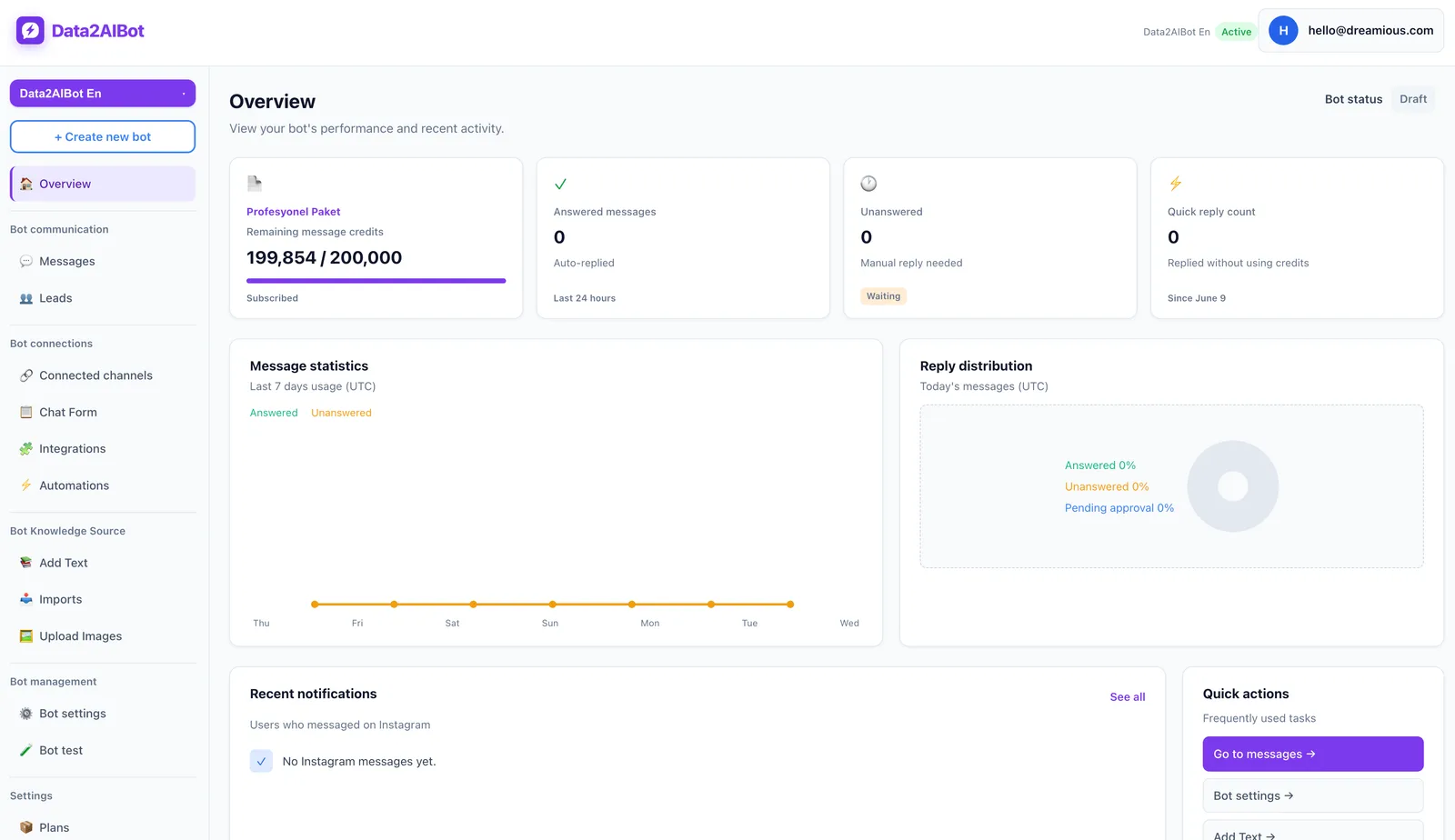
Data2AIBot is an official Meta Technology Provider. Instagram and WhatsApp can be connected in a few no-code steps, with setup possible in minutes. Check account access and necessary permissions first. Provider status does not override channel rules or guarantee message delivery.
3. Prepare the information behind the answers
Organize FAQs, product details, and business policies under clear headings. Choose file uploads, Google Docs, or Google Sheets imports according to where your team maintains the information.
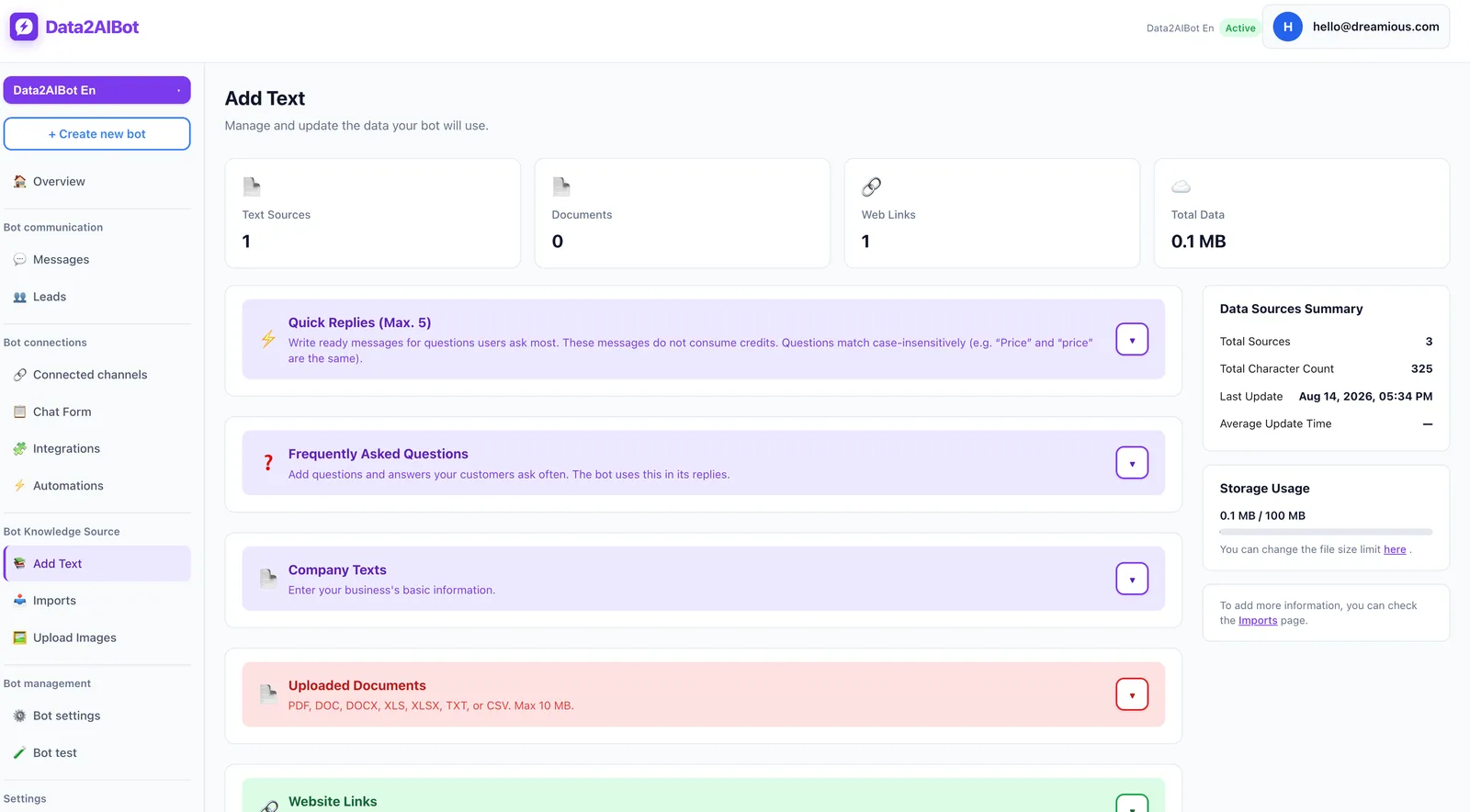
Where possible, keep one current source for each topic. An expired campaign document sitting alongside a newer policy can create ambiguity. Scope notes and validity dates also make your team's review process easier.
If you prepare a catalog in a spreadsheet, make the columns unambiguous. Separate product names, descriptions, and variants clearly before mapping them. Importing catalog information should not be treated as proof of a real-time inventory connection.
4. Define boundaries and an exception process
Write down which questions belong in the pilot. Establish a staff process for refund exceptions, individual discounts, and sensitive complaints. Your target behavior for unknown information should be visible uncertainty, not a confident invented answer.
For appointments, distinguish collecting a request from confirming availability. Receiving a customer's preferred time and contact details does not itself establish that the slot is booked. If you use Calendly automation, test the starting conditions and what counts as completion.
5. Test realistic wording before launch
Ask the same question in several forms, including short messages, typos, and follow-ups. “Open Saturday?”, “Can I visit this weekend?”, and “Does that time apply on Sunday too?” test different aspects of the conversation.
Review unsupported assumptions as carefully as correct answers. Fast technical setup does not eliminate the need for information preparation and quality checks. For the channel-specific starting point, see the Instagram AI chatbot page.
Three DM examples that reveal the difference
The following examples are evaluation scenarios, not guaranteed responses from a particular product. Use them to check how each approach handles your actual business information.
| Incoming DM | Saved-reply workflow | AI chatbot test objective |
|---|---|---|
| “How long do I have to return this?” | Employee selects the current policy template | Accurately explain the published policy without inventing exceptions |
| “Can this go outdoors, and how do I clean it?” | Employee combines relevant product details | Address both questions using available product information |
| “Is tomorrow at 3 definitely available?” | Employee checks availability | Avoid confusing a collected request with a confirmed booking |
Add a question with no supporting source, such as “Are you opening another location next month?” A convincing invented date is not a successful answer. Preserving the information boundary is more valuable than providing a polished but unsupported response.
These examples also show why saved replies need maintenance. A person can still send an outdated template. Human involvement helps with judgment, but it does not automatically make the underlying information current.
How to measure a small pilot
Record your starting point first. How much time does the team spend on routine questions? How long do customers wait for a meaningful answer? Which topics produce repeated follow-ups? Then run a limited pilot against comparable question types.
- Choose a scope: Use clear topics such as opening hours, basic product information, and published policies.
- Establish a baseline: Record manual workload across days with reasonably similar demand.
- Sample answers: Review accuracy, missing details, and unnecessary certainty.
- Count remaining human work: Include corrections and follow-up effort, not just automated messages.
- Expand selectively: Keep successful topics and revise the ones that cause confusion.
Message count alone is a weak success metric. A quick but incorrect answer can create more work through follow-up messages or complaints. The useful outcome is a customer reaching the right information with less effort.
This is where the Instagram saved replies vs AI chatbot decision becomes measurable. Saved replies reduce writing effort; a chatbot can take on part of the answering work within a suitable scope. Adoption makes sense when that benefit exceeds the preparation and oversight it requires.
Frequently asked questions
Do Instagram saved replies send automatically?
In their basic use, an employee selects and sends a saved reply. Welcome messages and rule-triggered responses are separate mechanisms. If a tool advertises “quick replies,” check whether it means manual templates, customer-facing buttons, or an automated workflow.
What is the simplest difference between saved replies and an AI chatbot?
A saved reply is prewritten text for a person to use. An AI chatbot interprets a question and generates an answer using supplied information. One reduces typing; the other can reduce manual handling for suitable questions. Both require accurate, current content.
Does a small business with few DMs need an AI chatbot?
Not necessarily. If your team responds promptly and conversations mostly require personal decisions, saved replies may be sufficient. However, even a modest number of important after-hours inquiries can justify a narrow pilot. Evaluate the type and timing of demand, not just volume.
Can an AI chatbot give incorrect answers?
Yes. Missing or conflicting sources, ambiguous questions, and an overly broad scope can increase the risk. Maintain current information, test varied wording, and define which topics require human review. Automation should not be treated as a guarantee of correctness.
Can Data2AIBot handle Instagram and WhatsApp together?
Yes. One bot can handle Instagram and WhatsApp together, and Data2AIBot also offers a website chatbot. Channel availability and permission to perform a particular action are different questions. Verify your connections and customer scenarios during the pilot.
Should we stop using saved replies after adding AI?
No. Saved replies can still help employees communicate consistently in special cases. A sensible division of work is routine information handled through automation, with uncertain, sensitive, or customer-specific decisions managed through a clearly defined human process.
Get started with Data2AIBot
You can sign up for Data2AIBot completely free — no credit card required — and connect Instagram and WhatsApp in minutes.