
No—you do not always need a Facebook Page to send automatic Instagram messages in 2026. Meta’s Instagram API with Instagram Login supports eligible professional accounts without a linked Facebook Page, while the Facebook Login route requires a linked Page. Your automation provider must support the connection route you want to use.
TL;DR
- Automatic Instagram messages Facebook Page requirements depend on the connection route, not simply on whether replies are automated.
- Meta’s Instagram Login route supports eligible professional accounts without a Facebook Page; Facebook Login requires a linked Page.
- Data2aibot is best for small businesses seeking no-code customer messaging across Instagram, WhatsApp, and websites.
- Check the provider’s actual connection screen before creating a Facebook Page or changing an existing account link.
Why this matters
Creating a Facebook Page is not the same task as enabling Instagram automation. If you follow instructions for the wrong connection method, you can spend time fixing a Page link your chosen integration does not need.
The useful question is: Which connection method does this tool support for my Instagram account? Ask that before changing account settings. A professional account, the correct permissions, and a supported messaging integration matter more than a generic instruction to connect Facebook.
For the practical reply-building steps after connection, see how to set up auto-reply on Instagram.
Do you need a Facebook Page to send automatic Instagram messages?
You need a Facebook Page when your automation uses Instagram API with Facebook Login. You do not need one solely to use Instagram API with Instagram Login. Both routes concern professional Instagram accounts, rather than ordinary personal accounts.
Meta’s Instagram Platform documentation distinguishes these connection methods. For your 2026 setup, match the instructions to the route named by the provider; an instruction written for Facebook Login does not establish a universal requirement for Instagram messaging.
| Connection route | Facebook Page required? | Best for | Main advantage | Main limitation |
|---|---|---|---|---|
| Instagram API with Instagram Login | No | Businesses choosing a supported Instagram-direct connection | Removes the Facebook Page dependency | Your provider must support this route and the permissions your workflow needs |
| Instagram API with Facebook Login | Yes, linked to the professional Instagram account | Businesses using an integration built around Facebook Login | Fits integrations that use the Page-linked route | Adds Page access and account-linking requirements |
This distinction does not mean every tool offers both methods. A provider can require a Page because of its own implementation, even though another supported route does not require one.
Treat the provider’s connection screen as the starting point. If it asks you to select a Facebook Page, confirm whether that is its required route before trying to bypass the step.
Instagram Login: no linked Facebook Page required
Instagram API with Instagram Login lets eligible professional Instagram accounts authorize supported integrations without first linking a Facebook Page. Best for businesses that want an Instagram-direct connection and have confirmed their provider supports it.
The benefit is a shorter chain of account dependencies. You do not have to create a Page just to satisfy the requirements of a different connection method.
The limitation is provider support. The existence of Instagram Login does not prove that a particular chatbot offers it, supports your desired trigger, or has permission to perform every action you want.
Before choosing this route, ask the provider:
- Does this connection use Instagram Login?
- Does it support my professional account type?
- Does it support the exact messaging trigger I need?
- What happens when authorization expires or access is removed?
Keep the questions specific. “Does it automate Instagram?” is too broad to establish whether it can handle your workflow without Facebook.
Facebook Login: a linked Facebook Page is required
Instagram API with Facebook Login uses a professional Instagram account linked to a Facebook Page. Best for businesses whose chosen integration explicitly uses the Page-linked route.
The advantage is compatibility with that integration’s connection process. If your business already uses the linked assets, this route can fit your existing administration.
The drawback is another access relationship to maintain. A connection problem can involve the Instagram account, its linked Page, or the permissions held by the person authorizing the integration.
If the provider cannot find your account, check the link and access rights before rebuilding anything. Seeing a Page in Facebook does not, by itself, establish that you have the access needed to authorize a business integration.
Do not disconnect a working Page link just because you learn that another route exists. First establish which connection your current automation uses and what reconnecting would involve.
Why Facebook Page requirements vary
Facebook Page requirements vary because Instagram automation is a category of workflows, not a single connection process. In 2026, use these factors to separate a genuine requirement from an irrelevant setup instruction:
- Connection method. Instagram Login and Facebook Login have different Page requirements.
- Provider implementation. A tool can support one connection route without offering the other.
- Account type. API-based messaging integrations require an eligible professional account; a personal account is not interchangeable.
- Requested permissions. Authorizing an account is not the same as granting every permission a messaging workflow needs.
- Intended action. Replying to an incoming DM and initiating a message from another supported trigger are different workflows with different conditions.
A connected account is only the foundation. You still need to confirm that the integration supports the action, that the necessary permissions are granted, and that the action follows Meta’s messaging policies.
A Facebook Page is a connection requirement for some routes—not permission to send unrestricted Instagram messages.
Check your setup before changing any accounts
Use these 5 setup checks to identify what you actually need. Complete them before creating a new Page, unlinking an account, or replacing a working integration.
- Confirm account type. Check whether your Instagram account is a professional account. If it is personal, review the implications of switching before authorizing a business messaging tool.
- Choose the workflow. Write down the action you want: answer an incoming question, acknowledge an after-hours DM, or respond to another supported trigger. Do not assume these actions share identical requirements.
- Identify login route. Ask the provider whether its connection uses Instagram Login or Facebook Login. For Facebook Login, confirm the linked Page requirement.
- Review access. Use an authorized business account to connect the integration. Read the permissions requested and check that the relevant business assets belong to the intended business.
- Test the reply. Send a realistic customer message through the supported workflow. Confirm the reply reaches the right conversation and that your team knows how to handle exceptions.
These checks separate account access from reply quality. A successful login proves neither that your automation contains accurate answers nor that it handles an unfamiliar request appropriately.
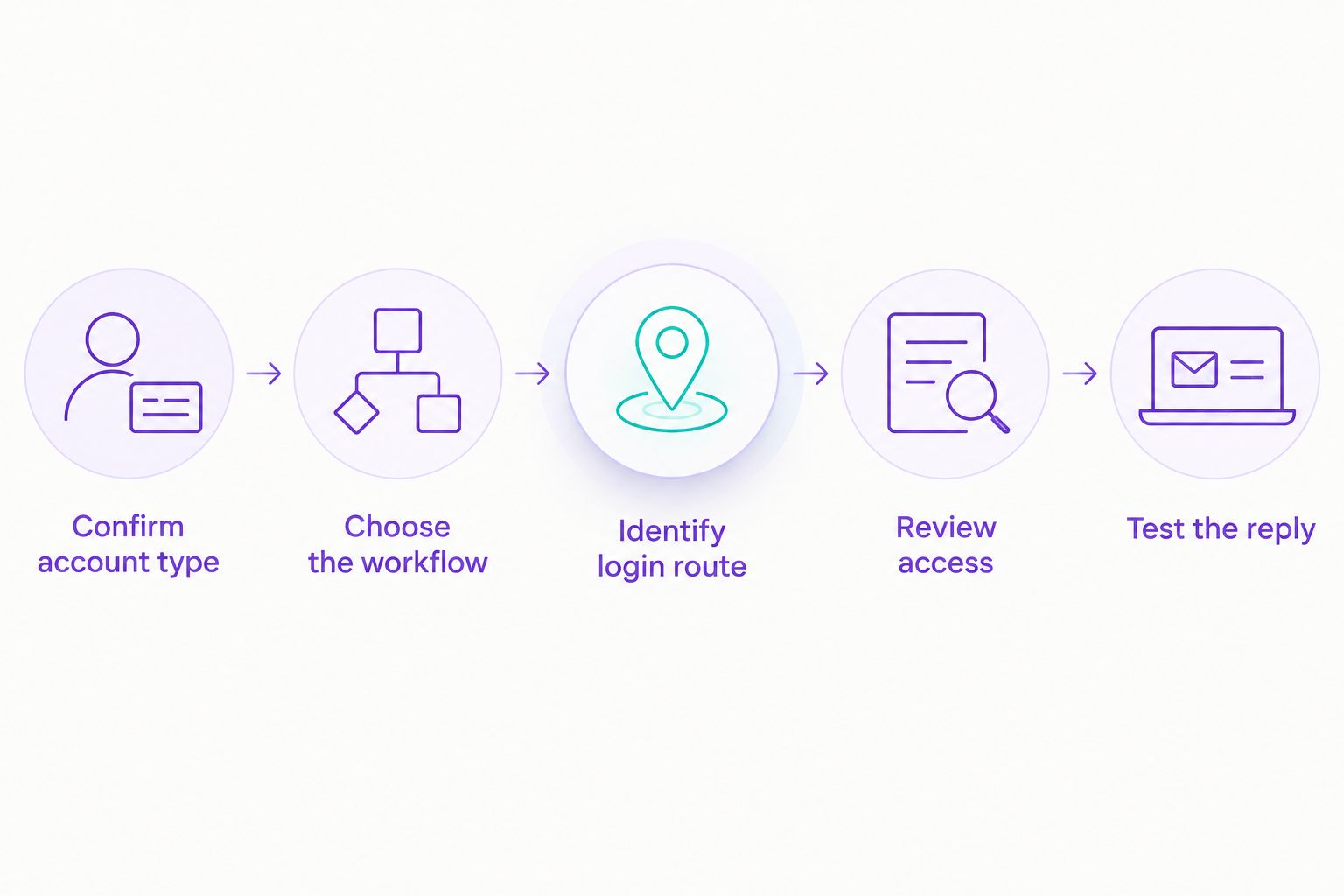
Identify the login route before changing your Facebook Page connection.
What automatic Instagram messages can and cannot do
Automatic replies can reduce repetitive typing when the workflow and information are defined. For example, you can plan an answer to a common product question or an acknowledgment that tells customers when a person will respond.
Do not confuse that with unrestricted outreach. Instagram messaging integrations operate under Meta’s permissions and messaging policies; connecting an account does not authorize unsolicited bulk DMs or remove rules about when you can respond.
Your 2026 workflow should specify:
- What event starts the reply.
- Which information the reply can use.
- Which requests need a person.
- What happens when the answer is unknown.
- Who checks that the automation still works after account changes.
For an appointment-based business, acknowledge a booking question without claiming an appointment is confirmed unless the connected workflow actually confirms it. For an e-commerce seller, do not promise an order update unless the system has access to the relevant order information.
Automate the answer you can support, not the answer you wish the system knew. That keeps a fast reply from becoming a misleading one.
Where does Data2aibot fit?
Data2aibot is best for small businesses seeking no-code customer messaging across Instagram, WhatsApp, and websites. The platform is relevant when you want to reduce repetitive support work across those channels without writing code.
Data2aibot’s no-code approach addresses setup and messaging work; it does not remove Meta’s account, permission, or messaging requirements. Confirm the supported Instagram connection route and your intended workflow before changing any Facebook Page relationship.
Data2aibot is an official Meta Technology Provider. That status is not Meta endorsement and does not mean every requested messaging action is permitted. Review what customer information your workflow uses and restrict access to the people who need it.
Can I automate Instagram DMs with a personal account?
A personal Instagram account is not sufficient for the professional-account messaging API routes discussed here. You need an eligible professional account and a provider that supports your intended workflow.
Review the account change before proceeding. Do not treat a switch to a professional account as proof that automation is already connected or ready to send replies.
Can I delete my Facebook Page after connecting Instagram automation?
Do not delete or unlink a Facebook Page while your automation depends on Facebook Login. Removing a required account relationship can interrupt the integration.
If you want to stop using the Page-linked route, first confirm that your provider offers an alternative. Follow its reconnection process and test the replacement before retiring the existing setup.
Does connecting a Facebook Page let me message every follower?
No—connecting a Facebook Page does not grant unrestricted permission to message followers. Your integration must follow Meta’s messaging policies and support the trigger you plan to use.
Build your workflow around permitted customer interactions. Avoid treating a follower list as an unrestricted messaging audience.
FAQ
Do I need a Facebook Page for automatic Instagram messages in 2026?
Not always: Instagram API with Instagram Login does not require a linked Facebook Page, while Instagram API with Facebook Login does. Your automation provider must support the route you choose.
Why does my Instagram chatbot still ask for a Facebook Page?
Your chatbot can require a Facebook Page because it uses the Facebook Login connection route. Ask the provider which route its integration supports before changing account links.
Can I use an Instagram creator account for messaging automation?
Creator accounts are professional Instagram accounts, but you still need to check the provider’s supported account types and workflow requirements. Do not assume that every integration supports every professional account configuration.
Is an Instagram saved reply the same as an automatic DM?
No—a saved reply is prepared text you select, while an automatic DM is sent through a configured trigger or workflow. Creating saved text alone does not make replies send automatically.
Will linking a Facebook Page automatically turn on Instagram replies?
No—linking a Facebook Page does not, by itself, configure automatic Instagram replies. You must also set up a supported reply feature or messaging integration and test its behavior.
Does an Instagram chatbot need my password?
Use the platform’s official authorization process rather than sending your password to a provider or support agent. Review the requested permissions and authorize only the business account you intend to connect.
Can I use the same setup instructions in every country?
Do not assume identical account eligibility or feature access across regions. Check the current requirements shown for your account, your provider, and your intended messaging workflow before launch.
One last thing
A reply can arrive instantly and still create more work if it gives the wrong answer. Before your 2026 launch, send 3 test messages: a common question, an unclear question, and a request that needs a person. Check accuracy and the next action—not just whether a message appears.
Start with 1 channel and a narrowly defined workflow. Expand after you can explain what triggers the reply, where its answer comes from, and who takes over when automation is not enough.
Related guides
- Instagram auto-reply message examples for small businesses
- Automatically reply to Instagram DMs after business hours
- Instagram DM automation for e-commerce sellers
Check whether Data2aibot fits your first Instagram reply workflow.
Get started with Data2AIBot
You can sign up for Data2AIBot completely free — no credit card required — and connect Instagram and WhatsApp in minutes.