

Your salon’s real decision is not whether to answer Instagram messages automatically. It is which questions can be resolved immediately and which appointments still need a person to confirm availability. A useful setup answers the customer’s question without turning an unchecked time request into a booking promise.
In short
- Prepare one current source for services, prices, durations, and salon policies.
- Answer the initial question before asking for booking details.
- Keep appointment requests separate from confirmed appointments.
- Connect Instagram, then add WhatsApp if your customers use both channels.
- Test unclear pricing, unavailable times, and appointment changes before launch.
How should a beauty salon Instagram auto reply work?
Start with three actions: answer the question, clarify the service, collect the booking request. Someone asking about manicure prices should receive relevant pricing information before being asked for a phone number. Someone requesting two simultaneous appointments needs a different conversation.
Avoid treating every incoming DM as a lead form. A customer asking for your address does not need to provide their full name and preferred treatment first. The next question should resolve the next uncertainty, not collect every detail at once.
| Approach | Best suited to | What the salon must check |
|---|---|---|
| Greeting message | Acknowledging an incoming DM | It does not resolve a price or booking question by itself |
| Saved replies | A small set of repetitive questions | Staff must select and maintain the right answer |
| Knowledge-based AI chatbot | Varied service and pricing questions | Source quality and responses to unknown information |
| Chatbot plus staff confirmation | Appointments dependent on staff, duration, or capacity | Customers must understand when a request becomes confirmed |
These are workflow options, not a guaranteed feature checklist. For a small salon, covering three popular services well is a more manageable starting point than automating the entire menu immediately.
1. Prepare one reliable service and pricing source
Automation needs consistent information. If an Instagram highlight advertises one price while the reception team uses another, connecting a chatbot will not resolve the underlying conflict.
Create a record for each service containing:
- Service name: Include common customer terms and abbreviations.
- Scope: Explain what is included and excluded.
- Pricing basis: State whether the price is fixed, starts from an amount, or requires consultation.
- Duration: Use only estimates approved by the salon.
- Prerequisites: Note any consultation or staff assessment requirements.
- Booking conditions: Include relevant staff preferences, add-ons, or group restrictions.
- Ownership: Record the update date and the person responsible for accuracy.
Do not present variable pricing as a fixed quote. If the total depends on removal, length, or an additional service, explain that dependency. A starting price is useful only when the customer understands what the base service includes.
A practical pricing response template
“[Service] costs [approved pricing information]. That includes [scope]. [Additional service] is assessed separately. Which day are you considering?”
Replace every bracketed field with your salon’s real information before using the template. These placeholders are not suggested market prices.
Add opening hours, location, cancellation terms, and any actual deposit policy to the same information pack. Give promotions an expiry date. Assign someone to remove outdated offers and verify revised answers rather than assuming an old campaign will stop appearing on its own.
2. Set up Data2AIBot in five steps
This sequence combines available product capabilities with recommended salon procedures. Your team still needs to define responsibilities, validate responses, and decide what counts as a confirmed appointment.
Step 1: Connect Instagram
Start by connecting your Instagram account. Data2AIBot supports no-code Instagram and WhatsApp connections in a few steps, with launch possible in minutes. Finishing the connection is not the same as testing your salon’s information.
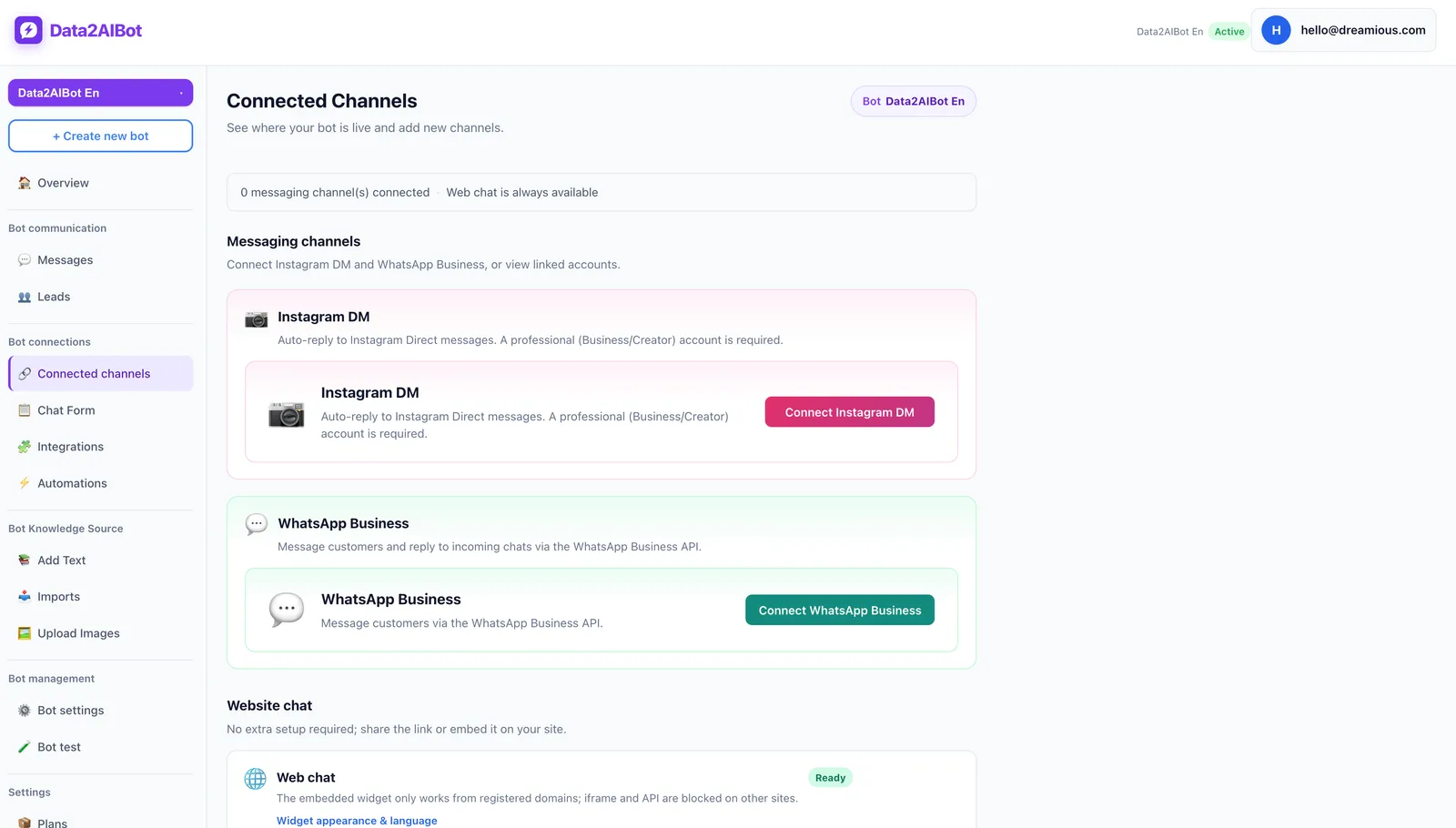
For channel connection and trust, Data2AIBot is Meta’s official Technology Provider. The Instagram AI chatbot page explains the channel’s use cases.
If customers also contact you on WhatsApp, one bot can handle both channels through a unified inbox. Consider that option when maintaining consistent service information across channels matters. You do not need to redirect every Instagram customer to WhatsApp just to answer a basic question.
Step 2: Add your knowledge sources
You can upload files to train Data2AIBot and import Google Docs and Google Sheets. Organize your service menu, price explanations, and salon policies under clear headings.
Avoid keeping contradictory versions of the same price in different documents. After changing a source, verify that the updated information is being used. Do not assume every source edit appears instantly without checking the import and update process.
Test the formal service name, a common nickname, and a misspelled question. The goal is not simply to add a document; it is to get a useful answer to the way customers actually write.
Step 3: Define the booking request
Data2AIBot can collect appointment and reservation requests in chat. Begin with the service, preferred date, time range, and staff preference if relevant. Ask for contact details only when they are needed for follow-up.
Review the Appointment and reservation chatbot alongside your existing scheduling process. Data2AIBot includes Calendly automations, but that does not establish compatibility with every salon management system or automatic validation of every staff member’s capacity.
If availability is not verified through your confirmed workflow, end with “We have your request,” not “Your appointment is booked.” Decide who checks the request and how the customer receives the final answer.
Step 4: Assign responsibility for incoming requests
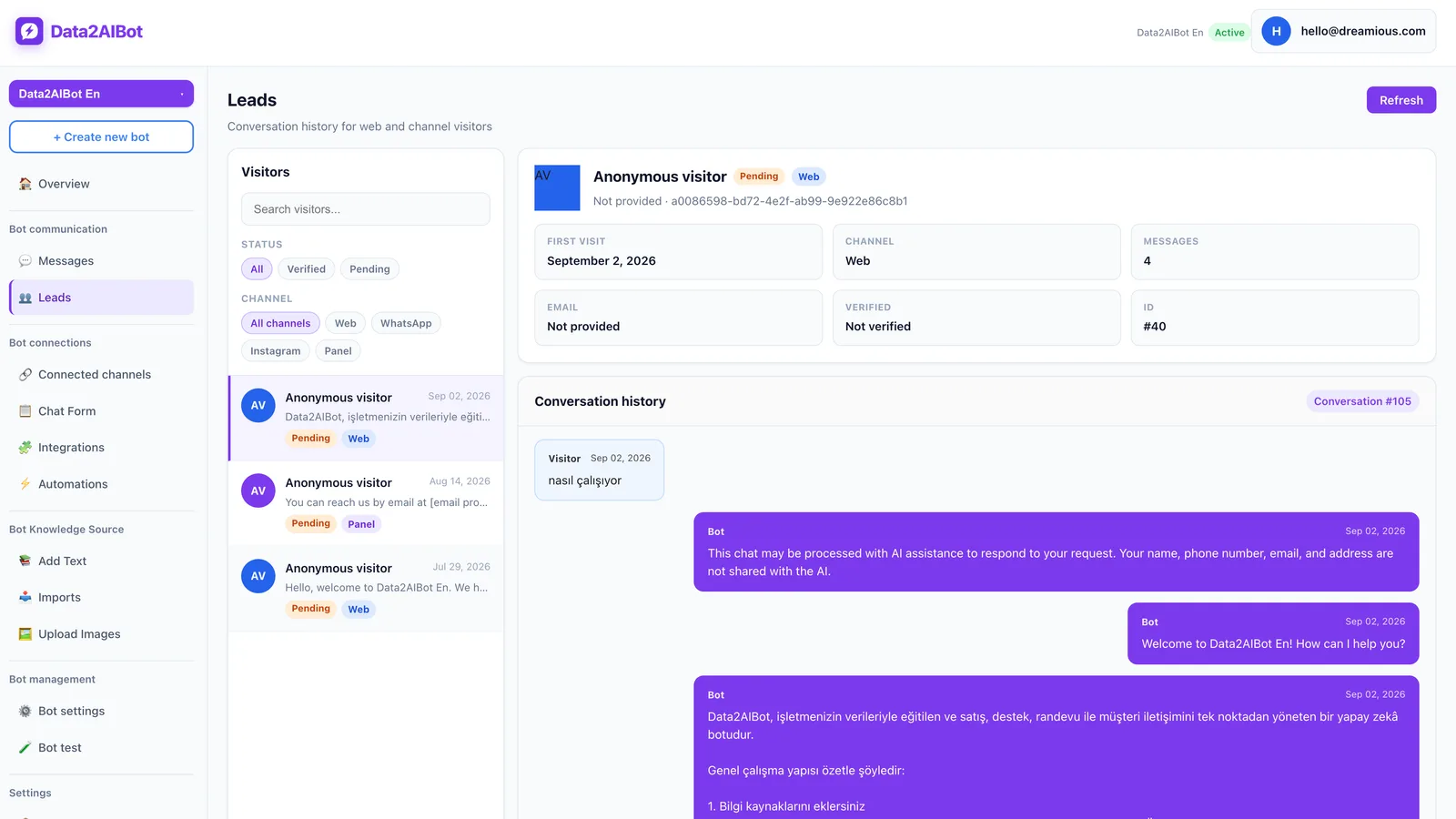
Use the visitors and leads list to review incoming interest and determine who will follow up. A unified inbox does not replace an operational owner. Specify who checks requests at opening, during shift changes, and before closing.
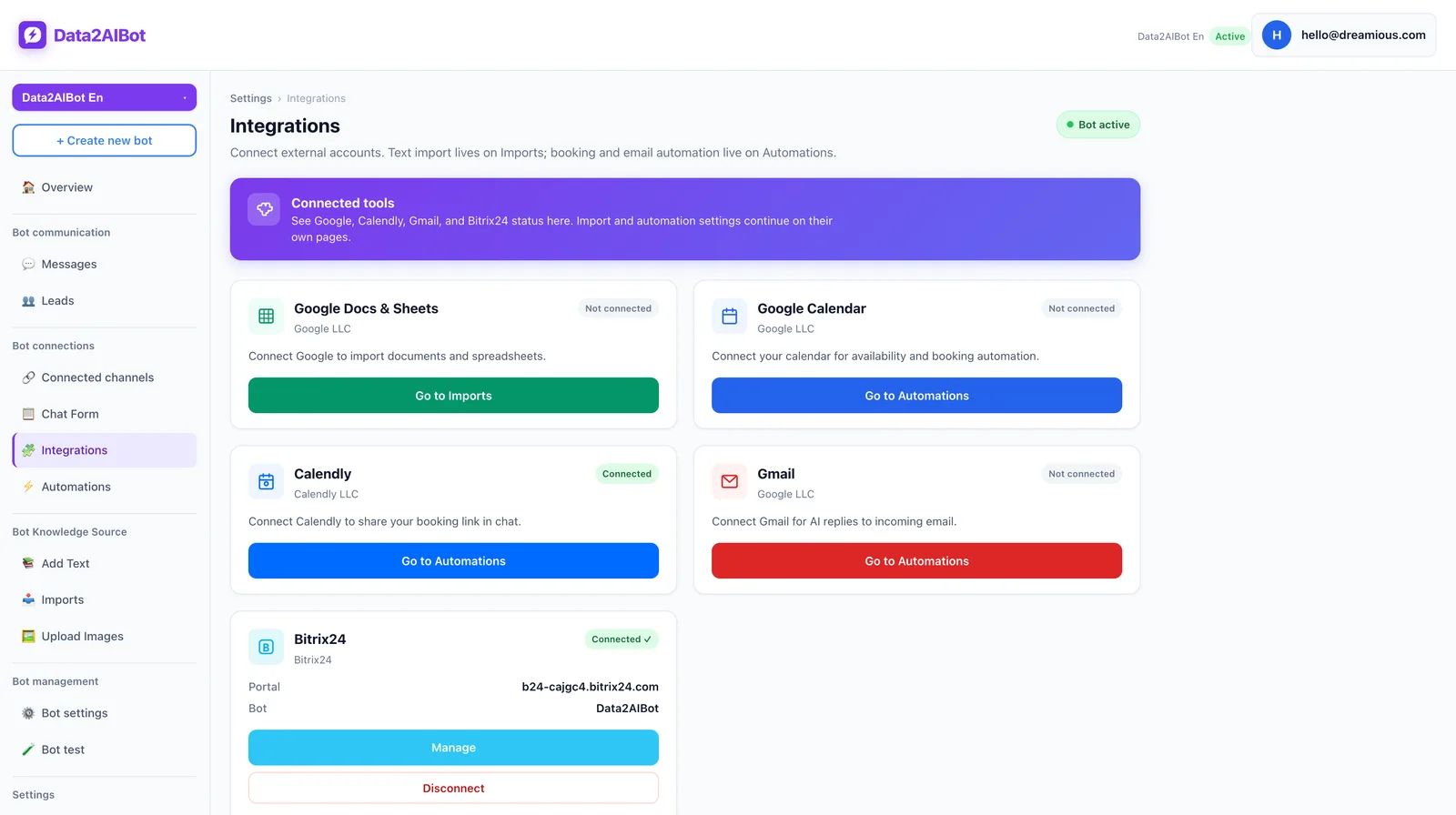
For salons using Bitrix24, Data2AIBot can create or update leads and contacts from Instagram, WhatsApp, and website chats, and write conversation history to the CRM timeline. Installation is available through the Bitrix24 Market without custom code. You do not need to introduce a CRM just to run an initial salon pilot.
Step 5: Launch a limited pilot
Cover your three most frequently discussed services, opening hours, and straightforward appointment requests first. Keep complex packages, group bookings, and assessment-dependent services outside the initial scope.
You can Start Data2AIBot for free with a 14-day trial. No credit card is required to start, and you can cancel anytime. Use the trial to evaluate actual customer questions and the staff follow-up process, rather than testing only easy greetings.
3. Four example Instagram conversations
These examples illustrate recommended communication, not prebuilt workflows or guaranteed calendar actions. Adapt the wording to your actual services and policies.
A customer asks what a service includes
Customer: Do you offer gel polish, and is removal included?
Example reply: We offer gel polish. Whether removal is included depends on the existing application. Do you currently have gel polish on your nails?
Next action: Provide the approved inclusion policy, then ask about the preferred date. Do not claim that everything is included unless your service information says so. If removal always follows a fixed policy, explain it directly rather than asking an unnecessary question.
A customer asks only about price
Customer: How much is a facial?
Example reply: Which facial are you considering? Our classic facial and other treatments have different inclusions and prices. I can briefly explain the options if that helps.
Next action: Once the service is clear, share the current price and scope. If a fixed price is available, do not withhold it behind a request for a phone number. Helping the customer make a decision comes before collecting contact details.
A customer requests a specific time
Customer: Can you book me for a manicure tomorrow at 6?
Example reply: I can collect your manicure request for tomorrow at 6 p.m. It is not confirmed until the salon checks availability. Do you have a preferred team member?
Next action: Clarify the calendar date and any ambiguous time. If the requested slot is unavailable, staff should offer verified alternatives. Presenting two unchecked times as available creates the same problem as confirming the first one.
A customer wants to reschedule
Customer: Can I move today’s appointment to Saturday?
Example reply: Let’s clarify your change request. Which service and appointment time do you currently have? The change is not confirmed until Saturday’s availability is checked.
Next action: Staff should verify the existing booking before changing it. Do not assume the original appointment has been cancelled because a new request was collected. Send one clear final message explaining which appointment remains active.
4. Set confirmation and privacy boundaries
The central rule is simple: collecting a request is not the same as placing a confirmed appointment on the calendar. If staff approval is required, explain it when discussing availability, not as a small disclaimer after the conversation.
A final confirmation should include the service, date, time, and salon location. Add the team member or deposit requirement if these affect the booking. Do not copy a deposit condition from a template if your salon does not use deposits.
For uncertain questions, define three acceptable responses: ask a clarifying question, share verified general information, or seek staff review. Do not guess at missing prices, expired promotions, or availability. Avoid promising an immediate human response outside your actual staffed hours.
Questions involving skin conditions, allergies, pregnancy, or medication need particular care. Do not use a DM conversation to make a personalized medical assessment or guarantee treatment suitability. Refer customers to an appropriate professional when needed.
Collect only information necessary for the appointment process. Avoid requesting identity documents, payment card details, or unnecessary health information. Explain why contact information is needed and review applicable privacy requirements, including access and retention practices. Using a chatbot does not, by itself, establish legal compliance.
5. Test seven scenarios before going live
Use the short, incomplete messages customers actually send. Write the expected outcome first so you can evaluate each response consistently.
- “Price?” Ask which service the customer means rather than inventing a quote.
- “How much for a manicure?” Share the approved price and scope without an unnecessary form.
- “Can I come late tonight?” Do not confirm a request outside documented opening hours.
- “There are two of us.” Check the requirement for simultaneous appointments before promising capacity.
- “Is that old offer still running?” Do not present an expired promotion as current.
- “Cancel my booking.” Verify the existing appointment and follow the salon’s cancellation process.
- “My skin is irritated. Which treatment should I get?” Avoid diagnosis, suitability guarantees, or unsupported health advice.
When a test fails, identify the cause. Is the source incomplete, the question ambiguous, or staff ownership unclear? Rewriting the greeting will not fix a missing cancellation policy. Correct the underlying issue, then rerun the same scenario.
6. Measure useful outcomes, not message volume
A simple tracking sheet is enough for the first week. These are suggested operating metrics, not claims that Data2AIBot includes specific built-in reports.
- Answer accuracy: How many reviewed conversations contain correct service and price information?
- Complete request rate: How many booking requests include the necessary service and timing details?
- Confirmation rate: How many collected requests become actual appointments?
- Correction workload: How often must staff repair a misleading expectation?
- Repeated questions: How often does a customer ask for the same information again?
If requests lack dates, ask the date question earlier instead of lengthening the welcome message. If answers are accurate but confirmations are slow, the bottleneck may be the team’s review schedule. Compare results using consistent definitions, and do not assume a conversion increase or a specific time saving before measuring it.
Frequently asked questions
What should a beauty salon Instagram auto reply say?
Briefly identify the salon, explain what customers can ask, and offer one next step. For example: “Hi! We can help with services, prices, and appointment requests. Which service are you interested in?” Avoid sending the entire menu to every customer.
Can an Instagram auto reply confirm salon appointments?
Only if real availability and booking conditions are verified through your workflow. Collecting a date and time in chat is not enough. Confirm how your calendar connection and capacity rules work before promising automatic booking confirmation.
How do I add my salon’s price list to the chatbot?
With Data2AIBot, you can upload files or import Google Docs and Google Sheets. Include pricing scope, exceptions, and validity dates alongside the amounts. After an update, test several real pricing questions to check that answers remain accurate.
Can I manage Instagram and WhatsApp together?
Yes. Data2AIBot supports one bot handling Instagram and WhatsApp together. A shared information source can help keep answers consistent, but your team still needs a clear process for reviewing appointment requests arriving through different channels.
Should I request a phone number before sharing prices?
Usually, answer the pricing question first when approved information is available. Ask for a phone number when there is a clear follow-up need, and explain why. Do not make a basic service question dependent on unnecessary personal data collection.
What if the chatbot shares the wrong salon price?
Check for outdated files, conflicting offers, and ambiguous service names. Correct the source, give the affected customer accurate information, and repeat the test. The lasting fix is a current knowledge source, explicit service scope, and regular review—not more confident wording.
Get started with Data2AIBot
You can sign up for Data2AIBot completely free — no credit card required — and connect Instagram and WhatsApp in minutes.