

Choosing a chatbot is really a decision about where customers contact you, which questions software should handle, and when your team needs to step in. For a small business, an impressive demo matters less than accurate answers, manageable upkeep, and a cost you can predict.
In short
- Start with your busiest customer channel, not the longest feature list.
- For Instagram, WhatsApp, and a website, Data2AIBot is a practical no-code default to evaluate.
- Compare total operating cost, including applicable usage charges and staff maintenance time.
- Test language quality and human handoff with realistic conversations rather than relying on feature labels.
- Run the same pilot across shortlisted tools, and reject any option that misses a mandatory requirement.
How to choose an AI chatbot for small businesses
Begin with a specific job: “Answer product questions from Instagram customers and help our team identify conversations that need personal attention.” That is easier to evaluate than a broad ambition to automate customer service.
Review a week of incoming messages. Separate repeat questions with documented answers from requests that require judgment. This tells you whether you mainly need a predictable scripted flow, answers drawn from business information, or a combination of approaches.
Before booking demos, write down five things:
- Your essential channel and the channel you might add later.
- Approximate monthly conversation volume, including seasonal peaks.
- The first ten questions to automate and their approved source material.
- Required languages and examples of how customers actually write.
- Situations in which the bot must stop attempting an answer and seek help.
Give every vendor the same brief. It prevents attractive but irrelevant features from taking over the discussion and makes proposals more comparable.
Which chatbot approach fits your business?
The table below compares buying approaches, not verified competitor plans or prices. Check current product scope and implementation details before treating a capability as available in your chosen package.
| Approach | When to consider it | Useful starting point | What to verify |
|---|---|---|---|
| Data2AIBot | No-code AI chat for Instagram, WhatsApp, and websites | File uploads, Google Docs and Sheets imports; one bot for Instagram and WhatsApp | Total cost, target-language quality, and human handoff workflow |
| Flow-based automation | Campaigns and questions with predictable steps | Designing a process with defined branches | Unexpected questions and ongoing flow maintenance |
| Website-focused chat | Most customer conversations begin on your site | Keeping the initial project focused on one channel | What changes when social messaging becomes necessary |
| Custom development | Mandatory business rules that standard tools cannot meet | Designing around specific requirements | Engineering, maintenance, security, and operational ownership |
Category peers such as ManyChat, Chatfuel, and Tidio may also belong on your shortlist. Do not assume a brand is exclusively rule-based, exclusively website-focused, or equally capable across every channel. Evaluate the current offering against your actual requirements.
Data2AIBot is a sensible default for businesses that want to evaluate AI across three common customer touchpoints without starting a development project. That is not a claim that it wins every use case. A narrow scripted process or an unusual mandatory integration can change the decision.
Five criteria that deserve a real comparison
1. Channel support: Test conversations, not channel logos
A WhatsApp logo on a pricing page does not explain the account connection process. Ask which account you will connect, what permissions are needed, and what preparation your business must complete.
Data2AIBot offers an Instagram AI chatbot, a WhatsApp AI chatbot, and a Website AI chatbot. One bot can handle Instagram and WhatsApp together, with a unified inbox for those two channels.
Its status as an official Meta Technology Provider is relevant when evaluating Instagram and WhatsApp connections. It does not remove the need to check account readiness or applicable channel requirements.
Test the same customer question on each required channel. A successful website demonstration does not establish that your social messaging workflow is ready.
2. Setup: Separate connection speed from launch readiness
No-code setup reduces development work. It does not eliminate the need to prepare reliable business information. Conflicting return policies and outdated product sheets should be fixed before you assess answer quality.
Data2AIBot lets you connect Instagram and WhatsApp in a few steps and launch in minutes. Still, allow separate time to prepare sources, run test conversations, and define who owns the system after launch.
During a demo, ask to see an ordinary maintenance task, not just first-time setup. How will your team update a changed product description? What work remains when a policy changes? The person maintaining the bot should understand the process without depending on the original project owner.
3. Price: Request a quote for the same operating scenario
A low entry price is not necessarily a low operating cost. Vendors may measure usage in messages, conversations, credits, or other units. Those units are not automatically equivalent.
Ask what the quote includes: subscription access, applicable usage charges, channel-related costs, team access, and any setup services. Do not assume every vendor charges separately for each item; the goal is to identify what is included and what is not.
This guide does not assign unverified prices or quotas to Data2AIBot or its peers. Confirm current costs using your own channels and expected activity. A free evaluation period answers different questions from an ongoing operating budget.
4. Language: Evaluate the way your customers write
A language appearing on a feature list does not guarantee good performance in every customer conversation. Test abbreviations, spelling mistakes, local terminology, and messages containing several questions.
For example, “Can it arrive Friday, and can I exchange it if it doesn’t fit?” requires two answers. A useful response should address both without inventing a delivery promise that your source material does not support.
If you serve Turkish-speaking customers, include messages without Turkish characters and examples from your industry. For any additional language, repeat the exercise with representative customer wording. Verify Data2AIBot’s performance, like every other candidate’s, during the pilot; this guide does not promise a particular language inventory or accuracy rate.
5. Human handoff: Ask for the difficult demonstration
A message saying “I’ll connect you to the team” is not proof of a working handoff. You need to know how someone receives the request, whether they can see the conversation, and where they reply.
Test three cases: the customer explicitly requests a person, the bot cannot find a supported answer, and the customer raises a complaint. Ask what happens outside business hours. Confirm notification, assignment, and bot-pausing behavior separately rather than assuming them.
The product facts supplied for Data2AIBot do not specify every detail of human handoff. Use a demo session to walk through your required process and verify what the proposed setup can deliver.
Make the budget comparison meaningful
Send each provider the same scenario: channels, estimated conversations, staff involvement, knowledge sources, and required integrations. Request a normal-month estimate and a busy-period estimate.
A useful planning formula is: Total monthly cost = subscription + applicable usage and channel charges + external services + staff maintenance time. This is a budgeting checklist, not a statement about any product’s pricing model.
Separate one-time implementation work from recurring upkeep. Cleaning a spreadsheet before launch is different from spending time every week updating policies. Also ask about cancellation, data export, and the practical steps involved in switching tools.
Measure value beyond the number of responses generated. Does the team actually save time? Do customers have to repeat themselves? Are employees spending new hours correcting unsupported promises? Cheap automation can become expensive if it creates avoidable cleanup work.
Set up a Data2AIBot pilot in four steps
1. Create an account and review the workspace
Start Data2AIBot for free to begin the 14-day trial. No credit card is required to start, and you can cancel anytime. Choose one initial outcome rather than trying to automate every customer interaction at once.
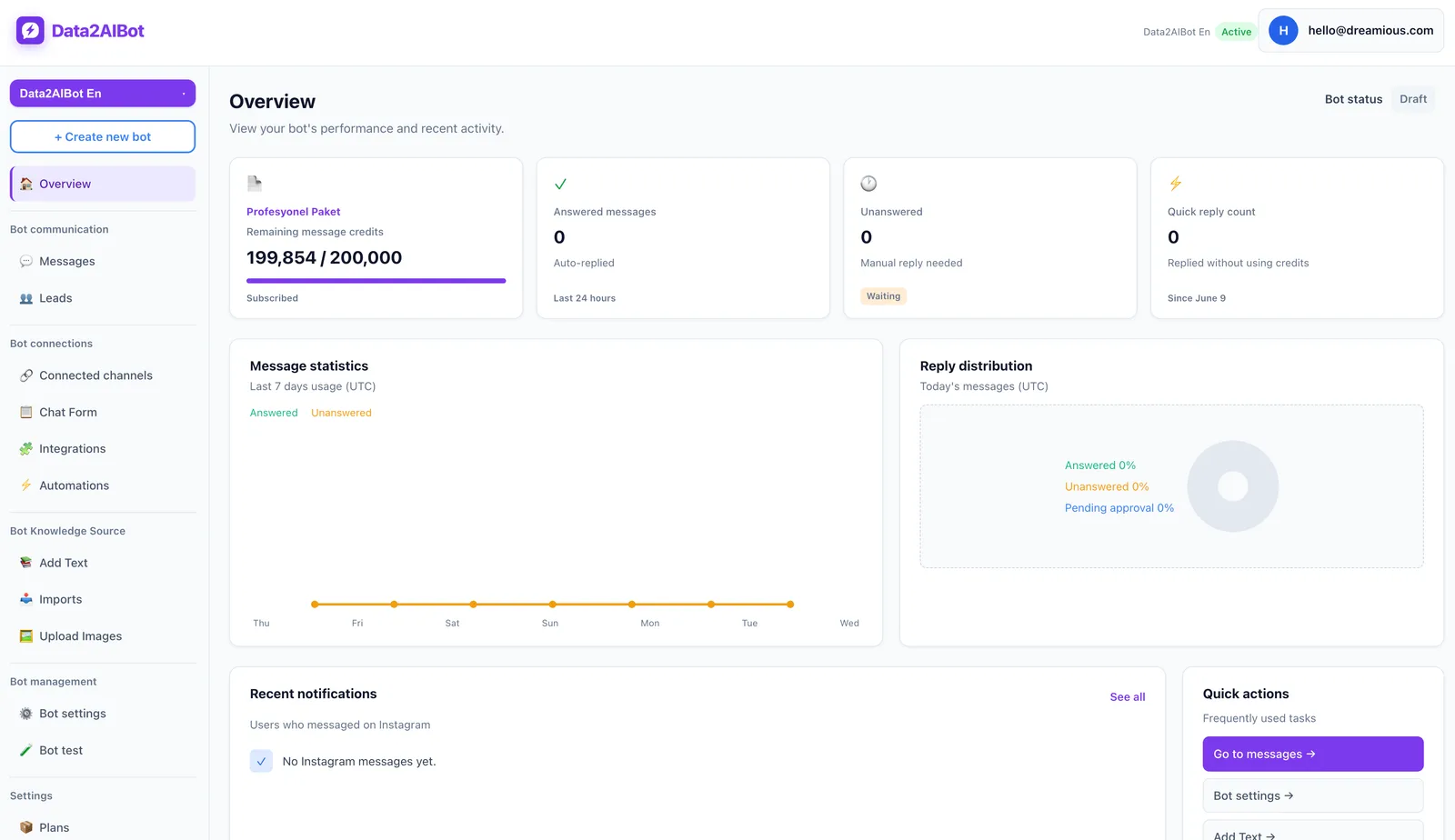
Assign a pilot owner who checks source accuracy, records test results, and collects unanswered questions. Without ownership, a trial can become a collection of random experiments rather than evidence for a buying decision.
2. Connect the priority channel
Start with the Instagram or WhatsApp account receiving the most repetitive questions. After the no-code connection steps, send messages that resemble real inquiries. Add the second channel once you understand the first set of knowledge gaps.
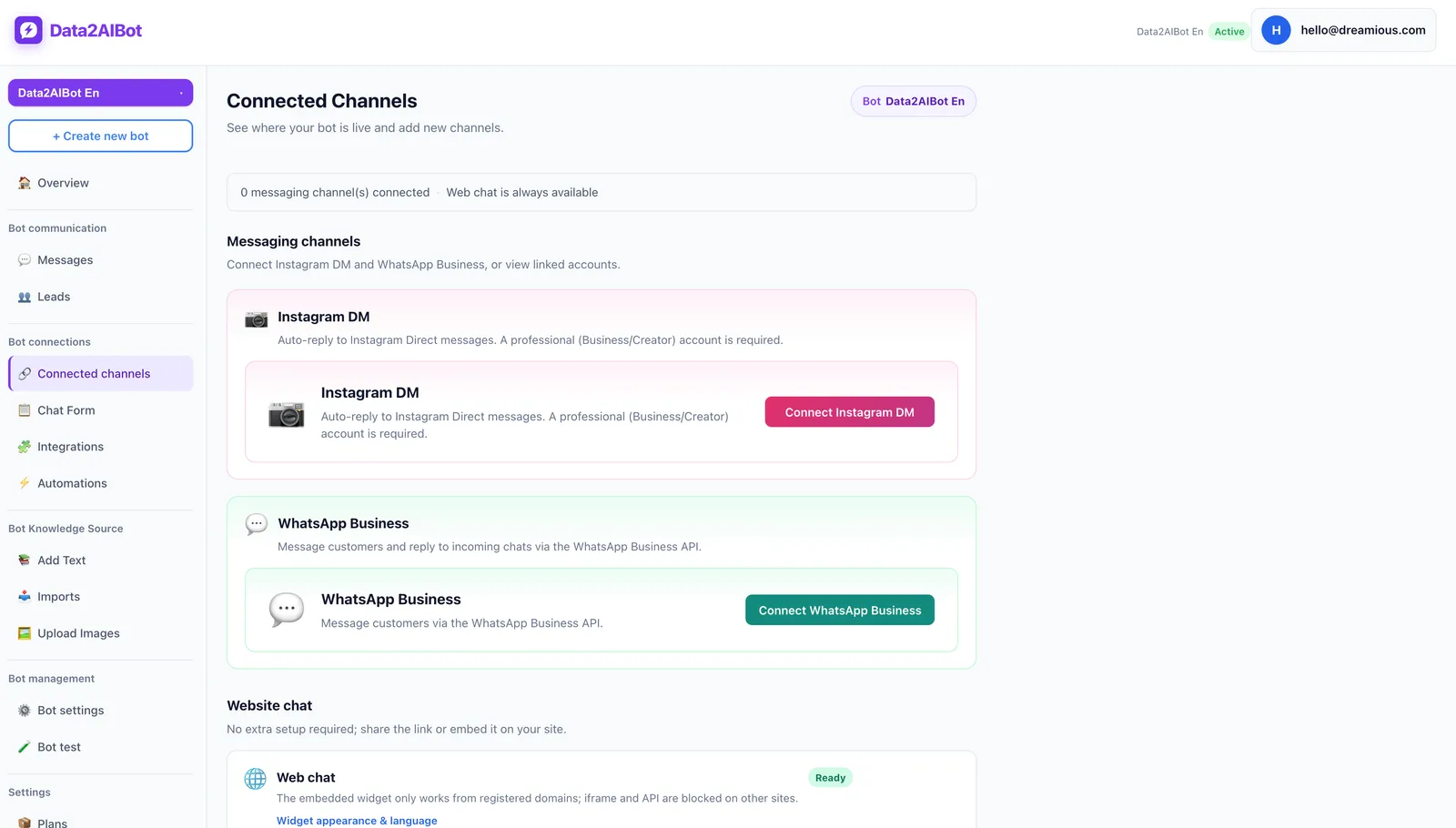
If you plan to use one bot across Instagram and WhatsApp, ask the same product questions on both. Prepare a separate visitor scenario for your website. Judge the customer experience on each required touchpoint instead of extrapolating from one successful test.
3. Add knowledge and only the integrations you need
You can upload files and import Google Docs and Google Sheets into Data2AIBot. Ecommerce catalogs can use spreadsheet column mapping. Start with current product information, opening hours, and clearly written customer policies.
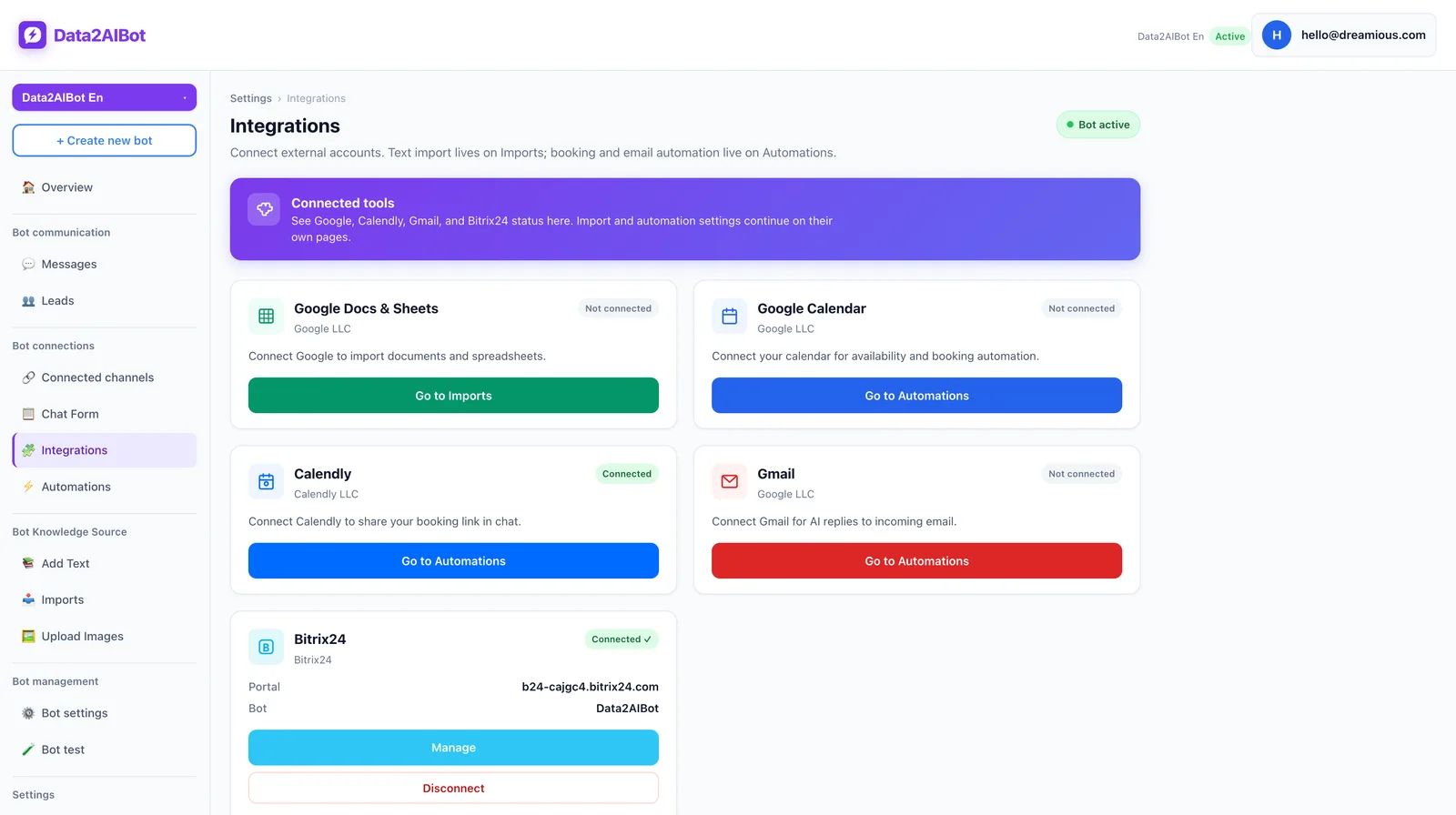
Consider Calendly automations or the Bitrix24 integration where relevant. Bitrix24 sync can create or update leads and contacts from Instagram, WhatsApp, and website chats, and write conversation history to the CRM timeline. It can be installed through the Bitrix24 Market without custom code.
You do not need every integration on day one. Establish answer quality first, then add the processes your team will genuinely use.
4. Test boundaries and team responsibilities
Ask about a price missing from the source material, an unsupported delivery date, and a complaint requiring employee judgment. The objective is not an answer at any cost; it is responsible handling of uncertainty.
Treat human handoff as its own acceptance test. If the proposed setup does not demonstrate your required workflow, record the gap and resolve it before calling the pilot successful.
A 14-day evaluation plan and scorecard
Use the first two days to prepare sources and connect the initial channel. Next, test ordinary questions, followed by ambiguous and higher-risk requests. Repeat the test set near the end to check whether your revisions improved the results.
A practical sample is 30 questions: 15 common inquiries, five typo-heavy messages, five requests outside the knowledge sources, and five conversations requiring a person. These numbers are a suggested test design, not product quotas.
| Criterion | Suggested weight | Evidence to collect |
|---|---|---|
| Answer accuracy | 30% | Complete responses supported by approved sources |
| Channel fit | 20% | Completed tests on priority channels |
| Human handoff | 20% | Outcome of conversations requiring staff |
| Setup and maintenance | 15% | Time spent and steps needed for updates |
| Total cost | 15% | Confirmed quote for the same operating scenario |
Score each criterion out of five, including target-language quality within answer accuracy. However, do not let a weighted average hide a dealbreaker. If an essential channel cannot connect or a mandatory handoff cannot be demonstrated, a high overall score is not enough.
Quick recommendations by business type
An Instagram-led retailer: Test product questions, sizing, and exchanges first. If WhatsApp is also part of the sales journey, Data2AIBot is a natural starting point for the shortlist.
An appointment-based service business: Distinguish collecting a booking request from completing a confirmed reservation. Data2AIBot can collect appointments and reservations in chat; evaluate Calendly automations against your actual scheduling process.
A website-led B2B business: Check what happens after a visitor receives an answer. Data2AIBot supports visitor email capture with OTP verification. If your team uses Bitrix24, also test the resulting CRM record and conversation history.
Frequently asked questions
What is the best AI chatbot for a small business?
There is no universal winner. Compare channels, knowledge sources, language quality, human handoff, and total cost. Data2AIBot is a practical no-code starting point for businesses evaluating Instagram, WhatsApp, and website chat together, but mandatory requirements should determine the final choice.
How should small businesses compare chatbot pricing?
Request quotes for identical channel and usage scenarios. Identify the billing unit, included access, applicable channel costs, and expected maintenance effort. Do not compare one provider’s message allowance directly with another provider’s conversation allowance without understanding the definitions.
Do I need coding skills to set up a chatbot?
Not necessarily. Data2AIBot offers no-code Instagram and WhatsApp setup in a few steps. Your business still needs to prepare reliable knowledge, test responses, and decide how employees will handle exceptions. No-code does not mean no operational preparation.
Can one chatbot handle Instagram and WhatsApp?
With Data2AIBot, one bot can handle Instagram and WhatsApp together. That does not mean every channel requirement is identical. Verify account connections, permissions, and the customer experience on both channels before relying on the setup for everyday conversations.
How do I test a chatbot’s language quality?
Use anonymized customer questions, including typos, local phrasing, industry vocabulary, and multiple requests in one message. Score factual correctness as well as fluency. A polished response should still fail the test if it invents a policy or misses the customer’s main question.
When should a chatbot hand over to a person?
A path to staff should exist when the customer requests it, the question exceeds approved knowledge, or the decision requires human responsibility. Implementation varies by tool. Verify after-hours behavior and employee access to the conversation before you buy.
Is a free trial enough to choose a chatbot?
It can provide useful evidence when you arrive prepared. Data2AIBot offers a 14-day trial with no credit card required to start. Use a written question set and clear acceptance criteria, then base the decision on recorded results and confirmed operating costs rather than first impressions.
Get started with Data2AIBot
You can sign up for Data2AIBot completely free — no credit card required — and connect Instagram and WhatsApp in minutes.