

Putting Instagram and WhatsApp messages in one inbox is only part of the decision. You also need a reliable way to continue conversations, keep answers consistent, and make sure someone follows up when a request remains open. Start with those outcomes, rather than a long list of automation features.
In short
- Connect Instagram and WhatsApp to one bot and manage conversations in a shared workspace.
- Prepare accurate product, delivery, returns, and appointment information before testing replies.
- A unified inbox does not automatically mean that identities or conversation histories merge across channels.
- Test both channels with realistic questions, incomplete requests, and customers switching channels.
- If sales follow-up happens in a CRM, verify how records and conversation history reach it.
How to manage Instagram and WhatsApp messages in one inbox
Use the following six steps to build a workable first version. Your initial goal is simple: connect both channels, answer common questions from reliable information, and establish a clear process for unfinished conversations.
Before starting, identify the accounts you want to connect, the person authorized to connect them, and the documents containing your current business information. Collect a few recent customer questions with personal details removed. These make better acceptance tests than generic messages such as “Hello.”
1. Create your workspace and define its first job
Start Data2AIBot for free and create your account. The trial lasts 14 days, requires no credit card to start, and can be canceled anytime.
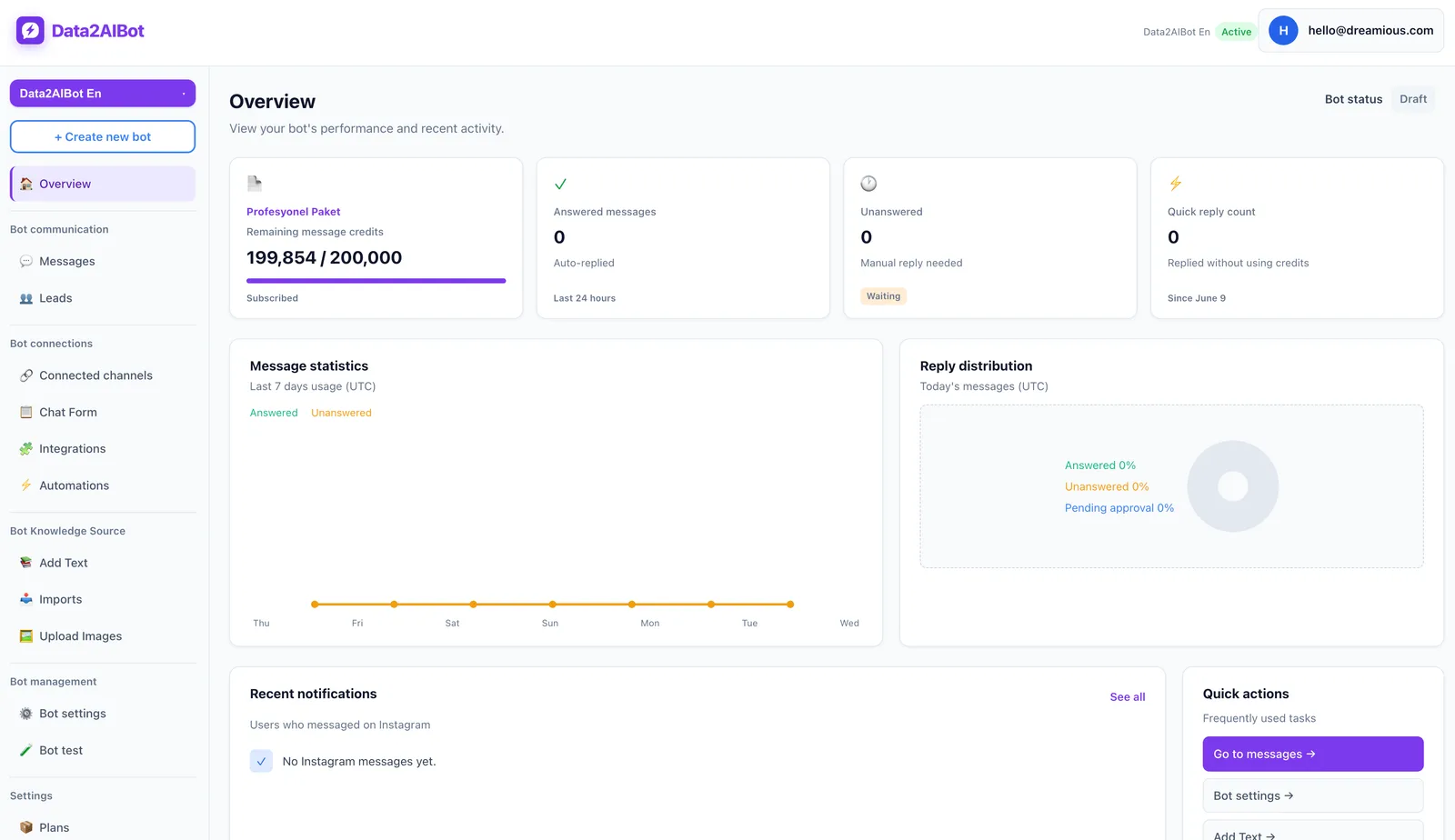
Write a one-sentence brief for your initial setup: “Answer product questions on Instagram and WhatsApp, collect appointment requests, and give our team a repeatable process for following up.” The follow-up process is an operating responsibility you need to define, not something to assume happens automatically.
Limit the first version to a few common topics. Product details, delivery conditions, and appointment requests are a reasonable starting point. Keep exceptions such as disputed refunds or special discounts outside that initial scope. A narrow launch makes errors easier to spot and knowledge easier to maintain.
2. Connect Instagram and WhatsApp
Data2AIBot supports Instagram and WhatsApp together through one bot. Its no-code setup lets you connect the channels in a few steps and launch in minutes. Follow the current on-screen connection instructions, with an authorized account owner checking access and requested permissions.
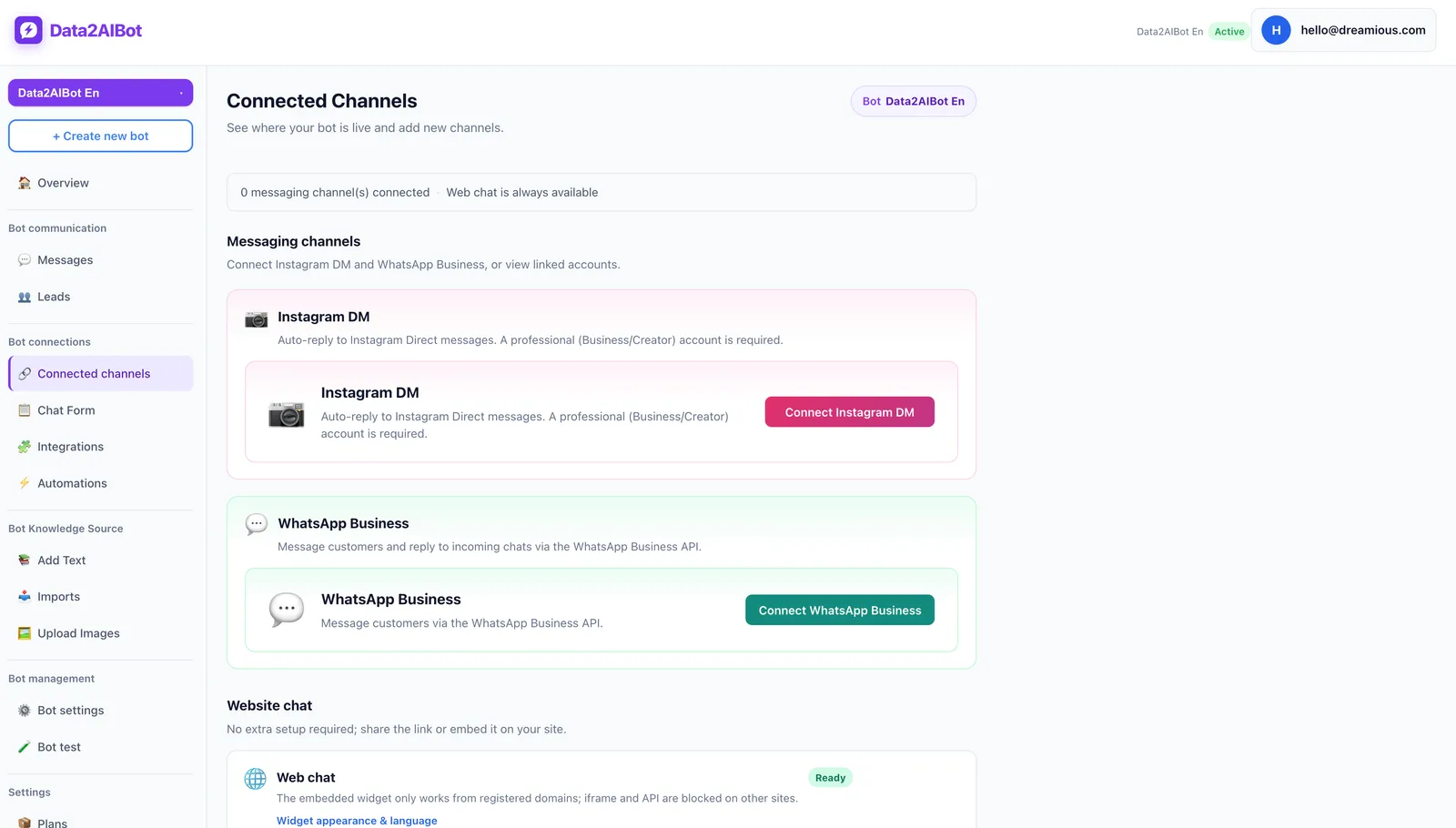
Data2AIBot is an official Meta Technology Provider. That is relevant when assessing the channel connection, but it does not remove account eligibility requirements or platform policies. If your business already uses WhatsApp, verify the implications for your existing setup before changing anything.
See the Instagram AI chatbot and WhatsApp AI chatbot pages for the respective channels. Then send a separate test message through each one. Treat a successful connection screen as the beginning of verification, not the end: you need to find and inspect the actual conversations.
3. Prepare one reliable source of answers
Customers should not receive different delivery conditions depending on which channel they choose. Prepare a shared set of approved business information first. Data2AIBot supports file uploads, Google Docs and Google Sheets imports, and ecommerce catalog setup through spreadsheet column mapping.
Your starting material should cover:
- Product or service names and descriptions.
- Verified delivery and returns conditions.
- Business hours and service areas.
- The minimum information needed for appointment requests.
- Your operating procedure when an answer is unavailable.
Give each source an owner and a review date. These are recommended documentation practices, not claims about built-in document-management features. Also, do not treat a spreadsheet import as a live inventory or real-time pricing connection unless that behavior has been separately verified.
Create a test question for every source. Include an exception that the document does not answer. This helps distinguish missing business information from a response-quality problem before customers encounter it.
4. Separate conversation tracking from identity matching
A unified inbox brings channel activity into a shared workspace. It does not, by itself, establish that an Instagram username and a WhatsApp phone number belong to the same person. Keep those two requirements separate when designing your workflow.
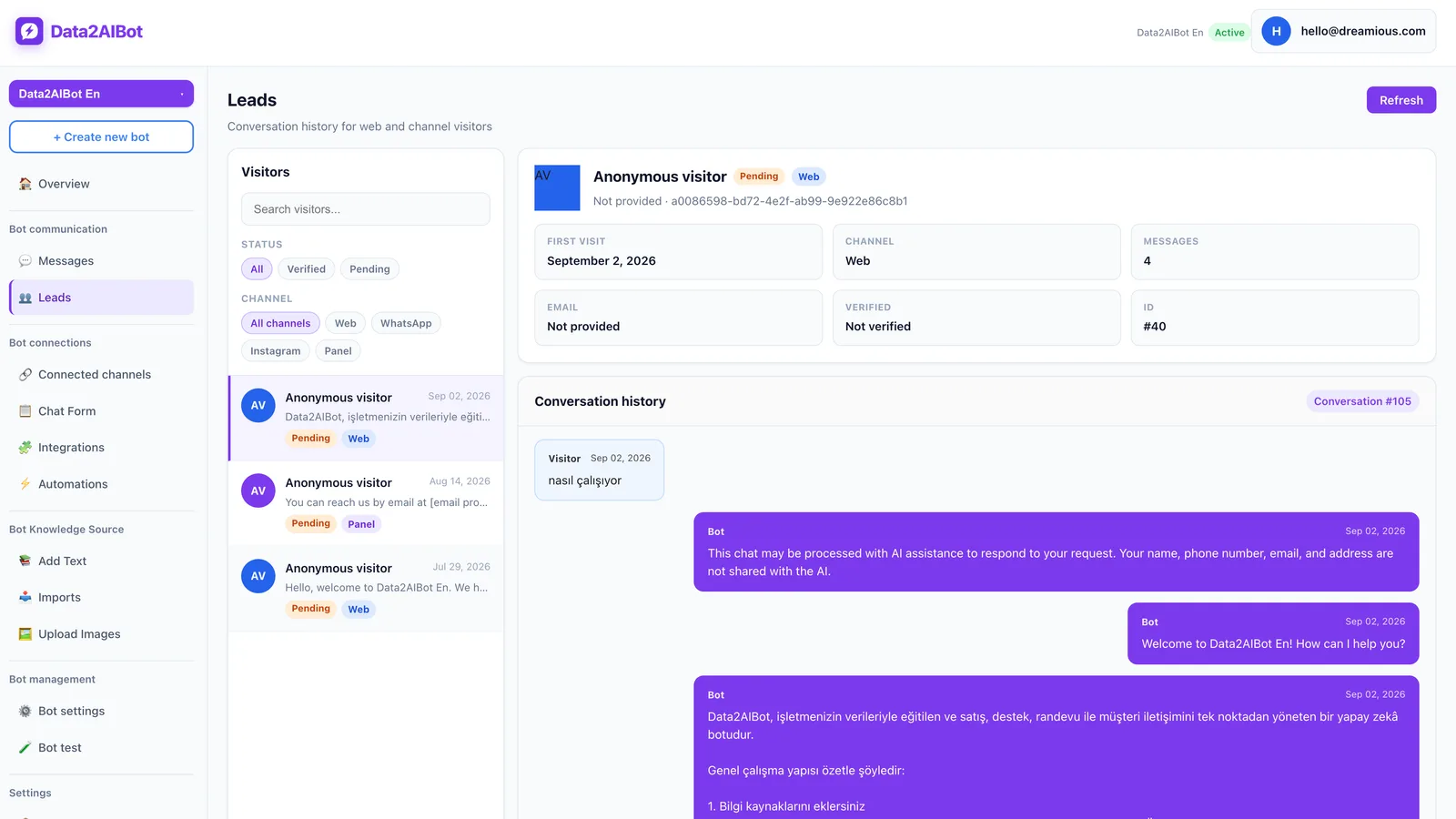
When reviewing visitors, leads, and conversations, ask four questions: Which channel did this come from? What does the customer need? What information is missing? What happens next? Use these as a team review standard rather than assuming they are built-in fields or automated labels.
If someone says, “I messaged you on Instagram,” request the minimum context needed to continue, such as the product name and a short description of the request. Verify identity appropriately before sharing order-specific information. Similar display names are not sufficient evidence that two conversations belong to one customer.
5. Define who owns the next action
A shared workspace cannot replace accountability. Decide who reviews incoming requests during each working period, which situations need specialist input, and where unresolved actions are recorded.
A simple operating rule might be: “The person covering the inbox reviews new requests, sends unanswered product questions to the product owner, and checks appointment exceptions with the relevant employee.” This is a suggested team process, not a claim that Data2AIBot provides automatic assignment or routing.
Test how your team will intervene without sending conflicting replies alongside the bot. Verify the current product behavior rather than assuming a particular handoff mechanism. When a request is resolved, record the outcome in your chosen tracking process. A sent message is not necessarily a solved customer problem.
6. Run a small acceptance test
Ask the same core questions on both channels. Then introduce incomplete messages, two questions sent in succession, and references to an earlier conversation elsewhere.
Use this checklist:
- Can you find a new Instagram conversation?
- Can you track a WhatsApp conversation in the same workspace?
- Do both channels give answers consistent with the approved source?
- Does an unanswered question produce an unsupported claim?
- Can your team identify the next action on an unfinished request?
- Is a channel-switching customer asked for unnecessary personal information?
For each failure, write down the expected behavior. Fix the source if information is missing; fix the operating process if ownership is unclear. Repeat the failed test before considering that part of the setup ready for customers.
Example conversations: Keep context when customers switch channels
These dialogues illustrate recommended conversation design. They are not prebuilt templates, guaranteed bot outputs, or evidence of automatic identity merging. Test them against your own information and business rules.
Example 1: An Instagram product question continues on WhatsApp
Customer on Instagram: “Does this bag come in a smaller size?”
Suggested reply: “Which model are you looking at? Please share the product name.”
Customer: “The Everyday model. I also wanted to check delivery.”
The next answer should rely on the catalog and verified delivery conditions. It should not promise stock availability or a delivery date without supporting information.
Customer later on WhatsApp: “We were talking about a bag on Instagram.”
Suggested reply: “Happy to continue. Which model were you considering, and what would you like to check?”
The objective is to recover enough context without asking the customer to repeat the entire conversation. A shared workspace can support the review, but the connection between the two identities still needs verification. This distinction matters especially before disclosing order details or making changes on someone’s behalf.
Example 2: A reservation request starts on WhatsApp
Customer: “Can I book for two people on Friday?”
Suggested reply: “What time would you prefer?”
Customer: “Around seven in the evening.”
Suggested reply: “What name should the request be under so it can be reviewed?”
Data2AIBot can collect appointments and reservations in chat and supports Calendly automations. However, collecting a request is different from confirming availability and completing a booking.
Design the wording around your actual process. Do not say “Your booking is confirmed” before availability has been verified. Specify when your team checks the request and how the customer learns the outcome. If that customer later follows up on Instagram, check the context before treating the message as a second reservation.
Which inbox approach fits your business?
Message volume alone is a poor selection criterion. A solo operator handling a few complex sales conversations may need better tracking more urgently than a larger team answering short, repetitive questions. Consider channel switching, conversation length, and how often another person needs to take over.
| Approach | Best fit | Main consideration |
|---|---|---|
| Manage channels separately | One person handling infrequent, short conversations | Cross-channel context must be recovered manually |
| Use a unified inbox | Both Instagram and WhatsApp receive regular requests | A shared view does not guarantee identity matching |
| Combine a unified inbox with a trained bot | Many questions rely on repeatable business information | Sources and exception handling need testing |
| Add CRM-based follow-up | Conversations become longer sales opportunities | Record matching and data quality need verification |
Data2AIBot fits the shared-inbox approach with one bot handling Instagram and WhatsApp. For any additional requirement—such as a specific permission model, report, or assignment rule—verify availability during evaluation rather than inferring it from the term “unified inbox.”
Connect conversations to Bitrix24 when sales follow-up needs it
If your team works from a CRM, review the Bitrix24 integration. Data2AIBot can create or update leads and contacts from Instagram, WhatsApp, and website chats, and write conversation history to the CRM timeline.
Pre-chat form fields can map to first name, last name, phone, email, comments, and lead title. Installation is available through the Bitrix24 Market without custom code.
Start with one test conversation. Check which record was created, which fields were populated, and whether the history appears on the intended timeline. Then test a returning contact. Do not assume every cross-channel identity will merge correctly just because a CRM integration exists.
Pay particular attention to shared phone numbers and incomplete contact details. Collect only the information your process needs. Additional fields create maintenance work if nobody uses them to make a decision or follow up.
What to measure during your first week
Choose a small sample of conversations and review it consistently. The following are suggested operating checks, not claims about built-in Data2AIBot analytics dashboards:
- Unanswered requests: Did the customer’s actual question receive an answer?
- Repeated information: Was the customer unnecessarily asked to explain the same issue again?
- Answer consistency: Did both channels use the same approved conditions?
- Next-action clarity: Was it clear what needed to happen and who would handle it?
- Request completeness: Was enough information collected to assess the appointment or sales inquiry?
If delivery questions regularly remain unresolved, inspect the source material first. The underlying issue may be an ambiguous policy rather than the bot. If answers are accurate but customers still wait for a promised response, focus on follow-up ownership.
Change one part of the workflow at a time and repeat the relevant tests. This makes it easier to understand whether better results came from clearer information, a better question, or a more reliable review process.
Frequently asked questions
What does managing Instagram and WhatsApp in one inbox mean?
It means managing conversations from both channels in a shared workspace instead of continually switching between separate apps. Data2AIBot supports both channels through one bot. You still need to define how identities are verified, unfinished requests are owned, and customer outcomes are recorded.
Do I need separate bots for Instagram and WhatsApp?
Not with Data2AIBot: one bot can handle both channels. You can start with common product and service information. Test each channel separately, however. A successful Instagram test does not prove that the WhatsApp connection or every conversation scenario is working as intended.
Will the same customer’s conversations merge automatically?
Do not assume that. A unified inbox and cross-channel identity matching are different capabilities. Verify that an Instagram account and a WhatsApp number belong to the same person before sharing sensitive information. If you use a CRM, test record-matching behavior with your own setup and representative cases.
Does setup require a developer?
Data2AIBot offers no-code setup for Instagram and WhatsApp, with connection in a few steps and launch in minutes. You still need appropriate account access and must complete the current connection requirements. Preparing reliable information and testing conversations are also part of implementation, even when no programming is required.
Can I connect my existing WhatsApp setup without changing it?
Verify the requirements for your existing number, account, and connection method before proceeding. This guide does not guarantee number migration, continued use alongside an existing app, or historical chat import. If those are essential, explain your current setup during a demo before making changes.
Can Instagram and WhatsApp conversations go into Bitrix24?
Yes. Data2AIBot’s Bitrix24 integration can create or update leads and contacts from those chats and write conversation history to the CRM timeline. Test field mappings and returning-contact behavior before relying on the integration for sales follow-up. Connecting a CRM does not eliminate the need for data-quality checks.
Does one inbox guarantee that no customer message gets missed?
No. A shared view can make tracking easier, but reliable service still depends on connection checks, current information, and clear ownership. Assign someone to review unfinished requests during each working period, and check whether the customer’s need was resolved—not simply whether a reply was sent.
Get started with Data2AIBot
You can sign up for Data2AIBot completely free — no credit card required — and connect Instagram and WhatsApp in minutes.