

Yes, you can set up a free appointment booking chatbot in 2026 if the provider’s free plan includes the channel and booking functions you need. Free setup does not automatically include calendar access, appointment reminders, or third-party messaging services, so check the complete workflow before you publish it.
TL;DR
- A free appointment booking chatbot needs a clear distinction between appointment requests and confirmed bookings.
- Check calendar access, channel rules, usage limits, and staff handoffs before choosing a free plan.
- Data2AIBot provides no-code customer messaging; verify appointment-specific requirements before choosing your setup.
- Test an available appointment, an unavailable appointment, and a staff handoff before launch.
Is it free to set up an appointment booking chatbot?
Yes, when the free plan covers the work you actually need the chatbot to do. Collecting a preferred appointment time is different from checking availability and reserving that time. Decide which result you need before comparing plans.
Start with a short list of approved answers. The guide to customer support automation with a small FAQ is a useful companion when preparing those responses.
| Setup approach | Best for | Practical benefit | Main limitation to check |
|---|---|---|---|
| Appointment requests | Businesses that confirm appointments manually | Collects the service and preferred time before staff reply | A request does not reserve a calendar slot |
| Booking-link handoff | Businesses with an existing scheduling page | Directs customers to the established booking process | Customers must finish booking outside the conversation |
| Calendar-connected booking | Businesses that need confirmation inside the conversation | Can check and reserve appointments when the required connection supports it | Requires verified calendar access and booking rules |
These are workflow choices, not promises about a particular provider’s free plan. Ask the provider to demonstrate your chosen approach before relying on it.
Why this matters
A customer who receives an appointment confirmation expects that appointment to exist. If the chatbot only collected a request, confirmation language creates a problem your staff must resolve.
For your 2026 setup, define success as a correct booking outcome, not simply a quick reply. A chatbot that clearly explains the next step is more useful than one that sounds confident but leaves the appointment unresolved.
Match the chatbot’s wording to the action it actually completed. Use request language when staff must approve the time, and reserve confirmation language for appointments that have genuinely been recorded.
Appointment requests: start with staff confirmation
An appointment-request chatbot collects the information staff need to arrange a booking. It does not need to promise live availability to be useful.
Best for: businesses that already confirm appointments personally. A salon, consultant, or repair business can use this approach to gather a service choice and preferred time before a person responds.
The benefit is a clearer initial conversation. The limitation is that staff still need to check the schedule, offer alternatives, and confirm the appointment.
Keep the distinction visible throughout the exchange:
- Describe the submission as an appointment request.
- Explain that the preferred time needs confirmation.
- Tell customers how they will receive the final answer.
- Provide a way to reach staff if the request is urgent.
Do not promise a response deadline unless your team can meet it. Opening hours and actual staff coverage should determine that wording.
Booking-link handoff: keep your existing booking process
A booking-link handoff answers preliminary questions and directs customers to your established scheduling page. The scheduling system remains responsible for showing available appointments and recording the booking.
Best for: businesses with a booking page that already works. This approach keeps appointment rules in the existing system rather than trying to reproduce them inside a conversation.
The benefit is a clear division of responsibility. The limitation is the extra step: receiving the link does not mean the customer finished booking.
Test the destination on a phone before publishing the chatbot. Check that customers can find the right service, understand the time zone, and recognize the final confirmation. If the destination cannot handle the requested service, route the customer to staff instead.
Calendar-connected booking: verify the complete action
Calendar-connected booking requires more than answering questions about opening hours. The chatbot needs a supported way to check the relevant schedule and record the selected appointment.
Best for: businesses that require appointment confirmation within the conversation. Choose this approach only after verifying the calendar connection, service rules, and confirmation behavior.
The benefit is completing the booking without a separate scheduling handoff, where supported. The limitation is added responsibility: calendar permissions, staff assignments, and booking changes all need testing.
Ask for a demonstration using your actual workflow. A general calendar connection does not establish that the system can handle different service lengths, staff-specific schedules, cancellations, or rescheduling.
Why free appointment booking chatbot setups vary
The word free does not define what happens between the first message and the final appointment. In 2026, compare the included actions rather than relying on the plan label.
These factors determine whether a setup fits:
- Booking outcome: Collecting a request, sharing a scheduling link, and reserving a slot require different functions.
- Messaging channel: Website chat, Instagram, and WhatsApp have their own connection requirements and platform rules.
- Calendar access: Reading availability and creating an appointment are separate capabilities to verify.
- Included usage: Check which conversations, messages, or automated actions count toward the plan’s limits.
- Follow-up needs: Reminders, cancellations, and rescheduling need explicit support rather than an assumption that booking includes them.
- Staff access: Confirm how a person receives unresolved requests and continues the conversation.
Check regional restrictions for your business location and intended messaging channel. A platform’s general channel support does not establish that every account or feature is available everywhere.
How do you set up an appointment booking chatbot?
Use this 2026 launch checklist to build the smallest workflow that gives customers an accurate next step. Start with 1 channel and add others after the booking process works correctly.
1. Choose the outcome
Decide whether the chatbot will collect a request, share a booking link, or confirm an appointment through a calendar connection. Write that outcome down before configuring replies.
For a request-only workflow, make staff approval part of the process. For direct booking, define what evidence the chatbot needs before it can say the appointment is confirmed.
2. Prepare approved answers
Write clear answers about services, opening hours, appointment requirements, and how customers change a booking. Use only information your business has approved.
Keep these answers separate from live availability. Knowing that you open on a particular day does not establish that a specific appointment is available.
3. Set the handoff
Decide which questions require a person. Examples include an unsupported service, an unclear request, or a calendar connection that cannot complete the booking.
Give customers a clear next step instead of repeatedly asking them to rephrase. Staff should receive enough context to continue without restarting the conversation.
4. Test the outcome
Run the workflow from the customer’s perspective. Check both the message shown to the customer and the destination where the appointment or request should appear.
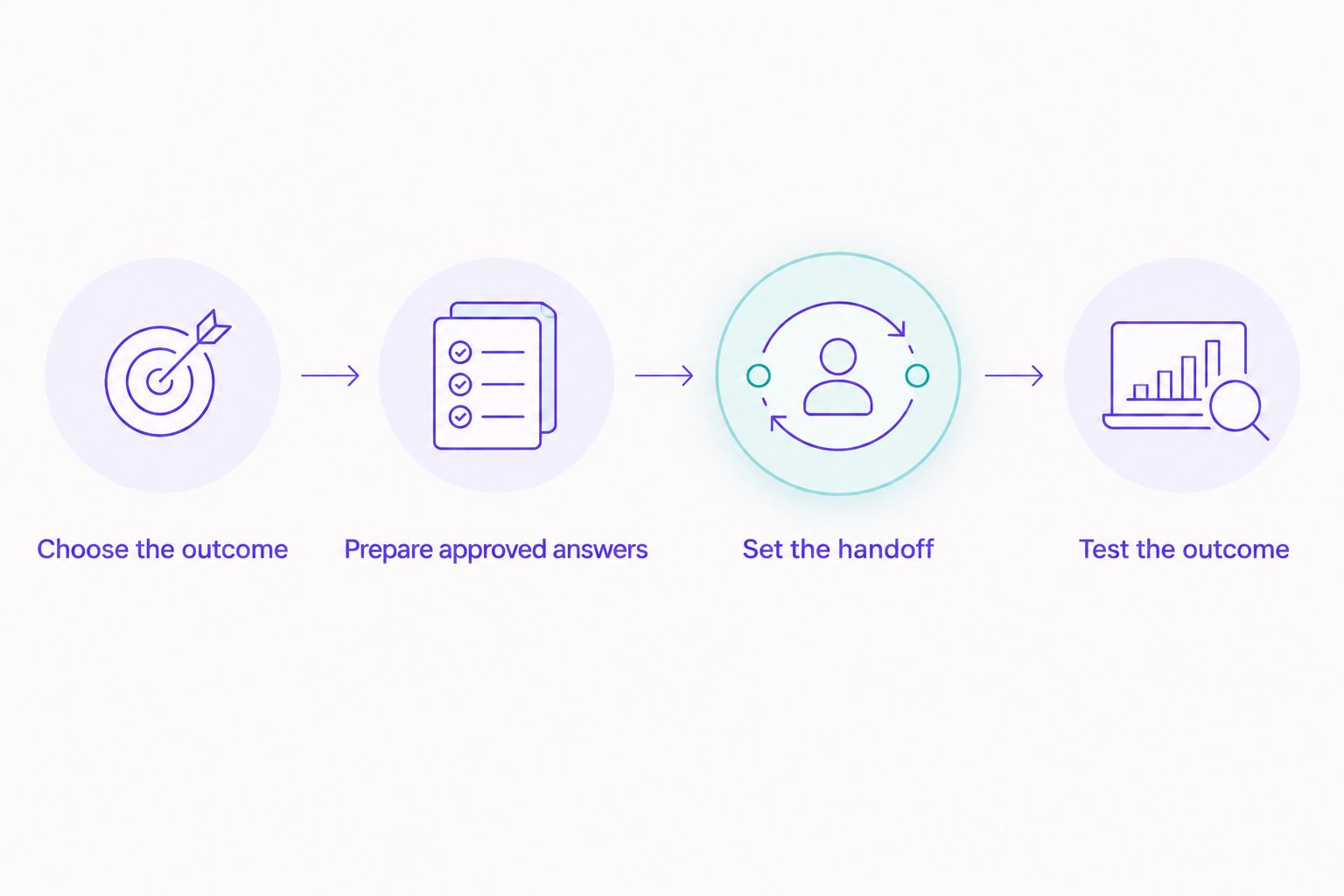
Define the booking outcome before configuring the conversation.
Keep launch testing narrow. A correct workflow for one service is a stronger starting point than a large menu of untested appointment types.
What information should the chatbot collect?
Collect only what you need for the next booking step. A useful starting checklist contains 5 fields: service, preferred date, preferred time, customer name, and contact method.
That is a suggested checklist, not a requirement to collect everything in every conversation. If the channel already provides an appropriate way to reply, avoid asking customers to repeat it without a reason.
Explain why you need personal information. Keep sensitive details out of the initial appointment conversation unless your business has an appropriate process for collecting and handling them.
For international customers, make the appointment’s time zone explicit. A preferred time without a shared time-zone reference is not enough to establish a clear appointment.
Can Data2AIBot handle the messaging side?
Data2AIBot is best for small businesses that want no-code customer messaging across WhatsApp, Instagram, and websites. The platform supports automated customer messaging and support across those channels.
That makes Data2AIBot relevant to appointment questions and initial customer conversations. Treat direct calendar booking, reminders, and rescheduling as separate requirements to verify before building your appointment workflow.
The fit is clear for businesses seeking no-code messaging. The boundary is equally important: customer messaging support alone does not establish that a platform can reserve appointments in your chosen scheduling system.
Review Data2AIBot against your chosen channel, booking outcome, and staff-handoff process. Ask appointment-specific questions rather than assuming that a general chatbot description covers the full booking process.
What should you check before accepting a free plan?
Read the plan terms against your workflow, not against a feature count. For your 2026 review, check whether the plan is ongoing or a trial, which actions it includes, and what happens when you reach its limits.
Data2AIBot charges no hidden fees or additional fees beyond those explicitly stated in the selected plan. Distinguish the platform’s own terms from any applicable third-party messaging or scheduling charges.
Before activating a plan, verify:
- Whether your required channel is included.
- Whether calendar access is included and what it can do.
- Whether reminders and staff handoffs require separate features.
- Whether a payment method is required to begin.
- How cancellation affects the connected workflow and stored information.
Do not interpret free setup as confirmation that every connected service is included. Check each dependency before connecting customer-facing accounts.
Can a free chatbot confirm appointments automatically?
Automatic confirmation requires supported access to availability and a way to record the appointment. A chatbot that only collects preferences should describe the result as a request.
Check the final record, not just the reply. If the conversation says confirmed but the appointment is absent from the scheduling system, the workflow has failed its test.
Do you need WhatsApp or Instagram to take bookings?
You do not need WhatsApp or Instagram if your appointment workflow runs through website chat or an existing scheduling page. Choose the channel where you already handle relevant customer enquiries.
Start with the channel your staff can monitor and support. Adding another inbox before defining responsibility makes the handoff harder to manage.
What should you test before going live?
Run 3 test conversations: an available appointment, an unavailable appointment, and a request that needs staff help. These are test cases to perform, not a performance claim.
Check whether each conversation ends with the correct status. Also test a booking change separately if your workflow promises cancellation or rescheduling.
FAQ
Can I build a free appointment booking chatbot without coding?
Yes, a no-code builder can remove the need to write code, provided its plan supports your required workflow. Check booking actions, channel access, and handoffs separately.
Does a free appointment booking chatbot include a calendar?
A free appointment booking chatbot does not automatically include calendar access. Verify whether the plan can read availability, create appointments, or only collect requests.
Is sending a booking link the same as confirming an appointment?
Sending a booking link is not the same as confirming an appointment. The customer still needs to complete the scheduling process and receive its confirmation.
Can I use Data2AIBot for appointment-related messages?
Data2AIBot supports no-code customer messaging on WhatsApp, Instagram, and websites. Verify calendar booking, reminders, and rescheduling against your specific appointment workflow.
Can I send appointment reminders with a free chatbot?
Appointment reminders require explicit support in your selected plan and messaging channel. Check scheduling functions, channel rules, and any applicable third-party requirements before promising reminders.
What should happen when the chatbot cannot book the requested time?
The chatbot should offer a supported next step rather than invent availability. That can mean collecting an alternative preference or handing the conversation to staff.
Do I need to collect personal details before showing a booking link?
Collect only the information needed for the next step. If customers can choose an appointment directly on your scheduling page, avoid making them repeat those details in chat.
One last thing
Test the failure path before polishing the greeting. An unavailable appointment reveals whether your chatbot explains the situation, avoids a false confirmation, and gives the customer somewhere useful to go.
Make that test part of your 2026 launch checklist. Friendly wording matters, but a correct booking status matters more.
Related guides
- Instagram chatbot for beauty salons and spas
- How to automate repetitive customer questions
- What an assistant chatbot can and cannot do
Choose your booking outcome, then check whether the platform supports it before connecting your first channel.
Check your booking workflow
Ask about your channel, calendar requirements, and staff handoff before you begin.
Get started with Data2AIBot
You can sign up for Data2AIBot completely free — no credit card required — and connect Instagram and WhatsApp in minutes.