

Yes—WhatsApp automatic replies can improve customer satisfaction when they answer the question accurately, explain the next step, and leave a clear route to a person. A fast acknowledgment alone does not resolve a problem; this guide explains how to make automated replies useful and measure whether customers actually benefit.
TL;DR
- WhatsApp automatic replies: customer satisfaction depends on useful answers, clear expectations, and access to human support.
- Data2AIBot is best for small businesses seeking no-code customer messaging across WhatsApp, Instagram, and websites.
- Measure resolution and customer feedback alongside response speed; a quick acknowledgment is not a completed support request.
- Start with repeatable questions, then review failed conversations before expanding automation.
Can WhatsApp automatic replies improve customer satisfaction?
Yes, when automatic replies remove a real obstacle rather than simply confirm receipt. Answering an opening-hours question helps someone plan a visit. Repeating a welcome message after someone describes a damaged order does not help resolve that order.
Choose the reply type around the customer's task. These approaches serve different purposes; none should replace judgment in every conversation.
| Reply approach | Best for | Main benefit | Main limitation |
|---|---|---|---|
| Greeting or away message | Acknowledging contact and setting expectations | Explains what happens next | Does not necessarily answer the question |
| Prepared FAQ answer | Repeated questions with stable answers | Gives consistent information | Becomes misleading when the source changes |
| Conversational chatbot | Questions expressed in different ways | Supports a more natural exchange | Needs clear boundaries and reliable information |
| Human response | Complaints, exceptions, and sensitive requests | Applies judgment to the individual situation | Depends on staff availability |
For your 2026 support plan, separate acknowledgment from resolution. A customer who receives an immediate greeting still needs an answer. Use the guide to automating repetitive customer questions to identify suitable starting points.
Why this matters
Your customer starts a conversation to accomplish something: understand a product, check a booking process, or resolve a problem. Automation earns its place when it moves that task forward. Speed matters, but it is not the whole experience.
For a small business, the practical goal is less repetitive work without making customers work harder. Treat every automated reply as part of the service, not as a substitute for providing service.
A useful 2026 review question is: after reading this message, does the customer know something useful or know exactly what to do next? If neither is true, rewrite the reply before adding more automation.
Where automatic replies help—and where they fall short
Greeting and away messages: best for setting expectations
A greeting can explain that an automated assistant is responding and what help it covers. An away message can clarify when someone will review a request. Both are useful when they replace uncertainty with an honest next step.
The limitation is simple: an acknowledgment is not an answer. Do not mark a conversation resolved because the system sent a welcome message. Keep the actual customer request visible for follow-up.
Avoid response-time promises that your team cannot consistently meet. State your real support schedule or explain the review process instead of inserting an attractive but unsupported deadline.
FAQ replies: best for stable, repeatable information
Start with questions whose answers you can verify in an approved source. Examples include published business hours, where to find a size guide, or how to request an appointment. Keep each answer focused on the customer's question.
Prepared answers reduce repeated typing, but they also repeat mistakes consistently. Assign someone to update them whenever the underlying information changes. A polished sentence with an outdated policy is still a poor answer.
Do not automate an individual order status or booking confirmation unless the response can use the relevant, current record. General instructions and customer-specific facts are different jobs.
Conversational chatbots: best for varied wording
Customers do not always use the same words as your FAQ. A conversational chatbot can help handle different phrasings and follow-up questions. The useful outcome is a relevant answer, not a conversation that merely sounds natural.
The trade-off is the need for boundaries. Define what the assistant can answer, what information it can rely on, and what should happen when it lacks an answer. Never treat fluent wording as proof of accuracy.
Data2AIBot is a no-code customer messaging platform that connects to WhatsApp, Instagram, and websites. It fits small businesses seeking that channel coverage; those capabilities do not, by themselves, establish a customer-satisfaction improvement.
Human support: best for judgment and exceptions
A person should handle situations that require discretion, sensitive discussion, or a decision outside the automated reply's approved scope. A complaint about how a previous conversation was handled is a clear example.
Human support has its own constraint: someone must own the next step. Whether you route requests manually or through a supported workflow, decide who reviews them and what context that person receives.
Do not offer a human-support route that nobody monitors. An honest process is more useful than an impressive-sounding promise.
Why customer satisfaction varies with automatic replies
The same reply can be helpful in one conversation and frustrating in another. Review these factors before expanding your 2026 automation:
- Relevance: Answer the customer's actual question rather than sending the same introduction after every message.
- Accuracy: Use approved information and remove answers that no longer match your business.
- Expectation setting: Explain what automation covers and what happens when a request needs review.
- Customer effort: Ask only for information needed for the next action; avoid making people repeat details unnecessarily.
- Human access: Provide a practical route for exceptions instead of trapping customers in repeated replies.
- Privacy: Avoid requesting unnecessary personal information, and explain how customers should share details needed for support.
These factors are connected. A correct answer can still frustrate someone if it arrives after several irrelevant questions. A clear handoff can protect the experience when automation cannot resolve the issue.
How do you set up replies that help customers?
Use this 4-stage workflow for a 2026 launch or review. Keep the first scope narrow enough that you can inspect the answers and follow up on unresolved requests.
1. Choose questions
Select questions that recur and have dependable answers. Separate general information from requests that depend on an individual account, appointment, or transaction. This prevents a generic reply from pretending to know a customer's situation.
For an appointment-based business, explaining how to request a booking is different from confirming a specific slot. For an online seller, describing the returns process is different from approving an exception.
2. Approve answers
Write the answer first, then remove anything that does not help the customer act. Include the next step when one is needed. Keep internal terminology out of customer-facing messages.
Name an owner for each answer and its source. When a policy or process changes, update the reply before relying on it again. Review source information rather than assuming that a convincing response is current.
3. Define escalation
Decide what happens when the answer is unavailable, the customer disputes it, or the request needs individual review. Make the route clear in the conversation. Do not require customers to guess a secret phrase.
Check your chosen setup's actual capabilities before promising an automatic transfer. If your process is manual, explain that accurately and make sure someone checks the incoming requests.
4. Review conversations
Read completed and unresolved conversations. Look for wrong answers, repeated questions, unclear next steps, and customers asking for a person. Change the answer or routing rule that caused the problem.
Review the whole exchange, not just the opening message. An apparently helpful first reply can lead to a loop later in the conversation.
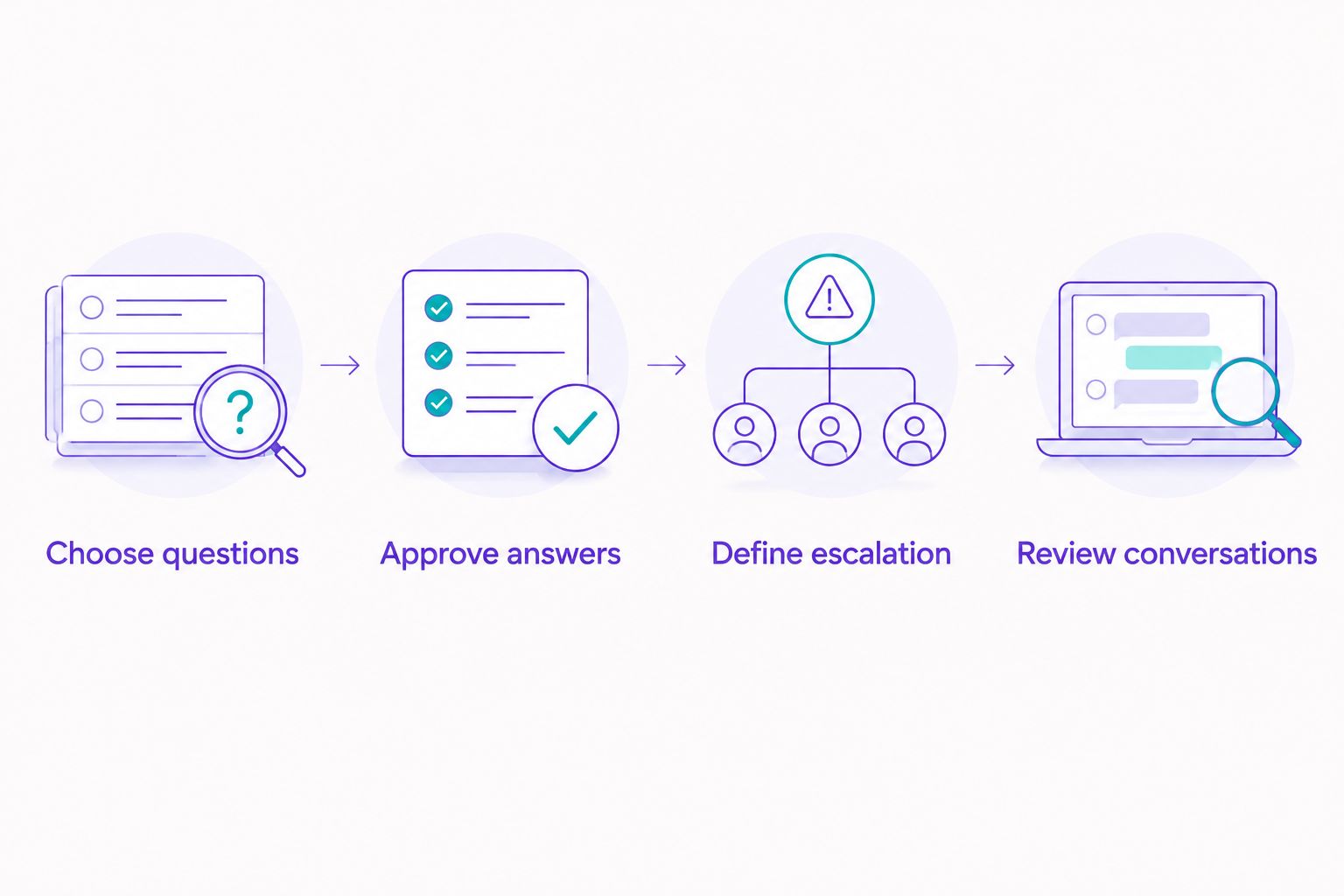
Define the unanswered-question process before expanding automated replies.
What should you test before turning replies on?
Test 3 conversation types: a straightforward question, an ambiguous request, and a request outside the approved scope. These are test cases, not a performance benchmark. Write down what a correct outcome looks like before checking the response.
For the straightforward question, check accuracy and clarity. For the ambiguous request, check whether the reply asks a useful follow-up question. For the out-of-scope request, check whether it explains the next step without inventing an answer.
Also test the conversation from a customer's phone. Read the message as a customer would: without internal context, instructions, or knowledge of your business systems.
Use a short review checklist:
- Does the message answer the question asked?
- Is every business fact current and approved?
- Does the customer understand the next action?
- Can someone take over when judgment is needed?
- Does the reply avoid unnecessary requests for personal information?
How do you measure customer satisfaction in 2026?
Measure the customer's outcome, not just the system's activity. Reply speed describes how quickly a message was sent. It does not show whether the customer understood the answer or finished the task.
Choose clear definitions before comparing results. Keep the reporting period and question categories consistent so changes in the mix of requests do not obscure what happened.
| Measure | What it tells you | What to check alongside it |
|---|---|---|
| First-response time | How quickly the customer receives a reply | Whether the reply contains useful information |
| Resolution time | How long the request takes to complete | Whether the customer has to contact you again |
| Repeat contact | Whether the same issue returns | Whether the earlier answer was incomplete |
| Human-support requests | Where customers need personal help | Whether the route works as described |
| Customer feedback | How customers describe the experience | The conversation that produced the rating or comment |
Ask a short, neutral feedback question after the support interaction ends. Do not ask for a satisfaction rating immediately after a greeting and treat that as feedback on the completed service.
When comparing an earlier process with a 2026 rollout, compare similar requests. A group of opening-hours questions is not a fair comparison with a group of disputed orders. Read negative comments alongside the messages that prompted them.
Can faster replies make customer satisfaction worse?
Yes—faster replies can make the experience worse when they repeat irrelevant information or block access to help. A customer who explains the same problem repeatedly has received messages, not useful support.
Watch for loops, premature resolution, and unsupported promises. Fix the underlying answer or process rather than adding another reassuring sentence.
Should you automate every WhatsApp customer conversation?
No—automate the parts you can answer accurately and route the rest to an appropriate person. The boundary should follow the request's requirements, not a target for how many conversations stay automated.
Keep exceptions visible. A low human-support count is not a success if customers are abandoning unresolved requests.
FAQ
Do WhatsApp automatic replies improve customer satisfaction?
WhatsApp automatic replies can improve customer satisfaction when they provide accurate answers and clear next steps. Confirm the effect through customer feedback and resolution outcomes rather than reply speed alone.
What's the best WhatsApp automatic reply for a small business?
The best reply answers the customer's immediate question or explains exactly what happens next. Keep it specific to the request and avoid unsupported response-time promises.
Is an automatic greeting enough for customer support?
An automatic greeting is not enough to resolve a customer-support request. It acknowledges contact, but the customer still needs an answer or a clear route to help.
Can I use a chatbot without coding?
Data2AIBot provides a no-code platform for customer messaging on WhatsApp, Instagram, and websites. You still need to decide which questions to cover and verify the answers customers receive.
Should customers be able to speak to a person?
Customers should have a practical route to a person when a request needs judgment or falls outside the automated scope. Explain that route clearly and assign responsibility for follow-up.
How do I know if automatic replies are frustrating customers?
Repeated questions, requests for a person, and feedback about irrelevant answers are reasons to review the conversation. Check whether the reply answered the original question before changing its tone.
What customer information should an automated reply request?
An automated reply should request only the information needed for the next support action. Avoid collecting unnecessary personal details, and explain the appropriate way to share information needed for the request.
One last thing
Test the question your automation cannot answer. That exchange shows whether your support process has a real next step or merely another message. A clear limit is more useful than a confident guess.
Related guides
- Can customer support automation work with a small FAQ?
- WhatsApp Business auto-replies compared with a chatbot
- Customer support automation for e-commerce sellers
Explore Data2AIBot when you're ready to plan your first no-code customer messaging workflow.
Get started with Data2AIBot
You can sign up for Data2AIBot completely free — no credit card required — and connect Instagram and WhatsApp in minutes.