
Best for no-code customer messaging: Data2AIBot. Best for Instagram-led enquiries: Manychat. Best for website support: Tidio. Best for custom conversation workflows: Botpress. This 2026 guide helps you choose an AI chatbot for dental clinics without confusing front-desk automation with clinical advice or confirmed appointment booking.
TL;DR
- Data2AIBot is best for small businesses seeking no-code customer messaging across WhatsApp, Instagram, and websites.
- Choose an AI chatbot for dental clinics around administrative enquiries, not diagnosis or treatment recommendations.
- Manychat suits Instagram-led enquiries; Tidio suits website support; Botpress suits custom conversation workflows.
- Verify patient-data requirements and appointment-system connections before sending sensitive information through any chatbot.
Why this matters
A dental enquiry is not always a booking request. Someone asking about opening hours needs a straightforward answer; someone describing symptoms needs a different response and a clear route to qualified staff.
Your chatbot should separate those situations. Start with approved administrative information, then check what happens when a question falls outside it. A fluent answer is not evidence that the answer is appropriate.
Choose a front-desk assistant, not a substitute dentist. The strongest starting point is a narrow set of repeatable questions that your reception team already answers consistently.
What makes the best AI chatbot for dental clinics?
Use these criteria to assess a dental chatbot in 2026. A broad feature list matters less than whether the tool fits your actual enquiry process.
- Channel fit: Choose around where patients already contact you: WhatsApp, Instagram, your website, or a combination.
- Answer boundaries: Check how you restrict answers to approved clinic information and stop unsupported treatment claims.
- Staff follow-up: Test what happens when someone asks for a person, disputes an answer, or describes a problem.
- Appointment accuracy: Distinguish collecting a preferred time from checking a calendar and confirming a booking.
- Patient-data controls: Review data handling, access, retention, deletion, contractual terms, and applicable regional requirements.
- Maintenance effort: Identify who updates answers when opening hours, services, or appointment instructions change.
Treat patient-data suitability as a gate, not a bonus feature. A platform that suits general customer messaging does not automatically suit medical records or sensitive patient conversations.
Best dental chatbot tools at a glance
These recommendations distinguish general platform capabilities from dental-specific capabilities. None of the rankings below establishes healthcare compliance, a dental software connection, or permission to process patient records.
| Tool | Best for | Standout capability | Key limitation to check |
|---|---|---|---|
| Data2AIBot | No-code customer messaging across channels | Connects to WhatsApp, Instagram, and websites | Dental-system connections and patient-data suitability require verification |
| Manychat | Instagram-led enquiries | Social messaging automation | Social enquiry handling is not dental appointment management |
| Tidio | Website-first support | Website live chat and AI customer support | Website support does not establish dental scheduling compatibility |
| Botpress | Custom conversation workflows | Visual chatbot building with custom integrations | More workflow design and maintenance responsibility |
The comparison reflects different starting points, not interchangeable healthcare systems. Choose the row that matches your main enquiry channel, then test the requirements that cannot fail.
1. Data2AIBot: best for no-code customer messaging
Data2AIBot is a no-code chatbot platform that connects to WhatsApp, Instagram, and websites. For a dental clinic, the relevant starting use case is answering approved administrative questions across the channels patients use to make contact.
Data2AIBot pros:
- No coding is required to use the platform.
- Its channel coverage includes WhatsApp, Instagram, and websites.
- Its customer-messaging focus fits a starting project built around repetitive administrative enquiries.
Data2AIBot cons:
- Dental practice-management connections require verification before you promise live appointment booking.
- General business messaging capabilities do not establish suitability for sensitive patient information.
Its official Meta Technology Provider status is relevant to its Meta-channel offering. That status does not imply Meta endorsement, clinical approval, or healthcare compliance.
The brand states that it charges no hidden fees beyond those explicitly stated in the selected plan. Review the plan terms and distinguish any applicable third-party charges from the platform's own charges.
Best for: A small clinic seeking a no-code starting point for routine customer messaging across these channels.
Verdict: Buy only after a pilot confirms your administrative workflow and data requirements. Keep patient records and clinical decisions outside the initial scope.
2. Manychat: best for Instagram-led dental enquiries
Manychat provides messaging automation for channels including Instagram and WhatsApp. It belongs on your shortlist when social messaging is the main entry point for questions about your clinic.
An Instagram-led clinic needs an enquiry process, not just an automatic greeting. Decide which approved information the conversation should provide and when reception should take over before building the automation.
Manychat pros:
- Its social-messaging focus matches Instagram-led enquiry handling.
- Conversation flows can structure common questions and next steps.
- Instagram and WhatsApp support makes it relevant to clinics evaluating those channels.
Manychat cons:
- A social conversation does not establish a connection to your dental appointment system.
- You still need clear boundaries around symptom descriptions and requests for treatment advice.
- Account eligibility, channel rules, and regional restrictions require checking before launch.
Ask a specific demonstration question: what happens after someone requests an appointment? Receiving a message, collecting a preferred time, and reserving a confirmed slot are different outcomes.
Best for: A clinic whose first priority is organising enquiries arriving through Instagram.
Verdict: Buy for an Instagram-first enquiry workflow; hold if confirmed dental scheduling is your main requirement.
3. Tidio: best for website-first patient enquiries
Tidio combines website live chat with AI customer support through Lyro. It is a relevant option when you want to answer routine questions while visitors browse your clinic website.
Website context gives you a useful planning starting point. List the questions reception receives from website visitors, then separate public information from anything requiring staff judgement or access to patient records.
Tidio pros:
- Website chat is central to its offering.
- Live chat and AI support provide different ways to handle visitor questions.
- Its support focus makes approved FAQs a practical evaluation use case.
Tidio cons:
- Website support capabilities do not establish compatibility with your dental calendar.
- You must assess data handling before inviting patients to share sensitive details.
- A website-first deployment does not replace planning for enquiries arriving elsewhere.
In a 2026 evaluation, test answers against the information your clinic currently publishes. An answer that contradicts your opening hours or booking instructions creates work for reception rather than removing it.
Best for: A clinic prioritising questions from visitors already on its website.
Verdict: Buy for website-first support after testing answer accuracy and staff follow-up; hold for unverified scheduling requirements.
4. Botpress: best for custom conversation workflows
Botpress offers a visual environment for building AI agents and connecting them to other systems. It suits a clinic with the technical support to design and maintain a more customised enquiry process.
Customisation is useful when your requirements are specific. It also shifts responsibility toward the people building the workflow: they must define permissions, failure handling, testing, and ongoing ownership.
Botpress pros:
- Visual workflow building supports tailored conversation paths.
- Integration capabilities make it relevant when a standard conversation is insufficient.
- Custom logic can separate different enquiry types within a designed process.
Botpress cons:
- A custom build needs someone responsible for design, testing, and maintenance.
- Connecting a dental system depends on that system's interfaces and permissions.
- More flexibility creates more decisions about data handling and failure behaviour.
Do not choose a custom platform simply because it offers more possibilities. Write down the exact requirement that simpler tools cannot meet, then ask the implementation owner to demonstrate it.
Best for: A clinic with technical support and a defined workflow that needs custom development.
Verdict: Hold until you have a written specification, an implementation owner, and a maintenance plan.
How these tools are ranked
The ranking prioritises channel fit, no-code accessibility, answer boundaries, staff follow-up, appointment accuracy, and maintenance effort. Each tool holds a different use-case slot rather than competing for an unsupported overall clinical score.
The recommendations assess general messaging and support capabilities. They do not claim hands-on clinical testing, measured reductions in missed appointments, or verified compatibility with your existing software.
Run a small pilot before choosing
For your 2026 rollout, use a controlled administrative pilot. The following quantities are suggested test boundaries, not vendor performance claims or industry benchmarks.
1. Define scope
Start with 10 administrative questions that reception answers repeatedly. Examples include opening hours, directions, accessibility information, and how to request an appointment.
Give every answer an owner. Leave out anything that requires a diagnosis, interpretation of a patient's history, or a personalised treatment recommendation.
2. Approve answers
Have the responsible clinic staff approve the wording before loading it into the chatbot. Include a clear response for questions outside the approved material.
Keep appointment wording precise. If staff must review a request, say that the request is awaiting confirmation rather than implying a slot has been reserved.
3. Test boundaries
Run 20 test conversations before exposing the chatbot to patients. Include ordinary questions, misspellings, conflicting requests, requests for a person, and messages containing symptom descriptions.
Test what the system does when it does not know. For safety-related messages, use an escalation response approved by qualified clinic staff rather than letting the chatbot improvise clinical guidance.
4. Review results
Use a 7-day supervised pilot as a manageable starting window. Review incorrect answers, unresolved conversations, and requests that failed to reach the right person.
Do not expand the scope until you have corrected those failures. Keep a staff member responsible for checking that published answers still match clinic policy.
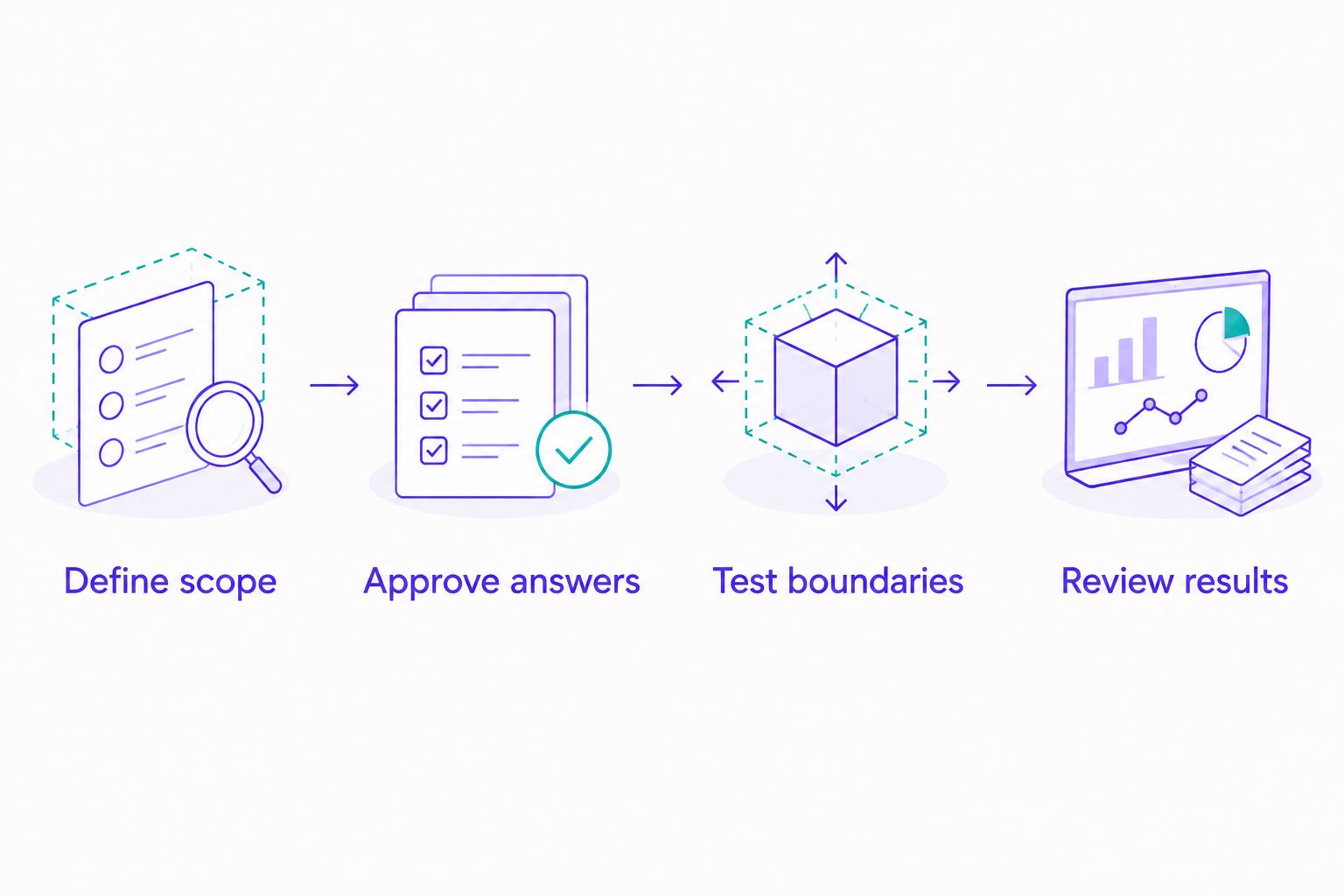
Test a narrow administrative scope before expanding the chatbot's responsibilities.
Check these details before connecting patient information
A successful demonstration is not a patient-data assessment. Before your 2026 launch, ask for written information about processing terms, data locations, retention, deletion, access controls, and whether conversation content is used for model training.
Your obligations depend on your location, the people you serve, and the information you process. For example, HIPAA requirements can apply to covered entities and business associates in the United States; GDPR gives health data special protection where that regulation applies.
Ask the vendor to address your actual use case. A general privacy statement is not the same as a contract or configuration suitable for your clinic.
Keep public-information enquiries separate from patient records where possible. A question about directions does not require a medical history, and a chatbot should not request sensitive details merely to appear helpful.
Which dental chatbot should you choose?
Data2AIBot is best for small businesses seeking no-code customer messaging across WhatsApp, Instagram, and websites. For a dental clinic, that makes it a starting candidate for administrative enquiries, subject to your data and workflow checks.
Choose Manychat when Instagram-led enquiry handling is the priority. Choose Tidio when website support comes first. Consider Botpress when a documented custom requirement justifies an implementation project.
For an undecided clinic, start with the channel reception already handles most often. Solve one repeatable enquiry process before attempting clinical routing, patient-record access, or live appointment changes.
FAQ
What's the best AI chatbot for dental clinics in 2026?
The best choice depends on your enquiry channel and administrative workflow. Shortlist a no-code multichannel platform for general messaging, Manychat for Instagram-led enquiries, Tidio for website support, or Botpress for custom workflows, then verify patient-data requirements.
Can a dental chatbot confirm appointments automatically?
A dental chatbot should confirm appointments only when a verified scheduling connection supports that action. Collecting a preferred date or sending a booking link is not the same as reserving a slot.
Can an AI chatbot give dental advice?
Keep a general customer-messaging chatbot out of diagnosis and personalised treatment recommendations. Use clinic-approved administrative answers and a clear route to qualified staff for clinical questions.
Is WhatsApp or website chat better for a dental clinic?
Choose the channel your patients already use for enquiries. Check messaging rules, account eligibility, regional restrictions, and data requirements before deploying either option.
Do I need coding skills to launch a dental chatbot?
You do not need coding skills for a no-code platform. Dental-system connections and custom workflows still require separate evaluation and, depending on the implementation, technical support.
How should a dental chatbot handle sensitive patient information?
A dental chatbot should collect only information your clinic has authorised it to process through an assessed workflow. Review contractual terms, access, retention, deletion, and applicable legal requirements before enabling sensitive conversations.
How do I test a chatbot before patients use it?
Test approved administrative questions, requests for staff, incorrect assumptions, and messages outside the chatbot's scope. Verify the actual outcome, especially whether appointment requests remain pending or become confirmed bookings.
One last thing
Your most useful chatbot test is a sentence that tries to turn a request into a commitment: please confirm that my appointment is booked.
If the system has not reserved a real slot, the response must say so. A clear pending request is better than a confident false confirmation. Make that distinction part of your 2026 launch checklist.
Related guides
- Can customer support automation work with a small FAQ?
- Best Instagram DM automation tools for small businesses
- What can an AI assistant chatbot do, and what can't it?
Start with your clinic's administrative questions and discuss the requirements before connecting patient information.
Discuss your clinic's messaging needs
Ask about channel fit, administrative workflows, and your patient-data requirements.
Get started with Data2AIBot
You can sign up for Data2AIBot completely free — no credit card required — and connect Instagram and WhatsApp in minutes.