

Best overall for small-business messaging: Data2AIBot. Best for Instagram conversation flows: Manychat. Best for custom chatbot development: Botpress. This 2026 guide compares AI chatbot tools by price considerations, channel fit, and day-to-day workload—not an unsupported cheapest-to-most-expensive ranking.
TL;DR
- Data2AIBot is the best fit here for small businesses seeking no-code WhatsApp, Instagram, and website customer messaging.
- Compare AI chatbot tools by price using channel coverage, usage allowances, staff access, and third-party charges.
- Manychat suits Instagram conversation flows; Tidio suits website support; Intercom suits helpdesk-centered operations.
- Botpress suits custom chatbot development when you can own the setup and maintenance.
Why this matters
A chatbot subscription is only part of your decision. You also need to understand what the plan covers, what triggers additional charges, and who will maintain the answers.
For an online shop, repetitive product questions are a different job from managing a support queue. For an appointment-based business, explaining services is different from confirming a booking. Buy for the conversation you need to handle, not the longest feature list.
What makes the best AI chatbot tools by price
Use these criteria before comparing current plans in 2026:
- Channel fit: The tool must work where customers already contact you. A website chatbot does not automatically solve Instagram or WhatsApp messaging.
- Clear billing units: Identify whether charges depend on contacts, conversations, messages, automated outcomes, staff access, or another unit.
- Answer control: You need a practical way to update business information and prevent unsupported replies.
- Human involvement: Decide how staff will handle exceptions, sensitive requests, and questions the chatbot cannot answer.
- Operating effort: Count the work needed to build, review, and maintain the chatbot alongside the subscription.
- Data handling: Review access, retention, deletion, and the information shared with connected services.
AI chatbot tools at a glance
These rows follow use-case order, not ascending subscription cost. Check current plan terms before deciding; feature packaging and billing rules determine which option fits your budget.
| Tool | Best for | Standout capability | Key limitation | Budget check |
|---|---|---|---|---|
| Data2AIBot | No-code customer messaging across WhatsApp, Instagram, and websites | Customer messaging across the three named channels | Accurate answers still require accurate business information | Confirm selected-plan allowances and applicable third-party charges |
| Manychat | Instagram conversation flows | Visual social messaging automation | A conversation flow still needs branches and maintenance | Check how the plan measures contacts and automated activity |
| Tidio | Website-focused customer support | Website chat alongside chatbot support | Website support needs do not establish suitability for every social channel | Separate staff-chat needs from automated-answer needs |
| Intercom | Helpdesk-centered support operations | Customer support workspace with an AI agent | Broader support operations require broader configuration decisions | Map staff access and AI usage to current billing terms |
| Botpress | Custom chatbot development | Visual tools for building agents and workflows | Custom behavior creates an ongoing maintenance responsibility | Account for platform terms, connected services, and builder time |
1. Data2AIBot: best AI chatbot for no-code multichannel messaging
Data2AIBot provides a no-code chatbot platform for WhatsApp, Instagram, and websites. Its stated audience is small businesses and e-commerce sellers that want to automate customer messaging and support.
That makes it a direct fit when your priority is answering recurring customer questions across those channels. Start with the questions your business already answers confidently, such as service descriptions or product information. Keep exceptions separate from routine replies.
Data2AIBot pros:
- No-code setup matches owners who do not want to build software.
- Supports WhatsApp, Instagram, and website messaging.
- Focuses on customer messaging and support for small businesses.
Data2AIBot cons:
- Business information still needs review and maintenance.
- Channel support alone does not establish compatibility with your booking, inventory, or order systems.
Budget check: Data2AIBot charges no hidden fees or additional fees beyond those explicitly stated in the selected plan. Distinguish those plan terms from any applicable third-party charges, and confirm what applies to your intended channel.
Best for: Small businesses that want no-code customer messaging across the supported channels.
Verdict: Buy for the stated multichannel use case after checking your required workflow against the selected plan.
2. Manychat: best AI chatbot option for Instagram conversation flows
Manychat provides visual automation for social messaging, including Instagram. It belongs on your shortlist when the main job is guiding people through repeatable conversations rather than operating a full support desk.
Consider an Instagram inquiry about a service. A structured flow can ask what the person needs and guide the next response. Distinguish those predefined steps from open-ended AI answers when evaluating the current product and plan.
Manychat pros:
- Visual flows make conversation branches easier to inspect.
- Social messaging is central to the product's purpose.
- Structured paths suit repeatable inquiries and qualification questions.
Manychat cons:
- Branching flows require updates when your offers or processes change.
- Prewritten paths do not answer every unexpected customer question.
Budget check: Review how the current plan measures contacts, automation, and any AI functionality you intend to use. Match the billable activity to your actual conversation pattern.
Best for: Businesses whose main requirement is a structured Instagram messaging journey.
Verdict: Buy for repeatable social conversation flows; skip if your primary requirement is a helpdesk workspace.
3. Tidio: best AI chatbot option for website-focused support
Tidio combines website chat with chatbot support. It is a relevant option when visitors ask questions while browsing your site and your team wants to combine automated replies with staff conversations.
For an online store, the evaluation should begin with product questions and support boundaries. Test whether the intended setup answers from approved information and handles questions that need a person. Do not treat a polished demonstration as proof that your own catalog is ready.
Tidio pros:
- Website chat matches support needs during site visits.
- Staff chat and automated support sit within the same product offering.
- A website-first pilot gives you a defined place to review conversations.
Tidio cons:
- A website-centered evaluation does not cover every social messaging requirement.
- Automated answers depend on the quality and currency of the information supplied.
Budget check: Identify which current plan components cover staff chat and which cover automated support. Evaluate the combination you will actually use.
Best for: Businesses prioritizing questions from website visitors.
Verdict: Buy for website-first support after testing real visitor questions.
4. Intercom: best AI chatbot option for helpdesk-centered teams
Intercom provides customer support software and an AI agent. Its role in this shortlist is support operations: managing customer conversations alongside automation, rather than adding a standalone reply tool.
A team with assigned responsibilities needs more than a good answer. It needs clear ownership when automation stops. Evaluate how the proposed setup supports that operating process before comparing subscription terms.
Intercom pros:
- Combines customer support operations with AI assistance.
- Suits evaluations that include both staff workflows and automated replies.
- Keeps the buying discussion focused on the wider support process.
Intercom cons:
- Broader configuration is unnecessary when you only need a narrow reply workflow.
- Staff access, automated work, and process ownership require separate planning.
Budget check: Read the current terms for staff access and AI usage together. A plan comparison is incomplete if it counts only one part of the intended support setup.
Best for: Support teams choosing a workspace and automation together.
Verdict: Buy when helpdesk operations are part of the requirement; skip for a simple standalone messaging need.
5. Botpress: best AI chatbot option for custom workflows
Botpress provides tools for building AI agents and conversation workflows. It suits businesses that need to define custom behavior and have someone responsible for building and maintaining it.
Customization is a responsibility, not just a feature. Before choosing this route, identify the exact task that a simpler customer messaging tool cannot handle. Then document how the agent should behave when a connected service fails or information is missing.
Botpress pros:
- Visual workflow building supports custom conversation logic.
- Agent-building tools suit requirements beyond a fixed reply path.
- Custom workflows let the builder define explicit steps and exceptions.
Botpress cons:
- Someone must own testing, changes, and troubleshooting.
- Connected services introduce additional dependencies to review.
Budget check: Include builder time and connected-service terms alongside the platform's current plan. Do not treat configuration and maintenance as work that disappears after launch.
Best for: Businesses with a defined custom workflow and a named person responsible for it.
Verdict: Buy for a documented custom requirement; wait if nobody owns maintenance.
How to compare chatbot costs without comparing the wrong plans
For your 2026 shortlist, use the same workload for every vendor. Otherwise, you are comparing different jobs under similar-looking plan names.
1. Choose one starting channel
Begin with 1 channel where repetitive inquiries already create work. An appointment business might choose Instagram service questions; an online store might choose website product questions.
Do not add channels solely because they appear in a plan. Each additional workflow needs approved answers, testing, and someone to maintain it.
2. Build a realistic conversation sample
Prepare 10 sample conversations from genuine customer questions, removing personal information first. Include straightforward questions, incomplete requests, corrections, and a request that needs a person.
Separate the sample into 3 question groups: factual answers, follow-up questions, and exceptions. These are test-design choices, not a promise about how many messages any tool can handle.
3. Map the billing terms
For each shortlisted plan, record the unit being charged and what happens when an allowance is exceeded. Also record which required capabilities belong to a different plan or service.
Keep vendor charges and third-party charges on separate lines. For WhatsApp, verify the current Meta rules and any applicable charges for the intended messaging activity and customer markets.
4. Review the operating work
Name the person who updates answers, checks unresolved questions, and handles exceptions. Include that person's work in the buying decision.
Writing assistance can help draft clearer FAQ wording, but it cannot establish whether your return policy or appointment rules are correct. The distinction also applies when comparing AI-powered writing tools: generating text and verifying business facts are separate tasks.
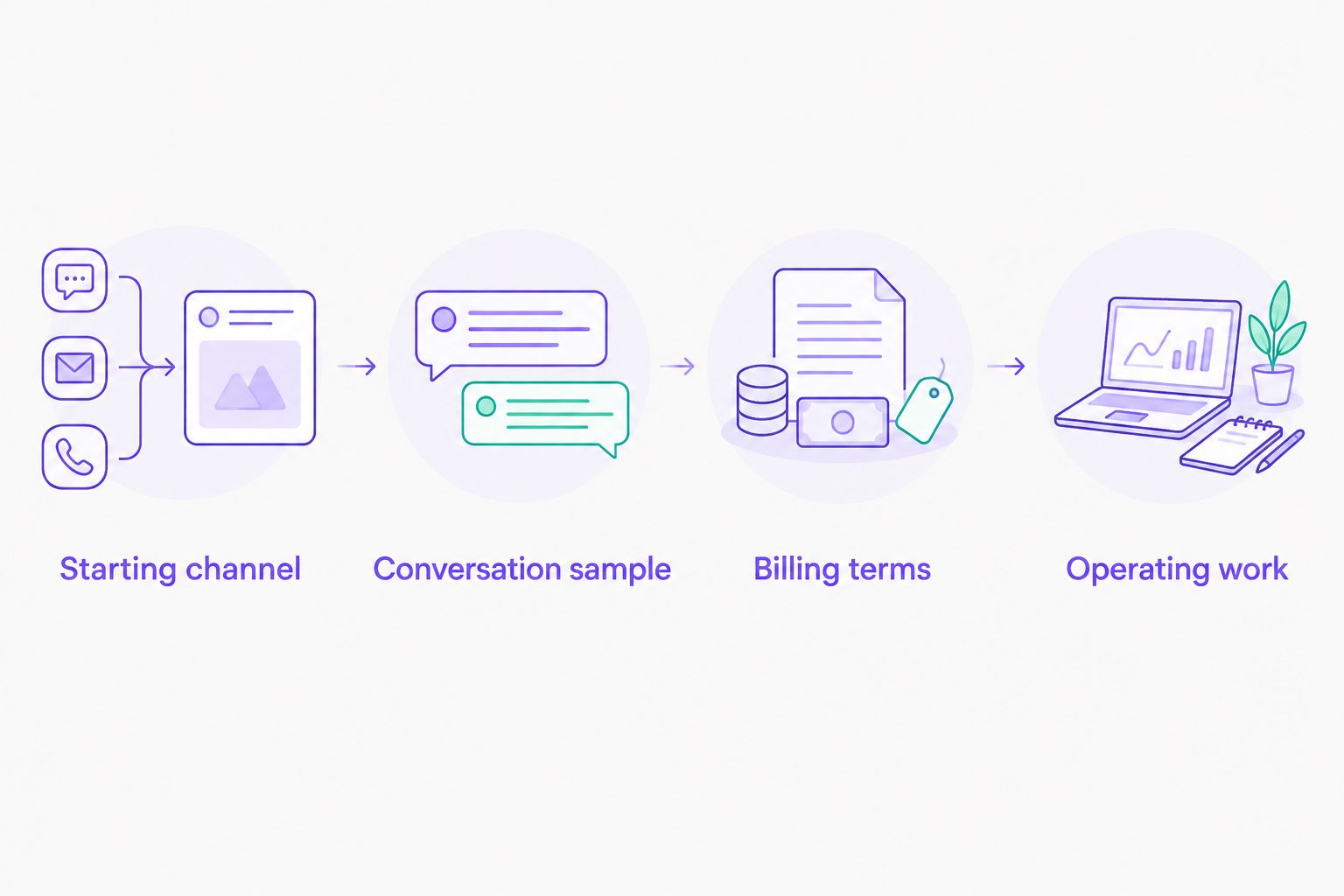
Compare the same workload before choosing a plan.
What to test before you commit in 2026
A chatbot should make the next customer interaction clearer. Use a simple acceptance checklist instead of judging only whether an answer sounds natural.
- Correctness: Does the answer match approved business information?
- Boundaries: Does the chatbot avoid inventing a policy, booking, or order update?
- Exceptions: Is there a defined next step when the question needs a person?
- Updates: Can the responsible person maintain the information without confusion?
- Privacy: Are you collecting only what the task requires?
For appointment-based businesses, separate explaining services from confirming availability. For e-commerce, separate describing a product from reporting live inventory or order status. Only enable actions that the actual setup supports.
Ask about regional restrictions before connecting a channel. Availability, account eligibility, and platform rules need checking for the markets and accounts you intend to use.
How this shortlist is ranked
This 2026 shortlist ranks tools by distinct business needs: no-code multichannel messaging, Instagram flows, website support, helpdesk operations, and custom development. It does not claim hands-on benchmark results or a universal lowest bill.
The criteria are channel fit, billing clarity, answer control, human involvement, operating effort, and data handling. The best-value option is the one whose actual plan covers your required job without unnecessary operational work.
Which AI chatbot tool should you choose?
Choose Data2AIBot for no-code customer messaging across WhatsApp, Instagram, and websites. Choose Manychat for Instagram flows, Tidio for website-focused support, Intercom for helpdesk-centered operations, or Botpress for a custom build.
If you are undecided in 2026, narrow the requirement before expanding the shortlist. Write down the channel, the recurring question, the approved answer source, and the exception process. That gives you a concrete buying decision instead of another feature comparison.
FAQ
What's the best way to compare AI chatbot tools by price?
Compare the same customer messaging workload against each tool's current plan terms. Include billing units, required channels, staff access, third-party charges, and maintenance work.
Which chatbot is best for WhatsApp, Instagram, and website messaging?
Data2AIBot is the best fit in this shortlist for small businesses seeking no-code customer messaging across WhatsApp, Instagram, and websites. Check your required workflow and selected-plan terms before committing.
Is Manychat better than a website chatbot?
Manychat is the more relevant option here when your main task is building Instagram conversation flows. A website-focused tool addresses a different customer touchpoint, so choose according to where the conversation starts.
Does a chatbot subscription cover every WhatsApp charge?
Do not assume a chatbot subscription includes every applicable WhatsApp charge. Check the provider's terms alongside current Meta rules and any third-party charges relevant to your messaging activity.
Can an appointment business automate booking questions?
An appointment business can use a chatbot to answer approved service and booking-process questions. Confirming live availability or making a booking requires a setup that explicitly supports those actions.
Should I choose a no-code chatbot or a custom chatbot builder?
Choose no-code customer messaging when the supported workflow matches your needs. Choose a custom builder when you have a specific requirement and someone responsible for implementation and maintenance.
Can I use a chatbot without sharing customer data?
Review what information the intended workflow collects and sends to connected services. Minimize personal data, review access and retention terms, and avoid entering sensitive information during initial testing.
One last thing
Your most revealing test is a question the chatbot should not answer. Ask about an exception that requires approval, then check whether the response respects that boundary. A confident invention is not a successful automated reply.
Related guides
- Customer support automation with a small FAQ
- Instagram DM automation tools for small businesses
- Website chatbot builders
Start with one channel and one repeatable customer question.
Get started with Data2AIBot
You can sign up for Data2AIBot completely free — no credit card required — and connect Instagram and WhatsApp in minutes.