

Before automating “What’s the price?” Instagram DMs, decide whether your customers need one fixed answer or a response that depends on the product, variant, or service scope. The goal is not simply to reply faster. It is to give an accurate price, explain what it covers, and help the customer take the right next step.
In short
- Connect Instagram and prepare a reliable source of product and service information.
- State a known price immediately; ask a focused question when a missing detail changes it.
- Include the currency, pricing unit, scope, and relevant extra charges.
- When information is missing or conflicting, acknowledge the gap instead of inventing a number.
- Test realistic DMs before launch, then review conversations and update your sources regularly.
Instagram price auto-reply setup: 5 practical steps
A useful response follows this pattern: Verified price + what it covers + one necessary clarification, if any + an appropriate next step. If the product is unknown, identify it first. Detecting the word “price” is not enough to identify the correct offer.
The steps below cover channel setup, knowledge preparation, and response testing with Data2AIBot. The suggested response rules are implementation guidance, not a promise of automatic price verification or live inventory access.
1. Connect Instagram and define the initial scope
Start by identifying the business account whose DMs you want to answer. If you manage several accounts, check that each account’s product range, service area, and pricing sources are clearly separated in your planning.
Data2AIBot offers no-code setup for connecting Instagram and WhatsApp in a few steps and launching in minutes. Follow the current in-app connection instructions, checking the requested permissions and account requirements along the way. Avoid assuming that every account will encounter identical authorization screens.
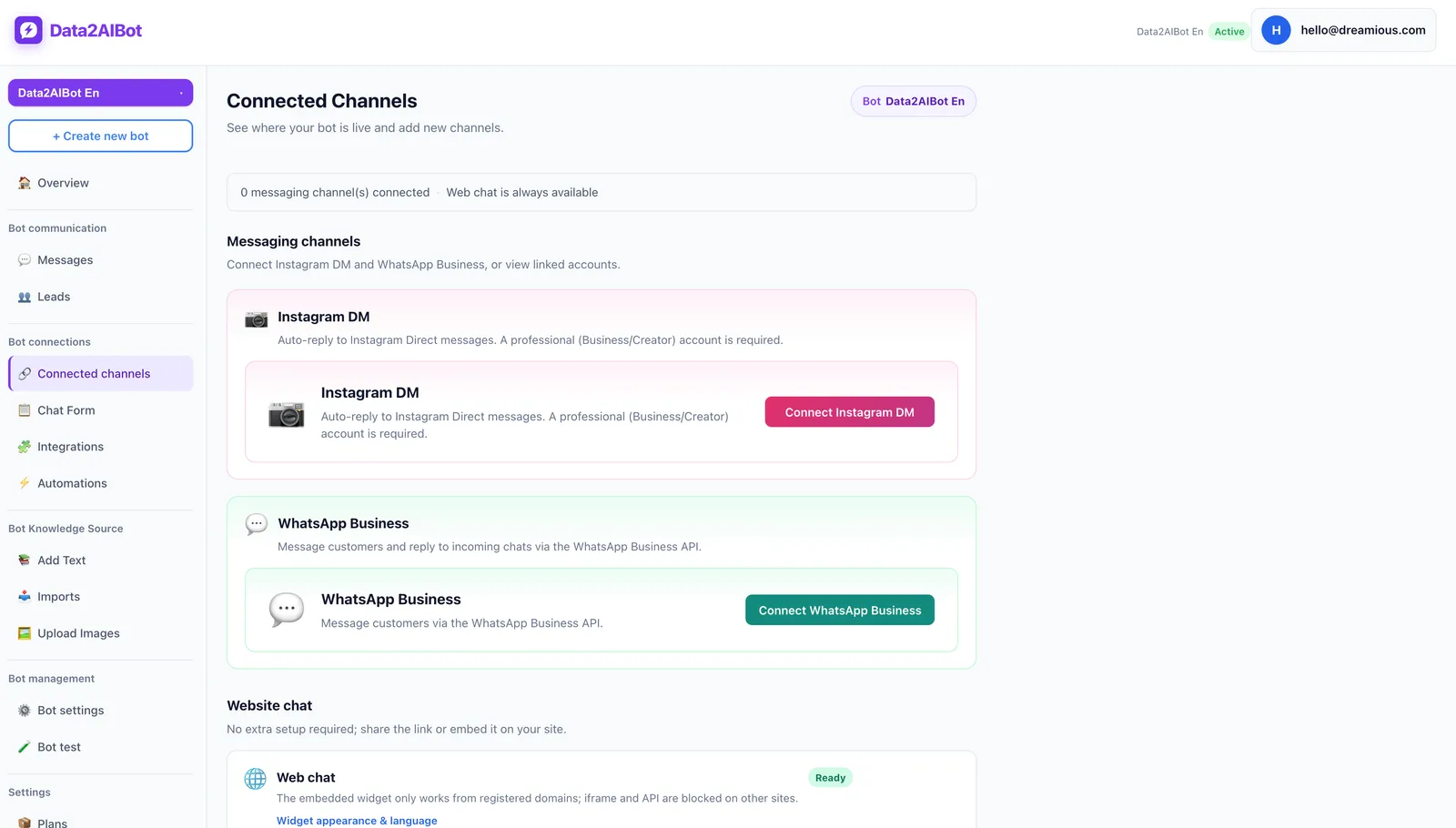
Data2AIBot is an official Meta Technology Provider. That status is relevant when evaluating channel connectivity and trust, but it does not remove platform rules or account requirements. One bot can handle Instagram and WhatsApp together. If you use both, maintain consistent product facts across the channels.
Keep the initial scope manageable: begin with a handful of frequently requested products or services. The Instagram AI chatbot page provides channel context. Your first milestone should be reliable answers to common price questions, rather than automation of every sales interaction.
2. Organize the information behind each price
An unclear price list creates avoidable ambiguity. Write each product or service entry so it makes sense independently. Replace references such as “same as the other package” with the actual amount and conditions.
Include these fields:
- Product or service name, plus common customer terms for it.
- Amount, currency, and unit: per item, session, hour, or package.
- Variants that affect price, such as size, material, duration, or group size.
- Whether tax, shipping, installation, and optional extras are included.
- Promotion dates and eligibility conditions, where applicable.
- Last review date and the person responsible for checking accuracy.
Data2AIBot supports training through uploaded files and imports from Instagram post captions, Google Docs, and Google Sheets. Ecommerce catalogs can use spreadsheet column mapping. These are ways to supply information; do not assume every later change to a source file is reflected instantly.
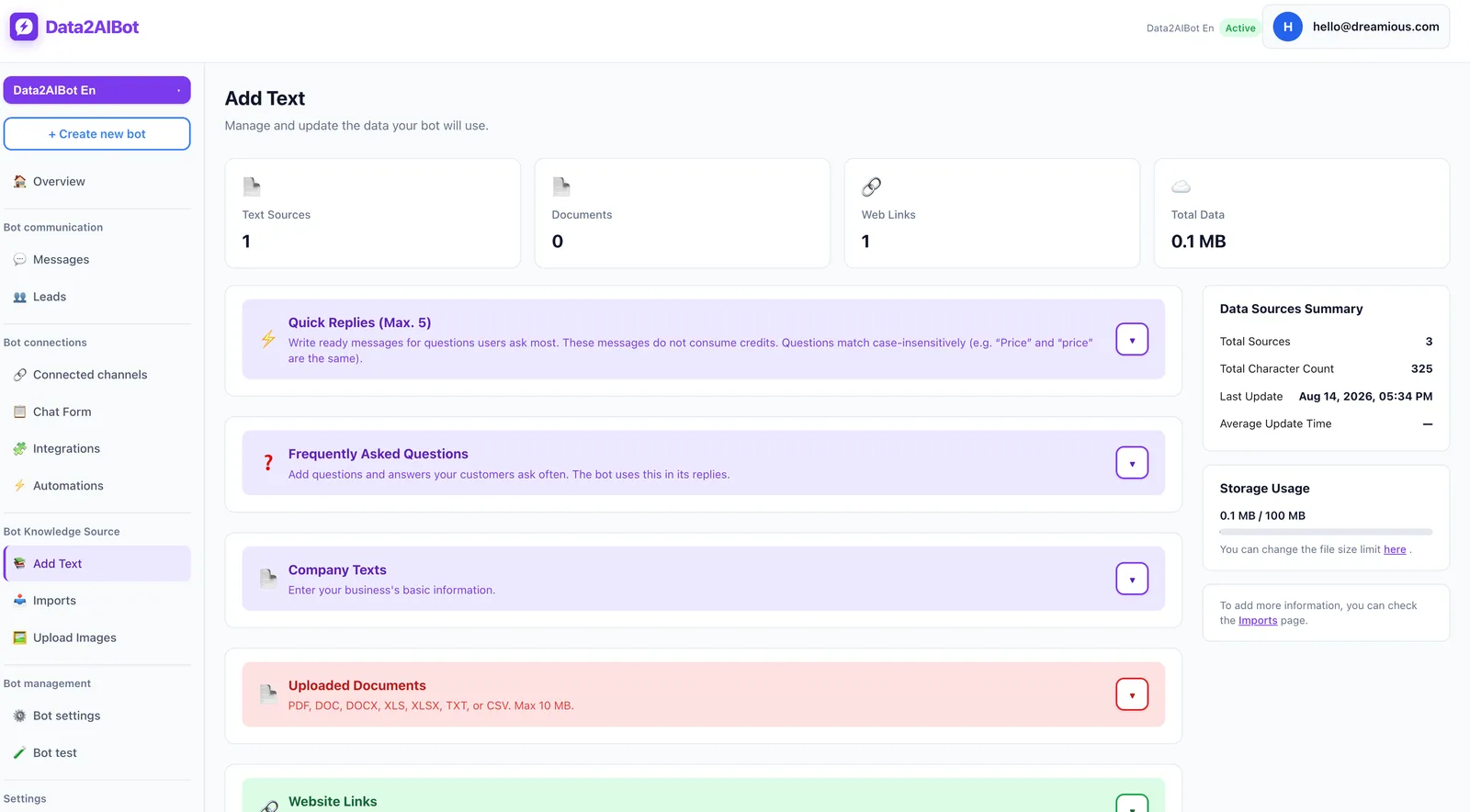
For example: “Luna desk lamp. Small: $45. Large: $60. Tax included. Shipping charged separately. Bulb not included.” These are fictional merchant prices used to demonstrate response structure, not Data2AIBot subscription prices.
When importing Instagram captions, check for expired promotions. If an older post conflicts with the current price sheet, resolve that conflict before testing. Do not expect the bot to infer which source your business considers authoritative.
For larger product ranges, consider the Ecommerce AI chatbot approach. Start with a small sample catalog so you can validate product names, variants, and pricing units before expanding the coverage.
3. Separate fixed prices, variants, and custom quotes
Most price inquiries fall into three groups. Describe the intended behavior in your prepared knowledge and response guidance, then verify the actual output.
Fixed price: If the product and option are known, lead with the amount. Do not hide an available price behind a request for a phone number. Explain the scope briefly, then offer a relevant next step.
Variant-dependent price: Ask only for the detail that changes the amount. If size matters but color does not, clarify size first. When there are only two or three options, listing their prices may be more helpful than adding another question.
Custom quote: If scope, dimensions, or participant numbers determine the price, avoid presenting a standard package as a final quote. Share an approved starting price or range only when that information exists and its conditions are clear.
A useful starting instruction is: “Use only the supplied current prices. If the product is unclear, ask for its name or model. If no price is available, say so. Do not describe shipping or tax as included unless the source confirms it. Do not invent discounts.”
Treat this as a draft, not a guarantee. Adapt it to your business and test requests such as “best price?”, “give me a discount,” and “what’s your cheapest option?” separately.
4. Test realistic DMs before relying on the answers
Do not test only neatly written questions like “How much is the small Luna lamp?” Customers also write “price?”, “how much for the bigger one?”, or “what if I buy two?” Follow-up messages may change the meaning of the original inquiry.
Use a test set that includes:
- A direct question with the product and variant specified.
- A short message with no identifiable product.
- A follow-up about shipping, tax, or optional extras.
- A request for an expired promotion.
- A product or service with no supplied price.
- A demand for a guaranteed discount, stock status, or delivery date.
Check three things: Does the amount match the source? Is the scope clear? Is the next question necessary? A short answer is not a good answer if it uses the wrong currency or omits “per session.”
When a response fails, inspect the source before repeatedly asking the same question. Fix ambiguity, then rerun the original message and two paraphrases. Passing one carefully worded test does not establish reliability across all price inquiries.
5. Review conversations and establish follow-up ownership
After launch, look beyond the number of messages answered. Note which products get confused, which fees customers keep asking about, and which service inquiries require a person to verify the price.
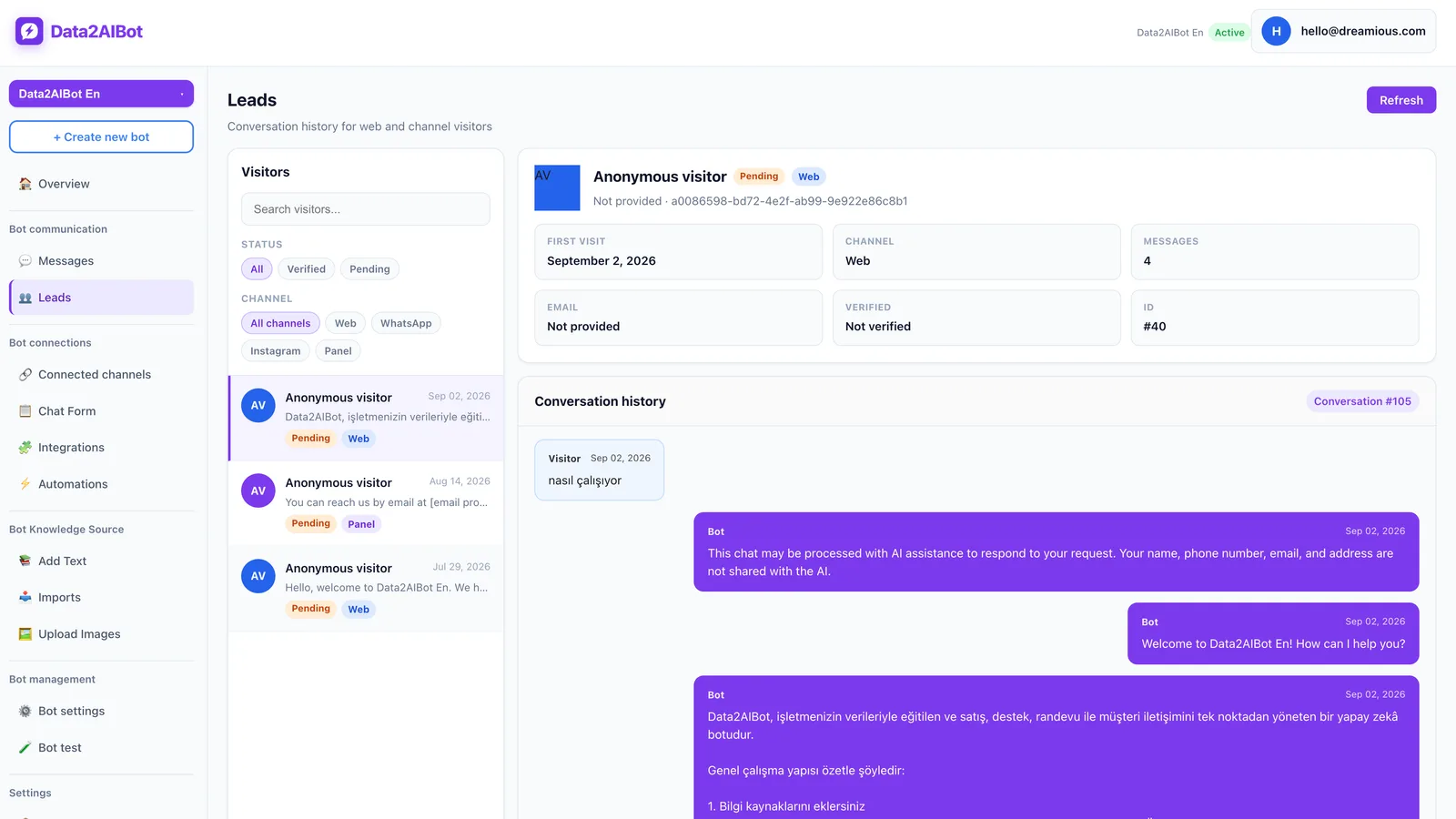
Use your visitor, lead, and conversation review process to assign clear responsibilities. Who checks an uncertain quote? Who updates the knowledge source when a price changes? If a response says someone will review the request, your business needs a real process for doing that.
For businesses using Bitrix24, Data2AIBot can create or update leads and contacts from Instagram, WhatsApp, and website chats and write conversation history to the CRM timeline. This is an optional follow-up integration, not a requirement for answering price questions.
To test a limited catalog, Start Data2AIBot for free. The trial lasts 14 days, requires no credit card to start, and can be canceled anytime. Define success as fewer incorrect or incomplete price answers, rather than simply more automated messages.
Sample conversations based on product and service facts
The businesses, offers, and amounts below are illustrative. Replace them with your own verified information. Do not add promises about delivery, availability, or discounts that your sources cannot support.
Example 1: A known product with a fixed price
Source facts: Small Luna desk lamp, $45; tax included, bulb excluded, shipping charged separately.
Customer: How much is the small Luna lamp?
Bot: The small Luna desk lamp is $45, including tax. The bulb and shipping are not included. I can also share the price difference for the large version.
Customer: What does the large one cost?
Bot: The large version is $60, which is $15 more. The bulb and shipping are also excluded.
Why it works: The response answers immediately and supports a useful comparison. It does not introduce unsupported claims about stock or delivery dates.
Example 2: The customer only writes “price?”
Source facts: The account sells both desk lamps and wall lights; the message does not identify a product.
Customer: Price?
Bot: Which product are you asking about: the Luna desk lamp or the Nova wall light? The model name is enough.
Customer: Luna.
Bot: The small Luna is $45 and the large is $60, including tax. Bulbs and shipping are excluded. Which size are you considering?
Why it works: The bot does not attach an ambiguous message to a random item. With only two sizes, showing both prices is efficient. If the product is already clear from the conversation, avoid asking the customer to identify it again; test that situation separately.
Example 3: Service scope changes the price
Source facts: A one-to-one online consultation costs $120 for 60 minutes, including tax. Team workshops require a separate quote.
Customer: What do you charge for consulting?
Bot: A one-to-one online consultation is $120 for 60 minutes, including tax. Are you looking for an individual session or a workshop for your team?
Customer: A workshop for eight people.
Bot: Team workshops need a scope-based quote; the individual session rate does not apply. What topic should the workshop cover, and roughly how long should it run?
Why it works: The response does not multiply an individual rate by eight and call it a quote. It asks for details that affect scope. For appointment workflows, Data2AIBot can collect appointments and reservations in chat and offers Google Calendar and Calendly automations. Verify availability-related wording against your actual setup.
Example 4: An expired promotion and missing custom price
Source facts: Last month’s promotion has ended. No current price is supplied for the requested custom size.
Customer: What would a custom size cost with last month’s discount?
Bot: Last month’s promotion has ended. I do not have a verified current price for a custom size, so I cannot give you an amount yet. What dimensions do you need?
Customer: 120 centimeters wide.
Bot: Pricing for that custom width needs separate confirmation. Please do not treat the standard product price as a quote for this size.
Why it works: The answer makes the information boundary explicit. It should not say “I’ve sent this to the team” unless a functioning follow-up process actually supports that statement. Honest uncertainty is more useful than a confident guess.
Saved replies, keyword flows, or a knowledge-based chatbot?
Choose according to pricing complexity before considering message volume. Even one service may need clarification if its scope changes from customer to customer.
| Approach | Best fit | Main limitation |
|---|---|---|
| Saved reply text | One product with one current price | A person must select the correct reply |
| Keyword-based flow | Few options and predictable questions | Ambiguous or combined questions can be difficult |
| Knowledge-based AI chatbot | Multiple products, variants, and follow-ups | Requires clean sources and regular testing |
| Human-prepared quote | Custom work, negotiation, complex scope | Response time depends on team capacity |
Use this decision rule: Answer when the price is known, clarify when an option changes it, and reserve unverified pricing for a quote process. Using AI does not mean every request should receive an immediate, definitive number.
A maintenance routine that reduces pricing mistakes
When a price changes, update the source and test the resulting answer. Removing an old promotion from a social post does not replace updating other knowledge sources that still contain it.
Review a small conversation sample each week. Record incorrect amounts, missing scope, unnecessary questions, and unresolved quote requests separately. These are suggested manual quality checks, not an assumption about built-in reporting features.
A repeated problem often calls for a better product entry rather than a longer response. If customers keep asking “Is that per item?”, make the pricing unit explicit in both the source and the first answer. Add the missing decision-making detail instead of adding generic sales language.
Frequently asked questions
How do I set up an Instagram price auto-reply?
Connect Instagram, supply current product or service information, and test fixed-price, variant-dependent, and custom-quote scenarios. When the product is known, lead with the price. When it is unclear, ask for the detail needed to identify the correct amount.
What should I reply when someone only says “price?”
If there is no product context, ask a short question such as “Which model are you interested in?” If the conversation already identifies the item, answer directly. A generic greeting adds friction without moving the pricing question forward.
Can different products receive different automatic price replies?
Clear product names, variants, and prices provide the basis for product-specific answers. Data2AIBot supports files, Instagram caption imports, Google Docs, and Google Sheets. Test similar product names, common abbreviations, and misspellings before expanding the catalog.
Should an Instagram price bot offer discounts?
Only use discounts your business has approved and documented. “What’s your best price?” is not permission to invent a new offer. Establish a human review process for negotiation requests, and make any existing promotion’s eligibility and expiration conditions clear.
Do Google Sheets price changes update replies immediately?
Google Sheets import is supported, but that alone does not establish continuous or instant synchronization. Check the update method you are using. After changing a price, send a sample DM and verify that the response uses the new amount.
Do I need a customer’s phone number before sharing a price?
Not when the price is already known and can be shared. If contact details are needed to follow up on a custom quote, explain why you are asking. Answering the price question or clarifying scope first usually creates a simpler conversation.
What should the bot say when it does not know the current price?
It should state the limitation clearly: “I do not have a verified current price for that option.” It can then ask for a model, dimension, or scope detail that helps verification. It should not present an estimate as a confirmed price or claim a handoff occurred when it did not.
Get started with Data2AIBot
You can sign up for Data2AIBot completely free — no credit card required — and connect Instagram and WhatsApp in minutes.